Solved

File Level Restore user permissions

  • April 28, 2025
  • 46 comments
  • 446 views

Show first post

46 comments

Marcel.K
Forum|alt.badge.img+11
  • Veeam Legend
  • Answer
  • May 29, 2025

Hi curious,

i am confused

you are trying to mount backup image to mount server, which does not have full permission? Then echo is correct - as managed server has to be flr appliance, so this has to have full permission like directly root or over sudoers file: ALL ALL



coolsport00
Forum|alt.badge.img+21
  • Veeam Legend
  • May 29, 2025

No worries...glad to help where we can.

It’s good to work through such things to try and be as secure as possible...I get it 😊


  • Author
  • Comes here often
  • May 29, 2025

@Marcel.K Yes. Basically I am mounting backup image to the backup server in this example, and user (even thought I am not quite clear what does he do since as I said I am beginner), doesn’t have root/sudo.
 

@coolsport00 Thank you.


Chris.Childerhose
Forum|alt.badge.img+21

Hi ​@curious - did you get an answer to your question and if so can you please share so we can mark an answer as “Best Answer” even if it is yours.


Marcel.K
Forum|alt.badge.img+11
  • Veeam Legend
  • June 3, 2025

Hi curious, as we explain, there is no other way, because mount server is only on server, which is registered as backup component in managed servers. And registering is provided with full permission.

For example for this mounting of vmdk you need full permission

In the past i was trying to limit some users, even veeam is providing documentation for full permission, but there were always new and new commands, so gave up ….


  • Author
  • Comes here often
  • June 3, 2025

Thank you once again ​@Marcel.K I agree, I had the same idea, like you did, but I guess yeah, new commands will be coming in all the time, makes no sense to do it this way in that case


Chris.Childerhose
Forum|alt.badge.img+21

Great to see you were able to resolve your issue with help from the community.  😊


  • Author
  • Comes here often
  • June 12, 2025

Let’s try to summarize it:
Adding Linux server to backup inventory, creating user and trying to connect via ssh keypair. 
This user, what is minimum set of permissions for him to have? 

2nd user, used for creating backup job and restoring, same question?


Marcel.K
Forum|alt.badge.img+11
  • Veeam Legend
  • June 12, 2025

hi curious,

for adding server into section managed servers you need root or user elevated to root (like in sudoers ALL ALL - no matter if user has password or key only)

what do you mean with user used for job creation? - this user on VBR server could be just “user” in windows, but in console has to have veeam administrator role

guest credentials are another topic - it depends if you would like to restore file form server in managed servers - because they are registered as veeam components - so you dont need credentials


  • Author
  • Comes here often
  • June 12, 2025

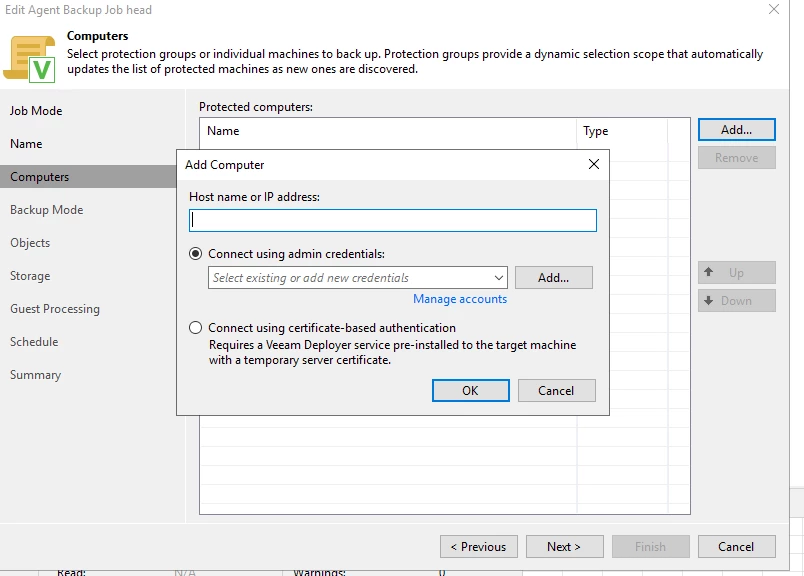
When I try to create job and when I come to this step it’s asking me for credentials:
 

I do need it no? I’m backing up from server that I added to backup infrastructure


Marcel.K
Forum|alt.badge.img+11
  • Veeam Legend
  • June 12, 2025

yes, because it will install veeam agent software on that server.

So you would like to backup server, which is part of managed servers? If this server is physical, then you cannot backup itself component, only if its VM, then is ok without credentials liek backup of proxy servers.


  • Author
  • Comes here often
  • June 12, 2025

Server is VM it’s not physical, I would like to backup specific files from that server, restore them back on that same server and on different server. 
yes, because it will install veeam agent software on that server. <--- yes, what permissions do I have to give, wheel group? Elevation in Veeam? Not very clear on it. Sorry for obvious questions.


Marcel.K
Forum|alt.badge.img+11
  • Veeam Legend
  • June 12, 2025

officially:

username ALL=(root) NOPASSWD: ALL


but you can try like:

username ALL=(root) NOPASSWD: /bin/hostname, /bin/uname, /bin/arch, /bin/cat,

/usr/bin/test, /bin/mkdir, /bin/rmdir, /bin/chown, /usr/bin/id, /usr/bin/veeamconfig, 
<package-manager paths>, /bin/sh, /bin/touch, /bin/chmod, /bin/rm, /bin/ps, /bin/mv, /tmp/VeeamAgent*

maybe during your test, you will need more ….


  • Author
  • Comes here often
  • June 12, 2025

Would you recommend one user to do all of it, when I mention user I am always talking about Linux user. So adding this VM linux machine to Veeam, backing up and restoring file to that same server.
When restoring to another linux VM on same network I assume I still need user with same permissions?


Marcel.K
Forum|alt.badge.img+11
  • Veeam Legend
  • June 12, 2025

i would recommend to backup entire VM without credentials via VM backup job

to restore file to another server you will need credentials from destination server - same permission ...


  • Author
  • Comes here often
  • June 12, 2025

Why do you recommend doing it that way, if you can elaborate would be great

I am already backing up whole machine, but I would like to be able to backup specific files so I can restore those specific files only


Marcel.K
Forum|alt.badge.img+11
  • Veeam Legend
  • June 12, 2025

is easier to manage backups

Since version 12, second issue is certificate. If on this server is already Veeam transport service it will create certificate. If you will install agent on this server it will overwrite transport’s certificate, so both cannot work together. 


  • Author
  • Comes here often
  • June 12, 2025

Not sure I understand. I do not need agents if we are talking about virtual machine and not physical ones. 
I got the task to do some file level backup and restore for some archive that we have on some servers with minimal set of permissions for needed linux users.
Veeam is installed on windows machine, I am backing up linux vm and restoring on that same vm and on some other linux vm.


Marcel.K
Forum|alt.badge.img+11
  • Veeam Legend
  • June 13, 2025

what this VM is part of managed servers? is there any role assigned on it?


  • Author
  • Comes here often
  • June 13, 2025

I want to test it on 2 VMs, they are DB servers. 


Marcel.K
Forum|alt.badge.img+11
  • Veeam Legend
  • June 13, 2025

it depends, if you need to backup databases there or not

but anyhow, you don’t need to add them into manage servers in console - is not needed

if you need backup databases, then you need to use full privileged user, then you will be able to restore via this credentials over enterprise manager

if you don’t need to backup them, then you need low priviledges user

so you need privileges only as file as

for example create file where owner is user01

so that file is restoreable with user01, condition is to have exec permission for home directory and /tmp for this user, this is minimum