
Question

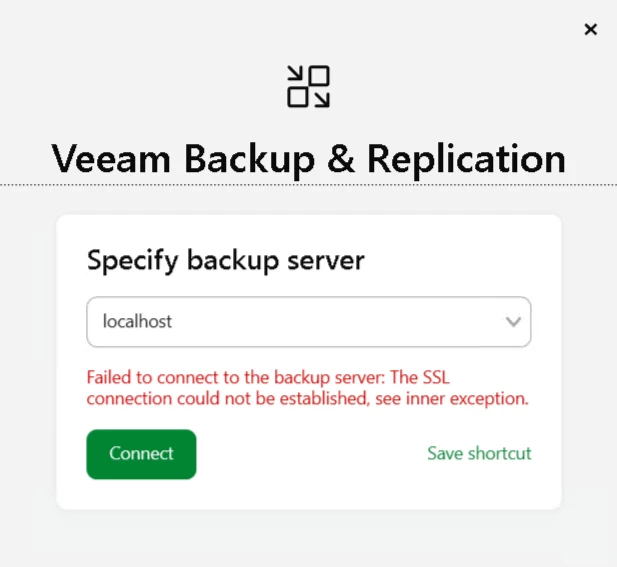
Error connecting to Backup Console - SSL connection could not be established

  • December 20, 2025
  • 10 comments
  • 38 views

Good afternoon everyone,

I'm using the latest version, 13, but after restarting my server, I can no longer connect to the console. It shows an SSL error, "see inner exception," but I haven't been able to find them to get more information. Could you please help me?



10 comments

Chris.Childerhose
Forum|alt.badge.img+21
  • Veeam Legend, Veeam Vanguard
  • December 20, 2025

Are all the services running and started?


  • Author
  • New Here
  • December 20, 2025

Are all the services running and started?

Yes, all without exception, I believe I even know why the error occurred, but not how to fix it... before, in the previous version, there was an error in the upgrade, and on forums I saw that they said to remove certificates, and I did that, but then I did the entire installation of 13 again, and so far without any problems, just restarting the server started this error.


Chris.Childerhose
Forum|alt.badge.img+21
  • Veeam Legend, Veeam Vanguard
  • December 20, 2025

Not sure then maybe a support ticket so they can check the logs for you. If a new install works then reboot breaks something is going on.


  • Author
  • New Here
  • December 20, 2025

Not sure then maybe a support ticket so they can check the logs for you. If a new install works then reboot breaks something is going on.

Okay, I'll do that, thanks!


Andanet
Forum|alt.badge.img+12
  • Veeam Legend
  • December 21, 2025

Have you tried to access on VBR via PowerShell? 

Connect-VBRServer -Server "YourServerName" -User "VeeamAdminUser" -Password "YourPassword"

Normally you must received same error. 

In meantime, from a powershell window you can generate and install a new self-signed certificate on the VBR

Generate-VBRBackupServerCertificate -FriendlyName "Veeam Replacement Cert 2025"

Please xhexk the right command on Veeam documentation 


  • Author
  • New Here
  • December 22, 2025

Have you tried to access on VBR via PowerShell? 

Connect-VBRServer -Server "YourServerName" -User "VeeamAdminUser" -Password "YourPassword"

Normally you must received same error. 

In meantime, from a powershell window you can generate and install a new self-signed certificate on the VBR

Generate-VBRBackupServerCertificate -FriendlyName "Veeam Replacement Cert 2025"

Please xhexk the right command on Veeam documentation 


PS C:\Program Files\PowerShell\7> Get-Service Veeam*

Status   Name               DisplayName
------   ----               -----------
Running  VeeamAHVSvc        Veeam AHV Service
Running  VeeamAWSSvc        Veeam AWS Service
Running  VeeamAzureSvc      Veeam Azure Service
Running  VeeamBackupCdpSvc  Veeam CDP Coordinator Service
Running  VeeamBackupRESTSvc Veeam Backup Server RESTful API Servi…
Running  VeeamBackupSvc     Veeam Backup Service
Running  VeeamBackupUpdate… Veeam Backup Update Service
Running  VeeamBrokerSvc     Veeam Broker Service
Running  VeeamCatalogSvc    Veeam Guest Catalog Service
Running  VeeamCloudSvc      Veeam Cloud Connect Service
Running  VeeamDataAnalyzer… Veeam Data Analyzer Service
Running  VeeamDeploySvc     Veeam Installer Service
Running  VeeamDistribution… Veeam Distribution Service
Running  VeeamEndpointBack… Veeam Agent for Microsoft Windows
Running  VeeamExplorersRec… Veeam Explorers Recovery Service
Running  VeeamFilesysVssSvc Veeam Backup VSS Integration Service
Running  VeeamGCPSvc        Veeam GCP Service
Running  VeeamGuestInterac… Veeam Guest Interaction Service
Running  VeeamHvIntegratio… Veeam Hyper-V Integration Service
Running  VeeamHyperCoreSvc  Veeam SC HyperCore Service
Running  VeeamKastenSvc     Veeam Kubernetes Service
Running  VeeamMountSvc      Veeam Mount Service
Running  VeeamNFSSvc        Veeam vPower NFS Service
Running  VeeamPVESvc        Veeam PVE Service
Running  VeeamRHVSvc        Veeam KVM Service
Running  VeeamThreatHunter… Veeam Threat Hunter Service
Running  VeeamTransportSvc  Veeam Data Mover Service
Running  VeeamVssProviderS… Veeam VSS Hardware Provider Service
StartPe… VeeamWebSvc        Veeam Web Service

PS C:\Program Files\PowerShell\7> Connect-VBRServer -Server localhost
Connect-VBRServer: Failed to connect to Identity service
PS C:\Program Files\PowerShell\7> Connect-VBRServer -Server localhost
Connect-VBRServer: Failed to connect to Identity service


Chris.Childerhose
Forum|alt.badge.img+21
  • Veeam Legend, Veeam Vanguard
  • December 22, 2025

This service is what is causing your issue -

StartPe… VeeamWebSvc        Veeam Web Service

It is in a start pending state and until that service starts the Console will not connect to the VBR server.


Chris.Childerhose
Forum|alt.badge.img+21
  • Veeam Legend, Veeam Vanguard
  • December 22, 2025

Also if this is the appliance where is the Identity service as it is completely missing?


  • Author
  • New Here
  • December 22, 2025

Also if this is the appliance where is the Identity service as it is completely missing?

Yes, I saw him there, but even after killing him and trying to start again, it's not working... I don't know how to solve this.


Chris.Childerhose
Forum|alt.badge.img+21
  • Veeam Legend, Veeam Vanguard
  • December 22, 2025

Also if this is the appliance where is the Identity service as it is completely missing?

Yes, I saw him there, but even after killing him and trying to start again, it's not working... I don't know how to solve this.

You need to contact Support at this point as things are not working and misconfigured.  Otherwise delete the appliance and redo it from scratch again is the only other suggestion I can give.


