

Question

Display Bug Veeam Backup & Replication v13

  • Nov 16, 2026 10:00 AM UTC
  • 7 comments
  • 35 views

Stabz
Forum|alt.badge.img+9

I have noticed a bug on several Veeam installations.

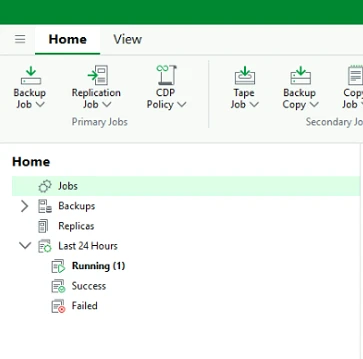
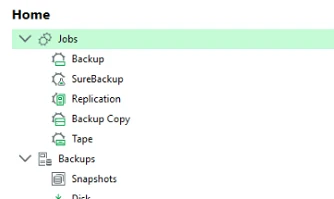
When launching the Veeam Backup & Replication console, the list of jobs is sometimes not displayed.

To make the jobs appear, I have to close the console and reopen it.

Has anyone else experienced this issue? Is there a known bug or a fix available?

Not good !
Good !
 

7 comments

lukas.k
Forum|alt.badge.img+12
  • Influencer
  • Nov 16, 2026 10:13 AM UTC

Hi ​@Stabz,

Please check and move this to R&D forums to let the team have a look.


tm67
Forum|alt.badge.img+4
  • Veeam Legend
  • Nov 16, 2026 10:36 AM UTC

Hi

I wouldn’t expect a quick fix here. With v13, Veeam is clearly moving to the Web UI. The Windows console is still here until the Web UI is feature-complete, and the PMs have said on the R&D forums that their focus is on the Web UI. Cosmeticissues in the console are not really a priority anymore I think… 


Chris.Childerhose
Forum|alt.badge.img+23

I have seen this before and just navigating the tree to another location and back to jobs brings them up. Sometimes F5 does too.  Got so used to it that it doesn't bother me anymore. 😂 


Marcel.K
Forum|alt.badge.img+13
  • Veeam Legend
  • Nov 16, 2026 2:16 PM UTC

on which version are you exactly running?

because i did not found that issue on latest version


Chris.Childerhose
Forum|alt.badge.img+23

on which version are you exactly running?

because i did not found that issue on latest version

It definitely seems better on 13.1.2 now for sure.  Maybe it was addressed in this release.


Mildur
Forum|alt.badge.img+12
  • Veeam Product Management
  • Nov 16, 2026 7:52 PM UTC

Hi ​@Stabz,

Please check and move this to R&D forums to let the team have a look.


This needs to be investigated by Customer Support, not through a Veeam R&D Forums topic. We cannot confirm what is happening without reviewing the logs.

Thanks,
Fabian


lucasmagnum
Forum|alt.badge.img+1
  • Experienced User
  • Nov 16, 2026 8:23 PM UTC

​@Stabz Hi!! 

I've experienced a similar issue before, which was resolved after updating the software version. If possible, I recommend upgrading to the latest version, as there's a good chance it will resolve the problem.

If you open a support case with Veeam, please share their feedback with us. It would be interesting to follow the diagnosis and the solution they provide. 🚀