Solved

Destination File Already Exists

  • Jul 10, 2025 7:40 AM UTC
  • 4 comments
  • 818 views

hs08
Forum|alt.badge.img+1
  • Comes here often

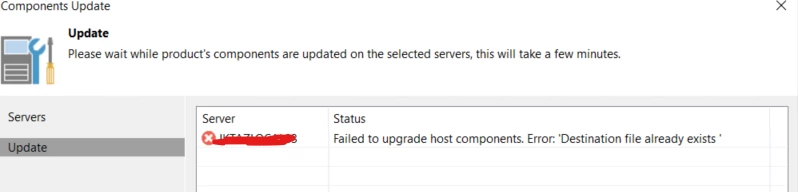
I upgrade my VBR then when try to upgrade the component for my hyper-v i got error the destination file already exists.

How we can solve this?
 

Best answer by hs08

the problem was solved by removing the installer on targer server then do update again from VBR. Thanks ​@coolsport00 ​@Iams3le 

View original

4 comments

Iams3le
Forum|alt.badge.img+15
  • Jul 10, 2025 8:48 AM UTC

During the VBR upgrade, did you select “Update remote components automatically”? Your image shared shows this must have been selected due to the information on it as discussed here and here.

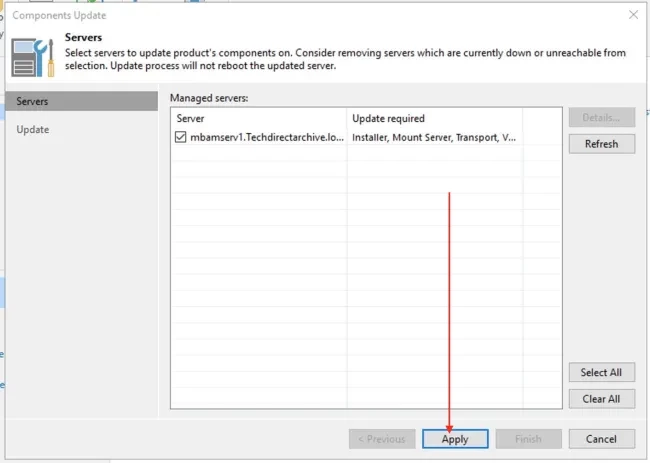
When not selected, you would have a similar windows as below: See for more information: How to upgrade Veeam Backup and Replication v11 to 12.1 - TechDirectArchive


coolsport00
Forum|alt.badge.img+23
  • Veeam Legend
  • Jul 10, 2025 12:09 PM UTC

Agree with Christian here ​@hs08 . It appears your components are upgraded already it looks like.


hs08
Forum|alt.badge.img+1
  • Author
  • Comes here often
  • Answer
  • Jul 10, 2025 12:40 PM UTC

the problem was solved by removing the installer on targer server then do update again from VBR. Thanks ​@coolsport00 ​@Iams3le 


coolsport00
Forum|alt.badge.img+23
  • Veeam Legend
  • Jul 10, 2025 1:17 PM UTC

Ah yes...have seen that before. Thank you for sharing what worked for you ​@hs08 

Best.