Question

Create Proxmox Backup


In the dialog where I can add servers there is no ption for Proxmox.

I have Veeam Backup & Replication 13.0.2.29 Enterprise Plus Edition.

How do I get the option for Proxmox

15 comments

CMF
Forum|alt.badge.img+8
  • Veeam Legend
  • August 25, 2026

Hi ​@Klaus Eckert ,

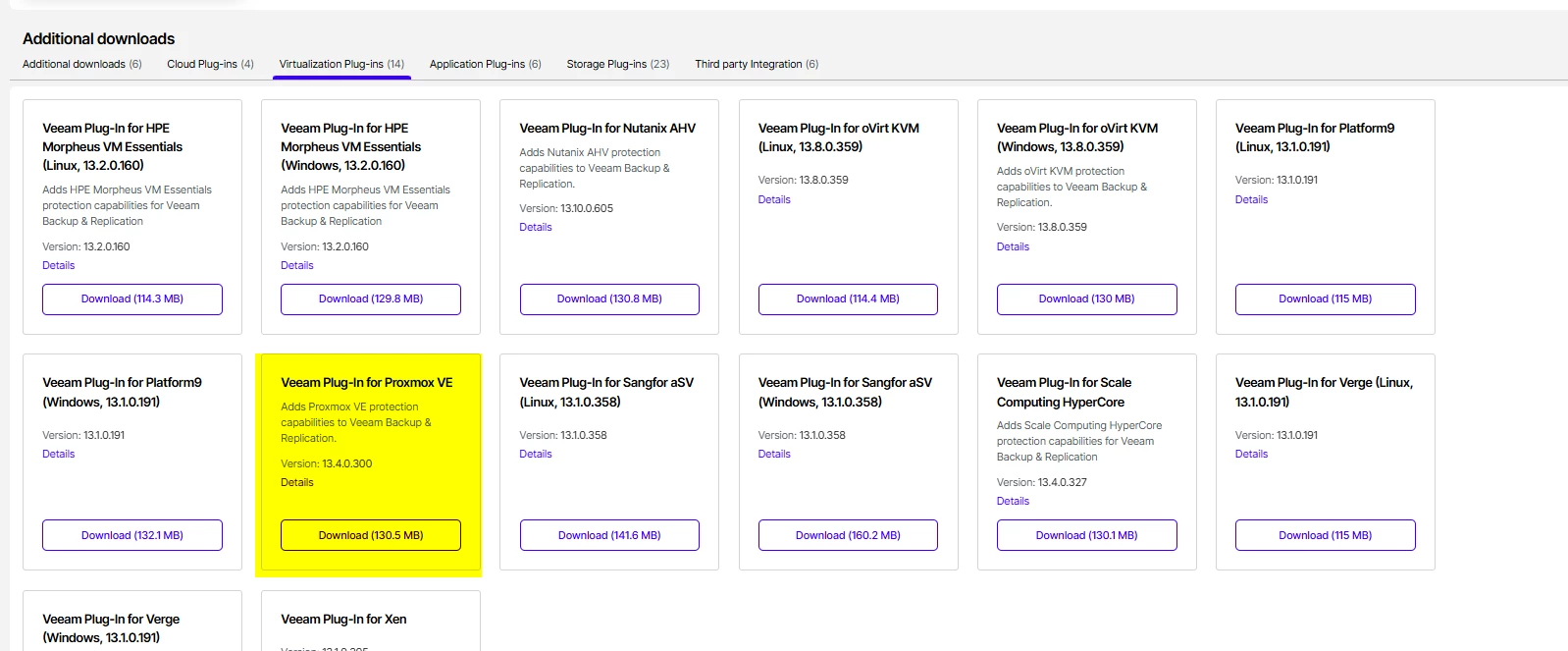
There is an Proxmox Plugin in the Download Area under my.veeam.com 

With this you should be able to add the Infrastructure.

Regards

Chalid


the url my.vmware.com does not work.


CMF
Forum|alt.badge.img+8
  • Veeam Legend
  • August 25, 2026

sorry my bad. Its my.veeam.com :-) 


coolsport00
Forum|alt.badge.img+23

Close Chalid. You had the “my” and “com” portions of the URL correct 🤣😂

​@Klaus Eckert - let us know if you need anything further to get PVE backups up & going.

Best.


The Proxmox plugin Requires: Veeam Backup & Replication 13.1.0 or later

I have Veeam Backup & Replication 13.0.2.29 Enterprise Plus Edition.

How can I update to 13.1?


coolsport00
Forum|alt.badge.img+23

​@Klaus Eckert - You just need to download the VBR ISO and run it. It should prompt you to “upgrade”. Make sure to read through the Upgrade part of the User Guide:

https://helpcenter.veeam.com/docs/vbr/userguide/update_vbr_windows.html?ver=13

If it’s a VM, I’d snapshot it too, as well as take a config backup right before upgrade.

Also, I forgot that “auto update” is not just VSA. It is on the Windows version as well:

https://helpcenter.veeam.com/docs/vbr/userguide/installing_updates_automatically.html?ver=13

Go to the Web UI and check on how you have updates configured:

https://helpcenter.veeam.com/docs/vbr/userguide/configuring_updates_vbr_web.html?ver=13


Thanks a lot.

I will try this.


Mildur
Forum|alt.badge.img+12
  • Veeam Product Management
  • August 25, 2026

​​​​​​Also, I forgot that “auto update” is not just VSA. It is on the Windows version as well:

https://helpcenter.veeam.com/docs/vbr/userguide/installing_updates_automatically.html?ver=13

Go to the Web UI and check on how you have updates configured:

https://helpcenter.veeam.com/docs/vbr/userguide/configuring_updates_vbr_web.html?ver=13

That‘s a v13.1 feature and can not be used to update VBR on Windows from v13.0 to v13.1.


​@Klaus Eckert 

Keep in mind, protecting Proxmox workloads require Veeam Universal Licensing (or Rental). 


Best,

Fabian


We have Enterprise Plus Edition.

Is this Edition OK for Proxmox?


CMF
Forum|alt.badge.img+8
  • Veeam Legend
  • August 25, 2026

It depends whether it is a perpetual license (per Socket) or a Universal License (per Workload).

What Fabian describes is the need of having a Universal License for every other Hypervisor but VMware and Hyper-V. 

You can check under License within the VBR Console if it is perpetual or transcription.  

Regards

Chalid


Mildur
Forum|alt.badge.img+12
  • Veeam Product Management
  • August 25, 2026

We have Enterprise Plus Edition.

Is this Edition OK for Proxmox?

I assume you have a socket license (Enterprise Plus). With each socket, you get a free instance (maximum 6). You can protect a maximum of 6 Proxmox VMs or other workloads (e.g. Agents) with it.

If you plan to fully migrate to Proxmox, then please contact a Veeam sales person in your region to discuss converting your current Socket license to a Veeam Universal license. Or you may not able to backup all VMs on Proxmox with your current license.


Best,

Fabian


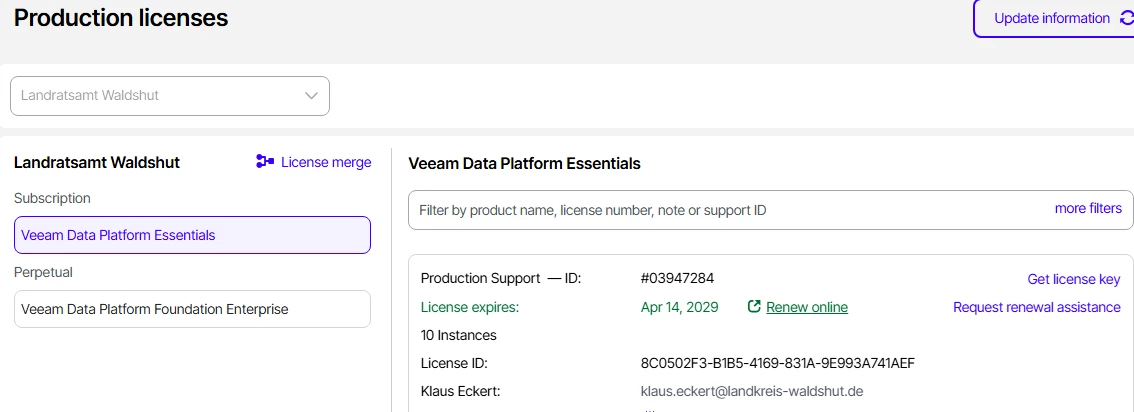
We have this license.

Actually we plan to have 4 Proxmox VMs and some Windows Clients.

Do we need more sockets?


coolsport00
Forum|alt.badge.img+23

That‘s a v13.1 feature and can not be used to update VBR on Windows from v13.0 to v13.1.


Best,

Fabian

Ah, good to know Fabian. I didn’t think it was around in pre-v13.1. Thanks for the clarification 👍🏻


coolsport00
Forum|alt.badge.img+23

At the moment, it appears you don’t need anymore since it says you have “10 instances” to use. But of course if you plan to grow/expand, yes...you will need to purchase some VUL licenses (not sockets).


CMF
Forum|alt.badge.img+8
  • Veeam Legend
  • August 25, 2026

With the highlighted License you should be fine.