Question

Create Proxmox Backup

  • August 25, 2026
  • 15 comments
  • 68 views

In the dialog where I can add servers there is no ption for Proxmox.

I have Veeam Backup & Replication 13.0.2.29 Enterprise Plus Edition.

How do I get the option for Proxmox

15 comments

CMF
Forum|alt.badge.img+8
  • Veeam Legend
  • August 25, 2026

Hi ​@Klaus Eckert ,

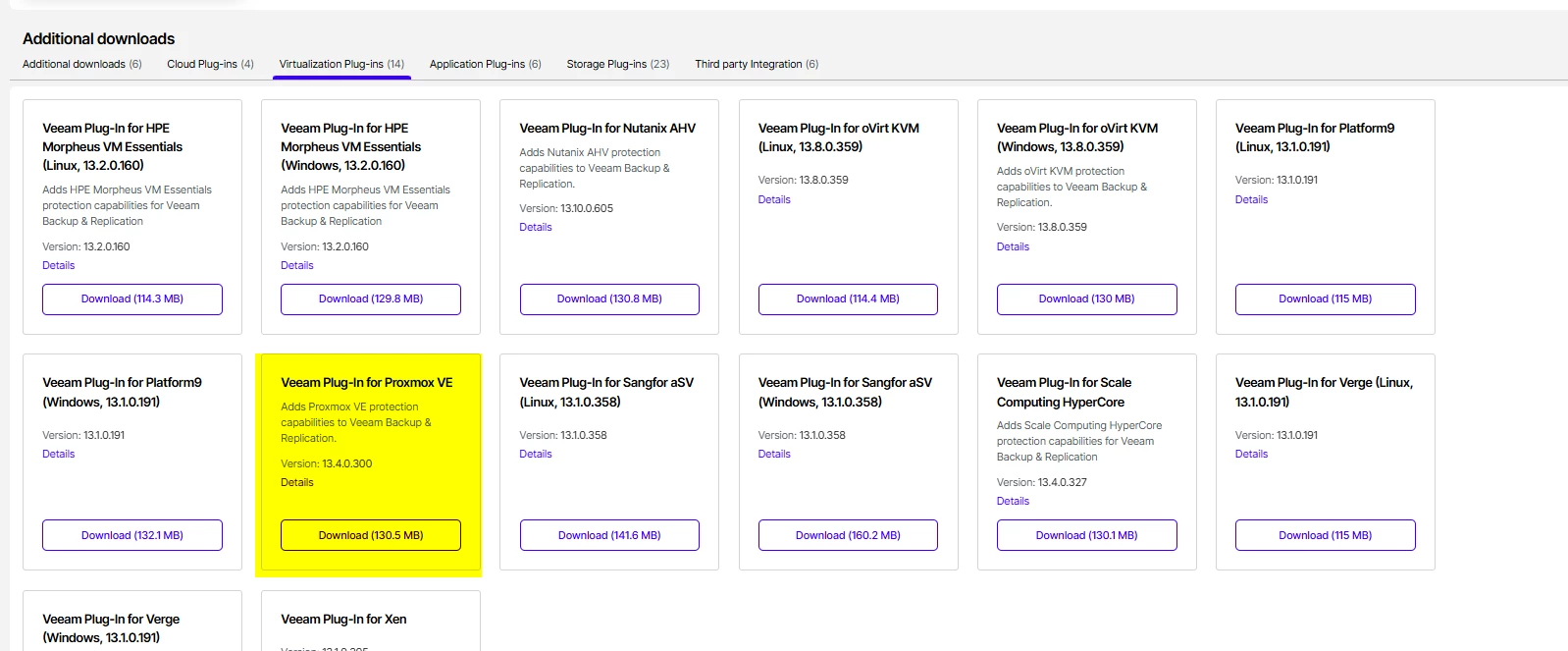
There is an Proxmox Plugin in the Download Area under my.veeam.com 

With this you should be able to add the Infrastructure.

Regards

Chalid


  • Author
  • New Here
  • August 25, 2026

the url my.vmware.com does not work.


CMF
Forum|alt.badge.img+8
  • Veeam Legend
  • August 25, 2026

sorry my bad. Its my.veeam.com :-) 


coolsport00
Forum|alt.badge.img+23
  • Veeam Legend
  • August 25, 2026

Close Chalid. You had the “my” and “com” portions of the URL correct 🤣😂

@Klaus Eckert - let us know if you need anything further to get PVE backups up & going.

Best.


  • Author
  • New Here
  • August 25, 2026

The Proxmox plugin Requires: Veeam Backup & Replication 13.1.0 or later

I have Veeam Backup & Replication 13.0.2.29 Enterprise Plus Edition.

How can I update to 13.1?


coolsport00
Forum|alt.badge.img+23
  • Veeam Legend
  • August 25, 2026

@Klaus Eckert - You just need to download the VBR ISO and run it. It should prompt you to “upgrade”. Make sure to read through the Upgrade part of the User Guide:

https://helpcenter.veeam.com/docs/vbr/userguide/update_vbr_windows.html?ver=13

If it’s a VM, I’d snapshot it too, as well as take a config backup right before upgrade.

Also, I forgot that “auto update” is not just VSA. It is on the Windows version as well:

https://helpcenter.veeam.com/docs/vbr/userguide/installing_updates_automatically.html?ver=13

Go to the Web UI and check on how you have updates configured:

https://helpcenter.veeam.com/docs/vbr/userguide/configuring_updates_vbr_web.html?ver=13


  • Author
  • New Here
  • August 25, 2026

Thanks a lot.

I will try this.


Mildur
Forum|alt.badge.img+12
  • Veeam Product Management
  • August 25, 2026

​​​​​​Also, I forgot that “auto update” is not just VSA. It is on the Windows version as well:

https://helpcenter.veeam.com/docs/vbr/userguide/installing_updates_automatically.html?ver=13

Go to the Web UI and check on how you have updates configured:

https://helpcenter.veeam.com/docs/vbr/userguide/configuring_updates_vbr_web.html?ver=13

That‘s a v13.1 feature and can not be used to update VBR on Windows from v13.0 to v13.1.


@Klaus Eckert 

Keep in mind, protecting Proxmox workloads require Veeam Universal Licensing (or Rental). 


Best,

Fabian


  • Author
  • New Here
  • August 25, 2026

We have Enterprise Plus Edition.

Is this Edition OK for Proxmox?


CMF
Forum|alt.badge.img+8
  • Veeam Legend
  • August 25, 2026

It depends whether it is a perpetual license (per Socket) or a Universal License (per Workload).

What Fabian describes is the need of having a Universal License for every other Hypervisor but VMware and Hyper-V. 

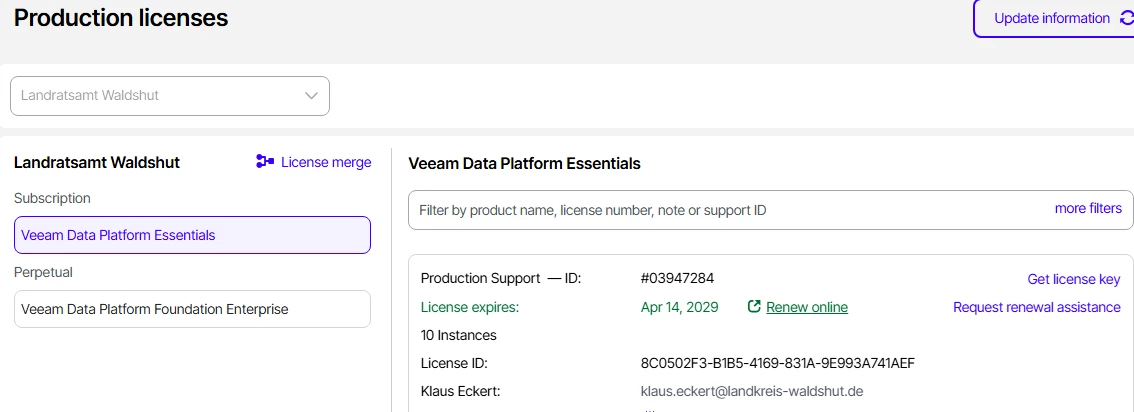
You can check under License within the VBR Console if it is perpetual or transcription.  

Regards

Chalid


Mildur
Forum|alt.badge.img+12
  • Veeam Product Management
  • August 25, 2026

We have Enterprise Plus Edition.

Is this Edition OK for Proxmox?

I assume you have a socket license (Enterprise Plus). With each socket, you get a free instance (maximum 6). You can protect a maximum of 6 Proxmox VMs or other workloads (e.g. Agents) with it.

If you plan to fully migrate to Proxmox, then please contact a Veeam sales person in your region to discuss converting your current Socket license to a Veeam Universal license. Or you may not able to backup all VMs on Proxmox with your current license.


Best,

Fabian


  • Author
  • New Here
  • August 25, 2026


We have this license.

Actually we plan to have 4 Proxmox VMs and some Windows Clients.

Do we need more sockets?


coolsport00
Forum|alt.badge.img+23
  • Veeam Legend
  • August 25, 2026

That‘s a v13.1 feature and can not be used to update VBR on Windows from v13.0 to v13.1.


Best,

Fabian

Ah, good to know Fabian. I didn’t think it was around in pre-v13.1. Thanks for the clarification 👍🏻


coolsport00
Forum|alt.badge.img+23
  • Veeam Legend
  • August 25, 2026

At the moment, it appears you don’t need anymore since it says you have “10 instances” to use. But of course if you plan to grow/expand, yes...you will need to purchase some VUL licenses (not sockets).


CMF
Forum|alt.badge.img+8
  • Veeam Legend
  • August 25, 2026

With the highlighted License you should be fine.