Question

Can't install Veeam B&R, as can't uninstall old VSS Hardware Provider


  • Not a newbie anymore

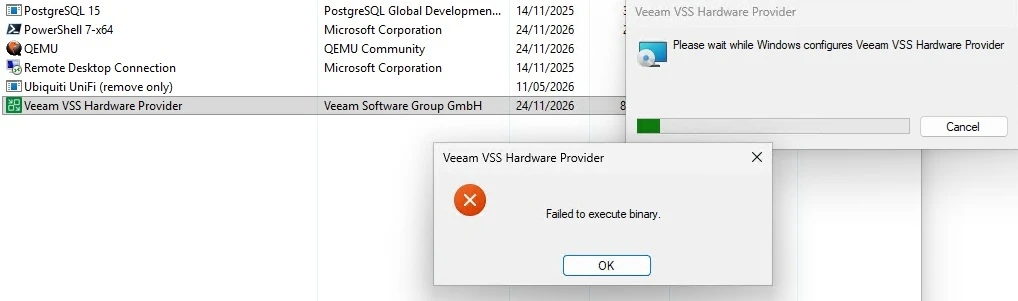
Hi. Veeam B&R install corrupted halfway through, so uninstalled everything so I could go for a clean install. however, as per below image, the Veeam VSS hardware provider application will not uninstall. I therefore cannot proceed with reinstall …. I'm completely stuck!! any help would be much appreciated. I do not have any kind of support! this installation is running on a Windows 11 VM. thanks.



24 comments

matheusgiovanini
Forum|alt.badge.img+12

Hi,

Since the uninstaller is failing with "Failed to execute binary", I'd suggest checking the Windows Application Event Log for any MsiInstaller errors around the time of the failed uninstall. This may give us a better indication of what's causing the issue.

Also, could you check if the Veeam VSS Hardware Provider service is still registered?

Get-Service VeeamVssProviderSvc -ErrorAction SilentlyContinue
vssadmin list providers

If possible, please share the results and any related errors from Event Viewer. I'd avoid manually removing registry entries or files until we understand what's preventing the uninstallation.


Chris.Childerhose
Forum|alt.badge.img+23

Also which version of Veeam are you trying to remove?  One other suggestion might be to use the ISO and find the MSI for that component to reinstall then try uninstall again.  Maybe it will fix the application and then allow removal.


  • Author
  • Not a newbie anymore
  • Nov 25, 2026 2:26 PM UTC

Hi guys, thanks for the responses! W11 VM was running 12.3, but but I had to change the hyper V server virtual switch onto new hardware, and the Veeam Backup server through a complete wobbly and kept on giving backup proxy errors?? so I removed 12.3 and was going to instal 13.1 over the top, but the installation failed because of the antivirus. I therefore uninstalled 13.1, but then this VSS hardware provider application still remained in the add-remove programs list, and this is where I am now!!


  • Author
  • Not a newbie anymore
  • Nov 25, 2026 2:28 PM UTC

no other Veeam components or applications are left, just the VSS one! I will try your recommendation of re-running the MSI from the ISO….


Chris.Childerhose
Forum|alt.badge.img+23

no other Veeam components or applications are left, just the VSS one! I will try your recommendation of re-running the MSI from the ISO….

Check the version of the VSS app listed to see which version it took - 12.x or 13.x - then use the related ISO for the version needed.


  • Author
  • Not a newbie anymore
  • Nov 25, 2026 3:07 PM UTC

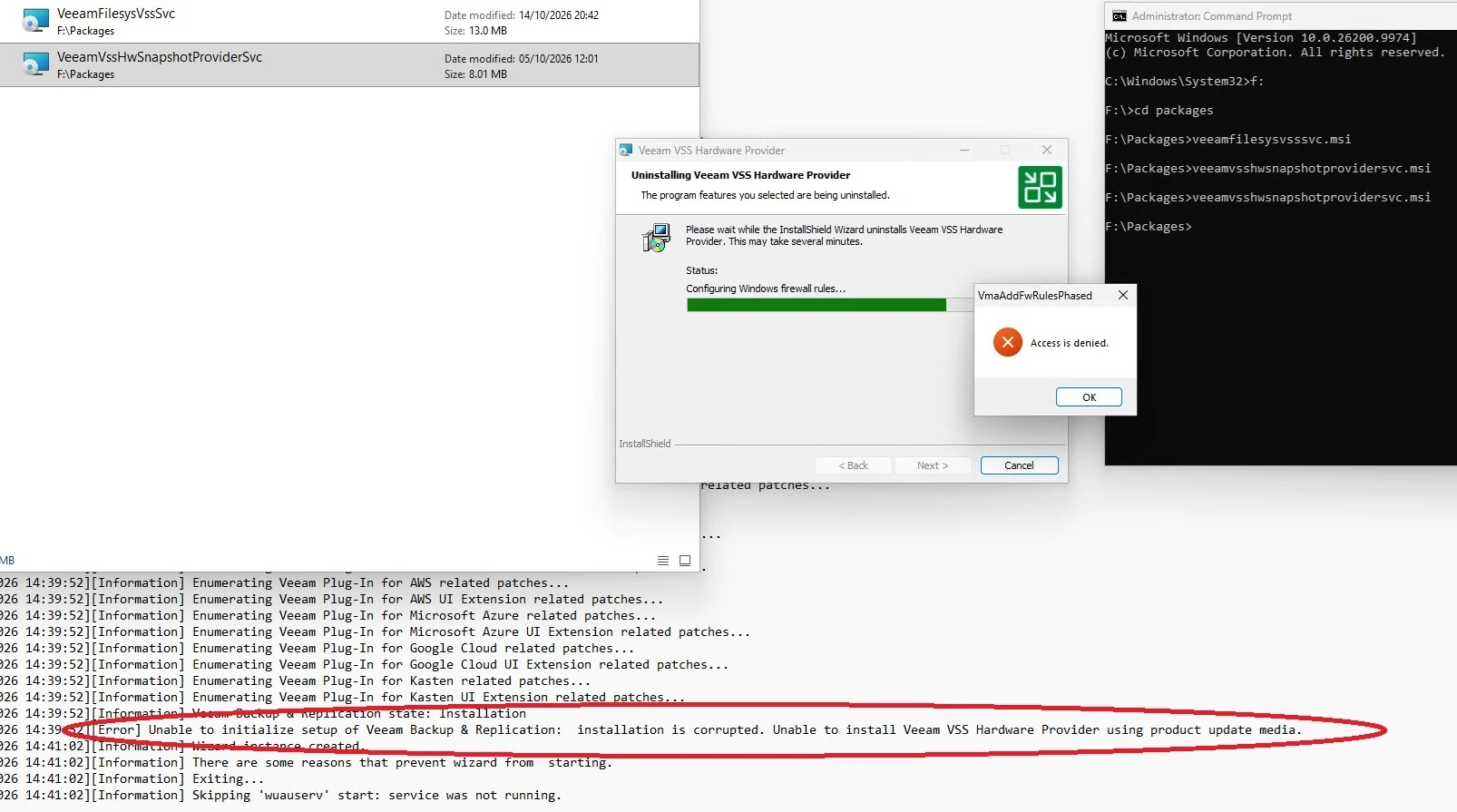
thanks for  getting back to me. the attached image shows everything that’s wrong!! when I run the VSS hardware provider msi and choose remove, I get the access is denied error attached. If I try and select repair, I get a message requesting that I insert the disc 1??!! you can also see the error (highlighted in red) from the suite Engine Installer report when trying to rerun the full installation. when I removed 12.3, everything was removed successfully, so this lingering app is from 13.1. The problem is, I deleted all of the contents from the program data folder for the VSS provider app and deleted the program entry from the registry, when trying to solve the issue!! not sure what I can do now but a full reinstallation of Windows, as the full Veeam installation will not continue whilst this app is still lingering!!


Chris.Childerhose
Forum|alt.badge.img+23

Unsure what to say at this point other than trying to clean up the entry in the control panel via the registry.  It seems you are stuck and support at this point would be the only way forward other than trying to Google fixes.  Sorry


Lars Kristoffersen
Forum|alt.badge.img+3

I guess I would reinstall the OS if possible, and then install VBR. This would also clean up old stuff.


lucasmagnum
Forum|alt.badge.img+2
  • Experienced User
  • Nov 26, 2026 11:28 AM UTC

​@spud  hi!! I once encountered a similar issue with a client; it was necessary to reinstall the operating system—we took the opportunity to install a newer version than the one previously on the machine—and we downloaded a different ISO file. After this procedure, we had no further issues. Everything worked out fine.


  • Author
  • Not a newbie anymore
  • Nov 26, 2026 11:37 AM UTC

thanks guys. I decided to reset the OS and install 13.1. Which went fine, and a blank Veeam B&R opened, but then I tried to restore the configuration, and that failed at the last moment with the following error:


veeam configuration restore failed to upgrade host components system cannot find the specified file


now the Program wont start at all…………………..😭 The Util.hostsupgrade.log gives the following (WHAT CAN I DO 😭):

[26.11.2026 11:32:15.169]    <25> [0005]    Info (3)    For msi C:\Program Files\Veeam\Backup and Replication\Backup\Packages\OpenSSL_FIPS_Redistributable_3.1.2_x64.msi return 'ProductVersion' property value: 3.1.2.2
[26.11.2026 11:32:15.248]    <25> [0005]    Info (3)    [ProxyVcpInvoker] 'Transport.DoRpc' error: The system cannot find the file specified.
[26.11.2026 11:32:15.248]    <25> [0005]    Info (3)        Failed to invoke rpc command
[26.11.2026 11:32:15.248]    <25> [0005]    Info (3)        
[26.11.2026 11:32:15.250]    <25> [0005]   Error (1)    [W11Veeam] Failed to search installed package. (System.Exception)
[26.11.2026 11:32:15.250]    <25> [0005]   Error (1)       at Veeam.Backup.ProxyProvider.CRpcProxyPackageCommanderImpl.FindPackageByUpgCode(String pkgUpgCode)
[26.11.2026 11:32:15.250]    <25> [0005]   Error (1)       at Veeam.Backup.ProxyProvider.CRpcProxyPackageCommanderImpl.FindPackage(String pkgUpgCode, String pkgCompId)
[26.11.2026 11:32:15.250]    <25> [0005]   Error (1)       at Veeam.Backup.ProxyProvider.CProxyPackageCommander.FindPackage(String pkgUpgCode, String pkgCompId)
[26.11.2026 11:32:15.250]    <25> [0005]   Error (1)       at Veeam.Backup.Core.ServerCreator.CWindowsPackagesDiscoverer.Discover()
[26.11.2026 11:32:15.250]    <25> [0005]   Error (1)       at Veeam.Backup.Core.ServerUpgrader.CWinBasedHostUpgradeTask.DiscoverPackagesWithLogging()
[26.11.2026 11:32:15.250]    <25> [0005]   Error (1)    The system cannot find the file specified. (Veeam.Backup.Common.CCppComponentException)
[26.11.2026 11:32:15.250]    <25> [0005]   Error (1)       in c++: Error code: 0x00000002
[26.11.2026 11:32:15.250]    <25> [0005]   Error (1)       in c++: Failed to open registry key [SOFTWARE\Veeam\Veeam VSS HW Snapshot Provider].
[26.11.2026 11:32:15.250]    <25> [0005]   Error (1)       in c++: Unable to obtain management port number for component 'Veeam VSS Hardware Provider'.
[26.11.2026 11:32:15.250]    <25> [0005]   Error (1)       in c++: Failed to call DoRpc. CmdName: [PckgFind].
[26.11.2026 11:32:15.250]    <25> [0005]   Error (1)    Failed to invoke rpc command (Veeam.Backup.Common.CCppComponentException)
[26.11.2026 11:32:15.250]    <25> [0005]   Error (1)       at Veeam.Backup.Common.CVcpInvoker.Invoke(CVcpStreamBase stream, String command, CVcpCommandArgs inArgs, Boolean noLog, CCancellationContext cancellationContext)
[26.11.2026 11:32:15.250]    <25> [0005]   Error (1)       at Veeam.Backup.Common.VcpInvokerExtensions.Invoke(IVcpInvoker invoker, CVcpStreamBase stream, String command, CVcpCommandArgs inArgs, Boolean noLog)
[26.11.2026 11:32:15.250]    <25> [0005]   Error (1)       at Veeam.Backup.ProxyProvider.CVcpInvokerHolder.Invoke(String command, CVcpCommandArgs inArgs, Boolean noLog)
[26.11.2026 11:32:15.250]    <25> [0005]   Error (1)       at Veeam.Backup.ProxyProvider.CProxyVcpInvoker.Call(String methodName, CProxyInvokeInputArg inputArg, Boolean secureCall, CCancellationContext cancelInfo)
[26.11.2026 11:32:15.250]    <25> [0005]   Error (1)       at Veeam.Backup.ProxyProvider.SRpcInvokerExtensions.Call(IRpcInvoker invoker, String methodName, CProxyInvokeInputArg inputArgs, Boolean secureCall)
[26.11.2026 11:32:15.250]    <25> [0005]   Error (1)       at Veeam.Backup.ProxyProvider.SRpcInvokerExtensions.Call(IRpcInvoker invoker, String methodName, CProxyInvokeInputArg inputArgs)
[26.11.2026 11:32:15.250]    <25> [0005]   Error (1)       at Veeam.Backup.ProxyProvider.CRpcProxyPackageCommanderImpl.FindPackageByUpgCode(String pkgUpgCode)
[26.11.2026 11:32:15.274]    <25> [0005]   Error (1)    Unable to enumerate installed components on host 'W11Veeam' (System.Exception)
[26.11.2026 11:32:15.274]    <25> [0005]   Error (1)       at Veeam.Backup.Core.ServerUpgrader.CWinBasedHostUpgradeTask.DiscoverPackagesWithLogging()
[26.11.2026 11:32:15.274]    <25> [0005]   Error (1)       at Veeam.Backup.Core.ServerUpgrader.CWinBasedHostUpgradeTask.UpgradeNoThrow()
[26.11.2026 11:32:15.274]    <25> [0005]   Error (1)    [W11Veeam] Failed to search installed package. (System.Exception)
[26.11.2026 11:32:15.274]    <25> [0005]   Error (1)       at Veeam.Backup.ProxyProvider.CRpcProxyPackageCommanderImpl.FindPackageByUpgCode(String pkgUpgCode)
[26.11.2026 11:32:15.274]    <25> [0005]   Error (1)       at Veeam.Backup.ProxyProvider.CRpcProxyPackageCommanderImpl.FindPackage(String pkgUpgCode, String pkgCompId)
[26.11.2026 11:32:15.274]    <25> [0005]   Error (1)       at Veeam.Backup.ProxyProvider.CProxyPackageCommander.FindPackage(String pkgUpgCode, String pkgCompId)
[26.11.2026 11:32:15.274]    <25> [0005]   Error (1)       at Veeam.Backup.Core.ServerCreator.CWindowsPackagesDiscoverer.Discover()
[26.11.2026 11:32:15.274]    <25> [0005]   Error (1)       at Veeam.Backup.Core.ServerUpgrader.CWinBasedHostUpgradeTask.DiscoverPackagesWithLogging()
[26.11.2026 11:32:15.274]    <25> [0005]   Error (1)    The system cannot find the file specified. (Veeam.Backup.Common.CCppComponentException)
[26.11.2026 11:32:15.274]    <25> [0005]   Error (1)       in c++: Error code: 0x00000002
[26.11.2026 11:32:15.274]    <25> [0005]   Error (1)       in c++: Failed to open registry key [SOFTWARE\Veeam\Veeam VSS HW Snapshot Provider].
[26.11.2026 11:32:15.274]    <25> [0005]   Error (1)       in c++: Unable to obtain management port number for component 'Veeam VSS Hardware Provider'.
[26.11.2026 11:32:15.274]    <25> [0005]   Error (1)       in c++: Failed to call DoRpc. CmdName: [PckgFind].
[26.11.2026 11:32:15.274]    <25> [0005]   Error (1)    Failed to invoke rpc command (Veeam.Backup.Common.CCppComponentException)
[26.11.2026 11:32:15.274]    <25> [0005]   Error (1)       at Veeam.Backup.Common.CVcpInvoker.Invoke(CVcpStreamBase stream, String command, CVcpCommandArgs inArgs, Boolean noLog, CCancellationContext cancellationContext)
[26.11.2026 11:32:15.274]    <25> [0005]   Error (1)       at Veeam.Backup.Common.VcpInvokerExtensions.Invoke(IVcpInvoker invoker, CVcpStreamBase stream, String command, CVcpCommandArgs inArgs, Boolean noLog)
[26.11.2026 11:32:15.274]    <25> [0005]   Error (1)       at Veeam.Backup.ProxyProvider.CVcpInvokerHolder.Invoke(String command, CVcpCommandArgs inArgs, Boolean noLog)
[26.11.2026 11:32:15.274]    <25> [0005]   Error (1)       at Veeam.Backup.ProxyProvider.CProxyVcpInvoker.Call(String methodName, CProxyInvokeInputArg inputArg, Boolean secureCall, CCancellationContext cancelInfo)
[26.11.2026 11:32:15.274]    <25> [0005]   Error (1)       at Veeam.Backup.ProxyProvider.SRpcInvokerExtensions.Call(IRpcInvoker invoker, String methodName, CProxyInvokeInputArg inputArgs, Boolean secureCall)
[26.11.2026 11:32:15.274]    <25> [0005]   Error (1)       at Veeam.Backup.ProxyProvider.SRpcInvokerExtensions.Call(IRpcInvoker invoker, String methodName, CProxyInvokeInputArg inputArgs)
[26.11.2026 11:32:15.274]    <25> [0005]   Error (1)       at Veeam.Backup.ProxyProvider.CRpcProxyPackageCommanderImpl.FindPackageByUpgCode(String pkgUpgCode)
[26.11.2026 11:32:16.069]    <24> [0005]    Info (3)    [ResourceScanner] Force rescan c77fc873-2c31-442d-a9a5-d5bcc87700c5, d7c4ff97-b99b-4d1f-884d-283b7b6b9ee3, b4f9dba2-7932-4406-aa8d-bc1b782721a7
[26.11.2026 11:32:16.095]    <14> [0005]    Info (3)        [ReconnectableSocket][StopCondition] Stop confirmation was received on [2b3f6ea2-8714-41c1-a703-2c9d0fefd8af].
[26.11.2026 11:32:16.095]    <14> [0005]    Info (3)        [ReconnectableSocket][StopCondition] Stop request was received on [2b3f6ea2-8714-41c1-a703-2c9d0fefd8af].
[26.11.2026 11:32:16.099]    <14> [0005]    Info (3)        [ReconnectableSocket][StopCondition] Stop confirmation was received on [b836d72e-a742-495c-9ca9-b03fc021e9b6].
[26.11.2026 11:32:16.099]    <14> [0005]    Info (3)        [ReconnectableSocket][StopCondition] Stop request was received on [b836d72e-a742-495c-9ca9-b03fc021e9b6].
[26.11.2026 11:32:16.101]    <22> [0005]    Info (3)    Disposing mapping SOAP connections
[26.11.2026 11:32:16.122]    <22> [0005]    Info (3)    [TimeSync]Client synchronization process was created
[26.11.2026 11:32:16.123]    <22> [0005]    Info (3)    [Session] Session completed with error. Job: [Host Upgrade].
[26.11.2026 11:32:16.145]    <22> [0005]    Info (3)    [CJobQuota] Looking for quota by job [448b8380-3193-474a-8841-4f7a51dd17a1]
[26.11.2026 11:32:16.146]    <22> [0005]    Info (3)    [CJobLogsManager] Cannot find quota. Job with id 448b8380-3193-474a-8841-4f7a51dd17a1 was not found.
[26.11.2026 11:32:16.150]    <22> [0005]    Info (3)    Job 448b8380-3193-474a-8841-4f7a51dd17a1 not found. Cleanup cloud connection cache
[26.11.2026 11:32:16.172]    <22> [0005]    Info (3)    [SVccTransportClientGlobalCache] Initializing VCC transport client provider, reason: first initialization
[26.11.2026 11:32:16.178]    <22> [0005]    Info (3)        Job event 'ready2finish' was created for session '448b8380-3193-474a-8841-4f7a51dd17a1'. Event full name: 'ready2finishvmjobevent448b8380-3193-474a-8841-4f7a51dd17a1'
[26.11.2026 11:32:16.404]    <22> [0005]    Info (3)    Job [Host Upgrader] is ready to finish. SessionId: [448b8380-3193-474a-8841-4f7a51dd17a1]
[26.11.2026 11:32:16.404]    <22> [0005]    Info (3)        Job event 'ready2finish' was disposed. Session: '448b8380-3193-474a-8841-4f7a51dd17a1'.
[26.11.2026 11:32:16.404]    <22> [0005]    Info (3)        Job event 'finished' was disposed. Session: '448b8380-3193-474a-8841-4f7a51dd17a1'.
[26.11.2026 11:32:16.405]    <22> [0005]    Info (3)        Job process lock was disposed.
[26.11.2026 11:32:16.406]    <22> [0005]    Info (3)        Job process lock was disposed.
[26.11.2026 11:32:16.407]    <22> [0005]    Info (1)    -> [NONE] Completed: THREAD: VBR.VirtualMain (CancellableThread.Create: 39) in  00:00:02.968


Chris.Childerhose
Forum|alt.badge.img+23

At some point I think you will need support since the configuration backup won't restore now.   What version was the configuration backup taken from as that can cause issues if not compatible.  Trying to provide the best suggestions we can but support is the best route.


  • Author
  • Not a newbie anymore
  • Nov 26, 2026 11:41 AM UTC

config backup was 12.3…...


matheusgiovanini
Forum|alt.badge.img+12

At this point, I would recommend opening a support case with Veeam, especially considering the sequence of issues you've experienced so far.

The initial installation was corrupted, then you had issues removing the VSS Hardware Provider, and now the configuration restore is failing while trying to upgrade the host components.

I'd also investigate a few things in parallel:

  • Check whether the VeeamVssProviderSvc service exists and its current status.

  • Verify whether the registry key mentioned in the log exists under HKLM\SOFTWARE\Veeam.

  • Confirm the VBR version used to create the configuration backup.

I'm also wondering whether there might be some inconsistency in the original installation or even something related to the configuration backup itself.

Given the history of this issue, I think it's worth having Veeam Support investigate the installation and configuration restore logs before making any further changes.


matheusgiovanini
Forum|alt.badge.img+12

One other thing I'd like to understand: what was the exact VBR version and build before reinstalling Windows, and which version was used to create the configuration backup?

I'm also wondering whether this could be related to a version compatibility issue or possibly an inconsistency in the configuration database.

Considering that the previous installation was already experiencing issues, I'd recommend opening a support case with Veeam so they can investigate the configuration restore process and the host components upgrade failure.


  • Author
  • Not a newbie anymore
  • Nov 26, 2026 11:45 AM UTC

thanks for all the suggestions. I’ll soldier on. as seemingly always with Veeam, when it does go wrong, the quickest way is just to START AGAIN FROM SCRATCH!!


matheusgiovanini
Forum|alt.badge.img+12

config backup was 12.3…...

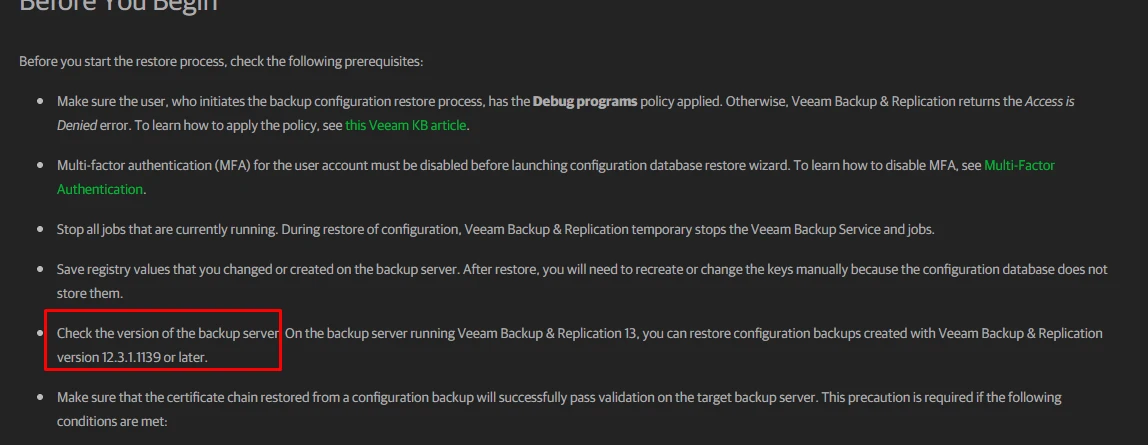
According to Veeam's documentation, VBR 13 supports configuration restores from version 12.3.1.1139 or later, so the exact build might be relevant here.


Before You Begin - Veeam Backup & Replication User Guide


Chris.Childerhose
Forum|alt.badge.img+23

config backup was 12.3…...

That is why it is failing if you are using 13.1.2 to restore.  You would have needed to put the same version back on, restore, then upgrade to 13.x.  You can revert to that version to get it working as I am sure support would tell you the same thing. There is no way to manipulate the config backup file.


lucasmagnum
Forum|alt.badge.img+2
  • Experienced User
  • Nov 26, 2026 11:46 AM UTC

I have the same thought as Chris. 

Open a support case so the logs can be evaluated.


matheusgiovanini
Forum|alt.badge.img+12

thanks for all the suggestions. I’ll soldier on. as seemingly always with Veeam, when it does go wrong, the quickest way is just to START AGAIN FROM SCRATCH!!

I know the feeling! 😅

Good luck with it, and hopefully you get everything back up and running soon!


  • Author
  • Not a newbie anymore
  • Nov 26, 2026 11:48 AM UTC

specific version was the final v12, I believe: 12.3.2.4465_20260307 (config backup was updated daily, so it would be consistent with the version mentioned)


Chris.Childerhose
Forum|alt.badge.img+23

specific version was the final v12, I believe: 12.3.2.4465_20260307 (config backup was updated daily, so it would be consistent with the version mentioned)

Try going back to that version, restore, then upgrade.


  • Author
  • Not a newbie anymore
  • Nov 26, 2026 11:53 AM UTC

yes, it’s probably what I should have done in first place!! I forget that Veeam prefers that method of restore to existing, then restore config backup, then upgrade! Oh well! annoyingly, the W11 backup server VM is painfully slow 🙄 thanks for all your advice guys, much appreciated 👍


Chris.Childerhose
Forum|alt.badge.img+23

yes, it’s probably what I should have done in first place!! I forget that Veeam prefers that method of restore to existing, then restore config backup, then upgrade! Oh well! annoyingly, the W11 backup server VM is painfully slow 🙄 thanks for all your advice guys, much appreciated 👍

No problem good luck getting it going.


lucasmagnum
Forum|alt.badge.img+2
  • Experienced User
  • Nov 26, 2026 12:01 PM UTC

yes, it’s probably what I should have done in first place!! I forget that Veeam prefers that method of restore to existing, then restore config backup, then upgrade! Oh well! annoyingly, the W11 backup server VM is painfully slow 🙄 thanks for all your advice guys, much appreciated 👍

If you need anything, we’ll be here, my friend! 🤜🏿🤛🏿