Question

Can't install Veeam B&R, as can't uninstall old VSS Hardware Provider

  • Nov 25, 2026 10:09 AM UTC
  • 7 comments
  • 31 views

  • Not a newbie anymore

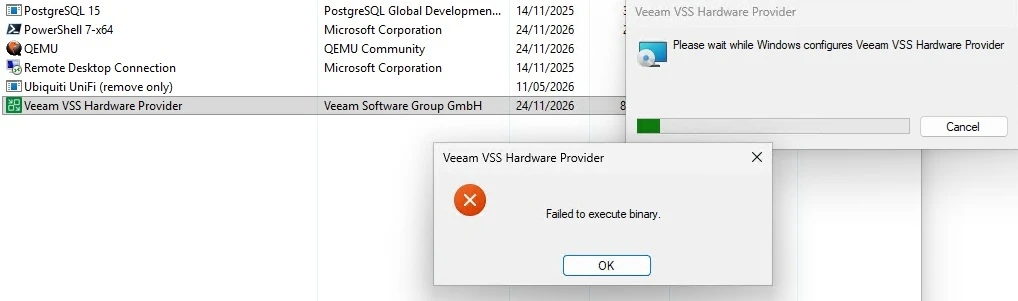
Hi. Veeam B&R install corrupted halfway through, so uninstalled everything so I could go for a clean install. however, as per below image, the Veeam VSS hardware provider application will not uninstall. I therefore cannot proceed with reinstall …. I'm completely stuck!! any help would be much appreciated. I do not have any kind of support! this installation is running on a Windows 11 VM. thanks.



7 comments

matheusgiovanini
Forum|alt.badge.img+12

Hi,

Since the uninstaller is failing with "Failed to execute binary", I'd suggest checking the Windows Application Event Log for any MsiInstaller errors around the time of the failed uninstall. This may give us a better indication of what's causing the issue.

Also, could you check if the Veeam VSS Hardware Provider service is still registered?

Get-Service VeeamVssProviderSvc -ErrorAction SilentlyContinue
vssadmin list providers

If possible, please share the results and any related errors from Event Viewer. I'd avoid manually removing registry entries or files until we understand what's preventing the uninstallation.


Chris.Childerhose
Forum|alt.badge.img+23

Also which version of Veeam are you trying to remove?  One other suggestion might be to use the ISO and find the MSI for that component to reinstall then try uninstall again.  Maybe it will fix the application and then allow removal.


  • Author
  • Not a newbie anymore
  • Nov 25, 2026 2:26 PM UTC

Hi guys, thanks for the responses! W11 VM was running 12.3, but but I had to change the hyper V server virtual switch onto new hardware, and the Veeam Backup server through a complete wobbly and kept on giving backup proxy errors?? so I removed 12.3 and was going to instal 13.1 over the top, but the installation failed because of the antivirus. I therefore uninstalled 13.1, but then this VSS hardware provider application still remained in the add-remove programs list, and this is where I am now!!


  • Author
  • Not a newbie anymore
  • Nov 25, 2026 2:28 PM UTC

no other Veeam components or applications are left, just the VSS one! I will try your recommendation of re-running the MSI from the ISO….


Chris.Childerhose
Forum|alt.badge.img+23

no other Veeam components or applications are left, just the VSS one! I will try your recommendation of re-running the MSI from the ISO….

Check the version of the VSS app listed to see which version it took - 12.x or 13.x - then use the related ISO for the version needed.


  • Author
  • Not a newbie anymore
  • Nov 25, 2026 3:07 PM UTC

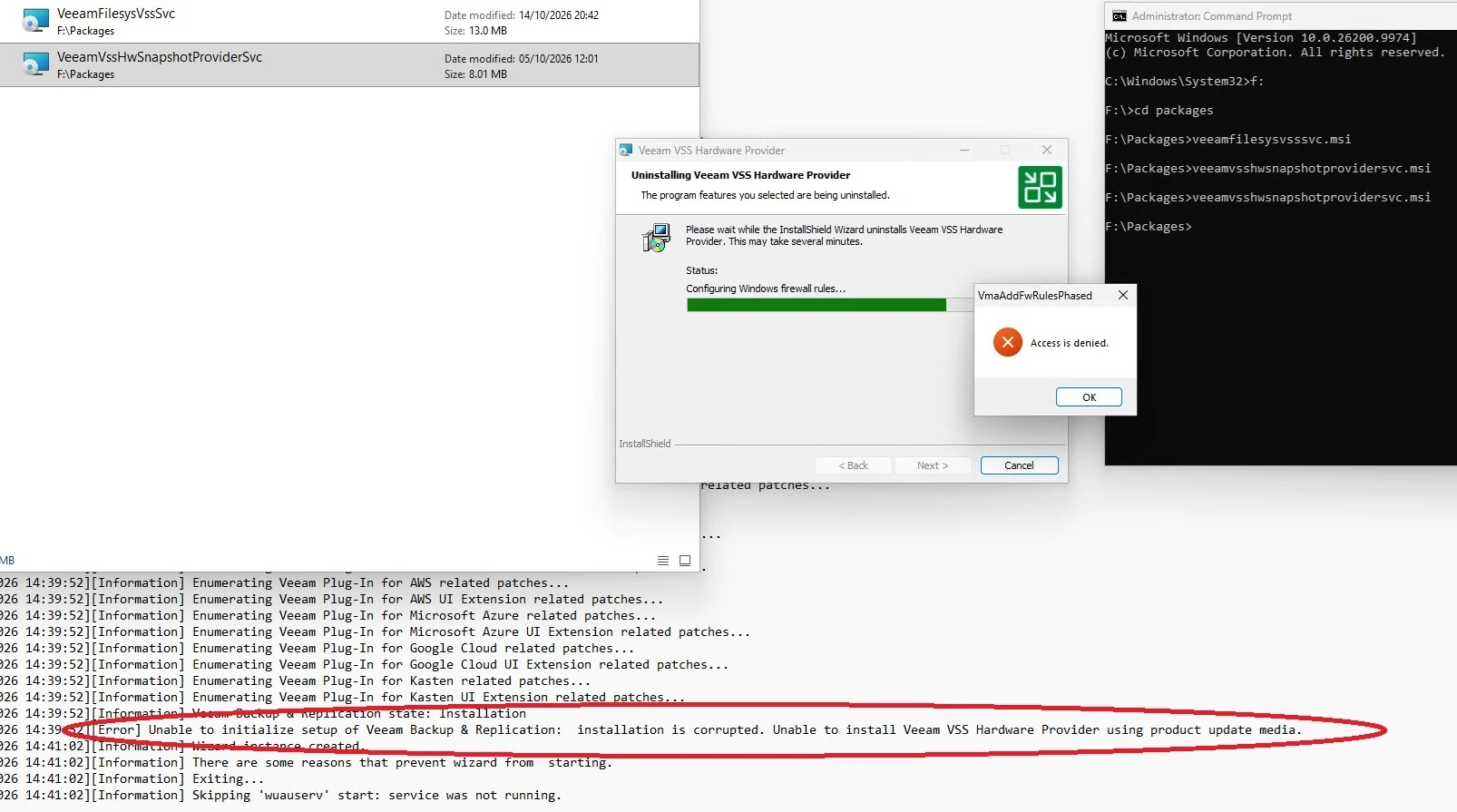
thanks for  getting back to me. the attached image shows everything that’s wrong!! when I run the VSS hardware provider msi and choose remove, I get the access is denied error attached. If I try and select repair, I get a message requesting that I insert the disc 1??!! you can also see the error (highlighted in red) from the suite Engine Installer report when trying to rerun the full installation. when I removed 12.3, everything was removed successfully, so this lingering app is from 13.1. The problem is, I deleted all of the contents from the program data folder for the VSS provider app and deleted the program entry from the registry, when trying to solve the issue!! not sure what I can do now but a full reinstallation of Windows, as the full Veeam installation will not continue whilst this app is still lingering!!


Chris.Childerhose
Forum|alt.badge.img+23

Unsure what to say at this point other than trying to clean up the entry in the control panel via the registry.  It seems you are stuck and support at this point would be the only way forward other than trying to Google fixes.  Sorry