Answer

Any Nutanix VMs in a backup job failed

  • August 23, 2024
  • 8 comments
  • 378 views

There are many Nutanix VMs in a backup job that are successful but any VM isn't.

Please help to advise me.
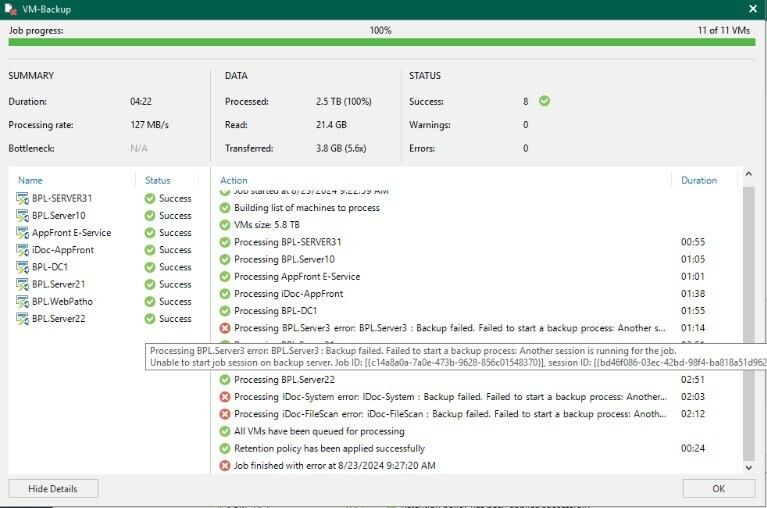
 

Thanks

Best answer by techsupport

The case was resolved by Veeam Support.

  1. He forced synchronization between the different components and restarted the Veeam services.
  2. Once this was done, I tested the backup and confirmed the issue was still persisting.
  3. Investigating the Veeam job statuses via PowerShell, I identified three sessions stuck and was able to abort the stuck sessions.
  4. The backup job is now progressing on the three VMs that were stuck and should be completed successfully.

The overall issue was completed by PowerShell.

8 comments

Chris.Childerhose
Forum|alt.badge.img+21

Is there a native backup or something happening on Nutanix?  Seems like Veeam is unable to start the backups based on the message.  I would possibly contact support if you check the logs, etc. without success.


  • Author
  • Not a newbie anymore
  • August 23, 2024

I’ve opened a case already, waiting for update from support.


Thanks


Andanet
Forum|alt.badge.img+11
  • Veeam Legend
  • August 23, 2024

It seems there is another job running for those VM… 

HAve you tried to restart all Veeam services or, optionally, restart VBR server? 


  • Author
  • Not a newbie anymore
  • August 23, 2024

@Andanet Yes, I restarted the VBR already but it’s not solved.


coolsport00
Forum|alt.badge.img+21
  • Veeam Legend
  • August 23, 2024

@techsupport -

Aside from waiting for Support (probably best bet), you could look at the logs on your Veeam server at: C:\ProgramData\Veeam\Backup\<job-name>.log . Maybe something in there provide more details and give you an idea where to specifically begin looking to resolve the error.


  • Author
  • Not a newbie anymore
  • Answer
  • August 28, 2024

The case was resolved by Veeam Support.

  1. He forced synchronization between the different components and restarted the Veeam services.
  2. Once this was done, I tested the backup and confirmed the issue was still persisting.
  3. Investigating the Veeam job statuses via PowerShell, I identified three sessions stuck and was able to abort the stuck sessions.
  4. The backup job is now progressing on the three VMs that were stuck and should be completed successfully.

The overall issue was completed by PowerShell.


coolsport00
Forum|alt.badge.img+21
  • Veeam Legend
  • August 28, 2024

Thank you for the update. Glad they got you working again. 


Chris.Childerhose
Forum|alt.badge.img+21

Great to hear support was able to assist and get thinga working for you.




