Question

About deploy pve worker on the air-gapped envirment

  • August 30, 2026
  • 3 comments
  • 16 views

Hi Everyone,


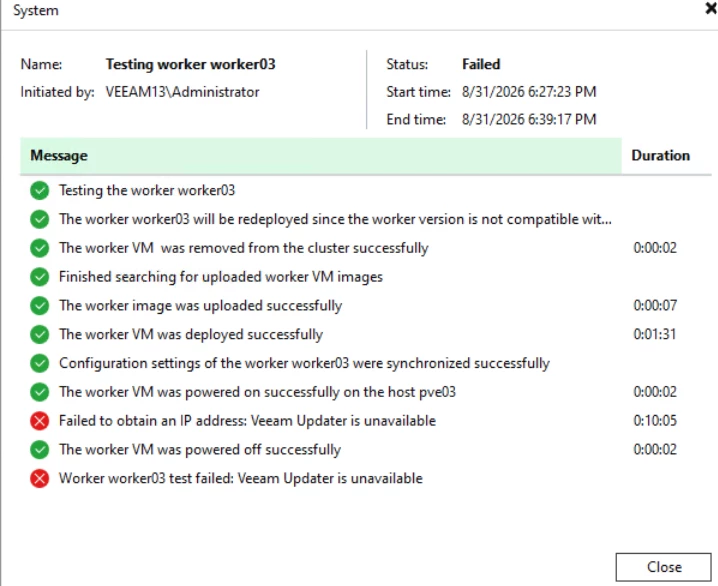
I installed Veeam 13.1 on Windows Server 2022 without joining an AD domain and in an environment without internet access. I used IP addresses when adding the PVE9.2, but when I deployed the workers, the installation failed with the error “Veeam Updater is unavailable.” Later, I set up DNS forward and reverse lookups for the PVE and worker IPs, but the same error persisted. I unchecked the “Check for updates online” option for the workers.

Does Veeam require an internet connection for the worker to install packages?


Translated with DeepL.com (free version)

3 comments

coolsport00
Forum|alt.badge.img+23
  • Veeam Legend
  • August 30, 2026

Hi ​@nsofl.chen - no, Veeam doesn’t require internet access for worker installs. See below reference in teh Uesr Guide on Architecture for PVE & Veeam:

https://helpcenter.veeam.com/docs/vbr/userguide/pve_infrastructure_components.html?ver=13

There is a somewhat similar thread about Updater Service on v13.1 below:

Maybe reach out to Support, and monitor that post for resolution to see if what Support does helps your issue as well.

Best.


  • Author
  • Comes here often
  • August 30, 2026

@coolsport00 
 

Thank you,

After reinstalling version 13.0.3.63, I’ve been using the backup LAN IP for everything without configuring any DNS A records or the hosts file. The worker installed and tested successfully, and backups are working normally.

I wonder if version 13.1.1.18 might have introduced some restrictions?


coolsport00
Forum|alt.badge.img+23
  • Veeam Legend
  • August 30, 2026

That's possible. Only Support would be able to answer that. 

Glad you at least got back to a working state.