



Background
While working with some security-conscious AWS customers recently, the same request kept coming up: keep backup traffic off the public internet, but still send backups to Veeam Data Cloud Vault. These customers are already running Veeam Backup for AWS with worker instances in subnets that have no internet access, and they reach Amazon Simple Storage Service (Amazon S3) through their own VPC endpoints. The question they kept asking: does that same pattern still work when the target is Veeam Vault instead of a customer-owned Amazon S3 bucket?
So I headed into the lab to prove it out. The short answer: yes, it works, as long as you understand the difference between a gateway endpoint and an interface endpoint, and you keep the appliance in standard (public) network mode rather than Veeam's Private Network Deployment mode.
There's a bit more to it, including the same-region path (the simplest) and the cross-region path (which needs just one change). For a detailed look at how it all fits together, keep reading 😁.
Two Ways to Isolate Worker Traffic
Before we get into the build, there's one distinction worth clearing up, because conflating these two things is the number-one source of confusion here. There are two separate things people mean by "private networking" with Veeam Backup for AWS.
1. Veeam Private Network Deployment mode.
This is a built-in feature of the appliance for fully air-gapped or compliance-mandated environments. When it's enabled, the appliance and workers (management and data planes) talk to every AWS service over VPC interface endpoints (PrivateLink).
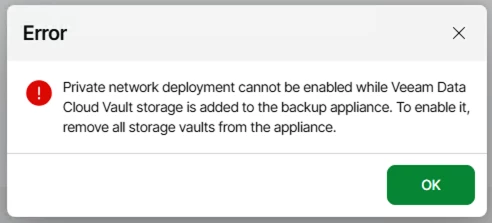
One important constraint in the current release: Private Network Deployment mode and Veeam Data Cloud Vault are mutually exclusive on a single appliance. You can't enable private network mode on an appliance that already has Veeam Vault storage configured, and you can't add Veeam Vault storage on an appliance that has private network mode enabled. The Add Vault Repository wizard enforces this. So if the plan was "turn on private network mode and point it at Veeam Vault," that plan doesn't work today.
2. Standard (public) network mode, with an isolated worker subnet and your own VPC endpoints.
This is what the customers above are actually doing, and it's what we're focused on here. The appliance stays in standard network mode (so Veeam Vault is allowed as a target), but the worker subnet has no internet gateway and no NAT gateway. Connectivity for the workers comes entirely from VPC endpoints that you create and manage: an S3 endpoint for the repository traffic, plus a handful of interface endpoints for worker orchestration.
The rest of this post is all about option 2.
How the Workers Reach AWS
Workers are ephemeral EC2 instances that Veeam Backup for AWS spins up in your configured worker subnet to move data. They're orchestrated through AWS Systems Manager (SSM), and they read changed blocks and write backup data to the repository. In a subnet with no internet path, every one of those conversations needs a VPC endpoint, or the worker just times out.
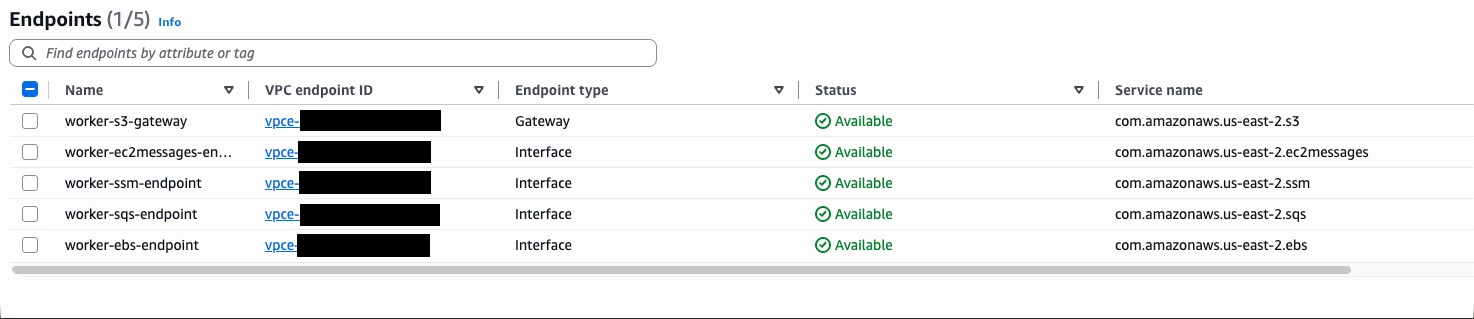
For the isolated-worker pattern, here are the endpoints you'll need:
| Endpoint | Type | Why it's needed |
| com.amazonaws.<region>.s3 | Gateway (same region) or Interface (cross region) | The backup repository connection, including Veeam Data Cloud Vault |
| com.amazonaws.<region>.ssm | Interface | Worker orchestration, all operations |
| com.amazonaws.<region>.ssmmessages | Interface | SSM session channel |
| com.amazonaws.<region>.ec2messages | Interface | EC2 operations (backup, restore, health check, retention) |
| com.amazonaws.<region>.sqs | Interface | All operations |
| com.amazonaws.<region>.ebs | Interface | EC2 image-level backup (changed-block reads) |
Interface endpoints need private DNS enabled and a security group that allows inbound 443 from the worker subnet. They carry an hourly charge plus a per-GB charge. The S3 gateway endpoint, on the other hand, is free and works through route-table entries rather than ENIs, which is exactly why it's the preferred option for the high-volume repository traffic.
Here's the crux of the whole design, and the one thing to get right: gateway endpoint vs. interface endpoint.
- An S3 gateway endpoint is free, attaches to a route table, and routes S3-bound traffic via a managed prefix list. It only works within the same region. It can't reach an Amazon S3 bucket (or a Veeam Vault) in another region.
- An S3 interface endpoint (PrivateLink) uses ENIs and private DNS, costs money, and can be region-matched to a target in a different region.
The S3 endpoint choice comes down to one question: are your workers and your Veeam Vault in the same region?
- Same region: use an S3 gateway endpoint. Free, simple, route-table based.
- Cross region: the gateway endpoint won't work. Use an S3 interface endpoint in the worker VPC, region-matched to the Veeam Vault region.
If your workers and your Veeam Vault are in the same AWS region (the common case, and the design I'd recommend), the whole thing is a gateway endpoint plus a handful of interface endpoints for orchestration.
Configuration – Same-Region to Veeam Vault
Step 1: Configure a Veeam Vault in the same region
Before building anything on the AWS side, provision a Veeam Data Cloud Vault repository in the same AWS region as your workers. This is the target the isolated workers will back up to, and keeping it co-located with the workers is exactly what lets you use the free S3 gateway endpoint in the steps that follow.
(For my test everything is running in us-east-2)

Step 2: Build the isolated worker subnet
Create a VPC and subnet for worker deployment with no internet gateway and no NAT gateway attached. This is the environment we're proving out: workers with zero public internet path.
Step 3: Add the S3 gateway endpoint and the orchestration interface endpoints
Add the S3 gateway endpoint (associated with the worker subnet's route table), plus the interface endpoints for worker orchestration: ssm, ssmmessages, ec2messages, sqs, and ebs. Enable private DNS on the interface endpoints and make sure their security group allows inbound 443 from the worker subnet.
Step 4: Watch out for the route-table propagation delay
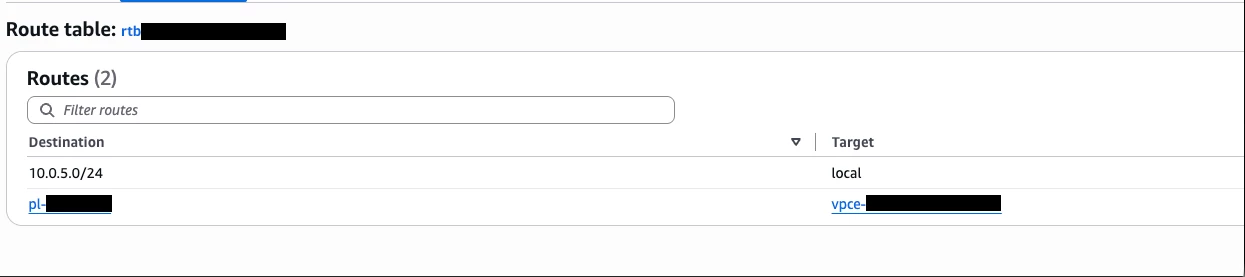
The first policy run after adding the endpoints can still fail with an S3 connection error. The cause is timing: the S3 gateway endpoint's prefix-list route takes a short while to populate on the subnet's route table, and until it's there, S3 traffic has nowhere to go.
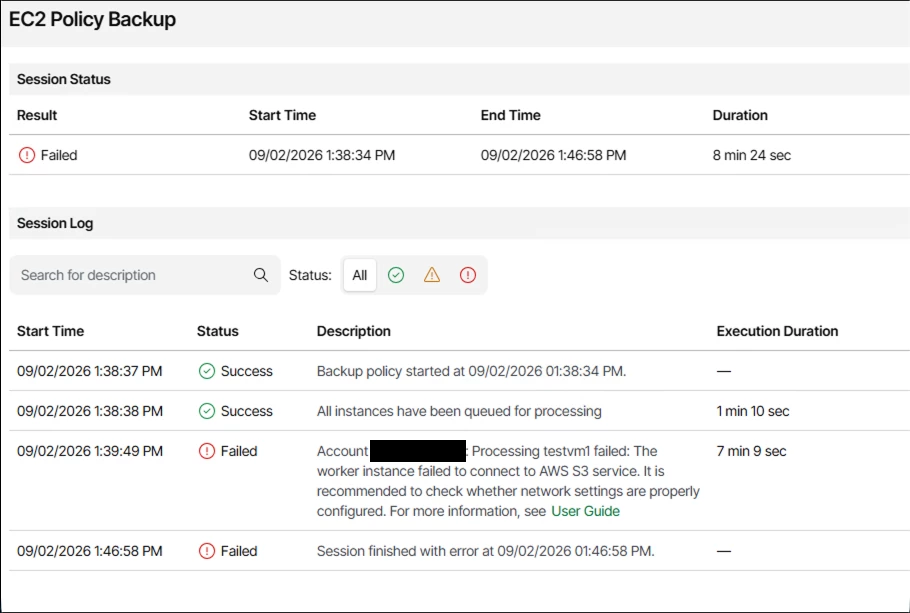
Give it a minute, confirm the managed-prefix-list route to the S3 gateway endpoint is present in the route table, and then retry.
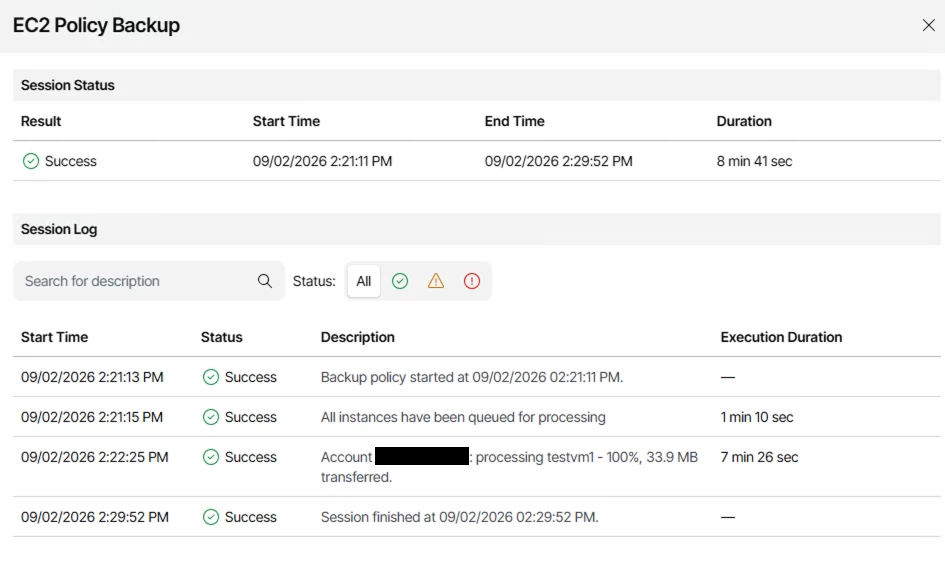
Step 5: Run the backup and confirm success
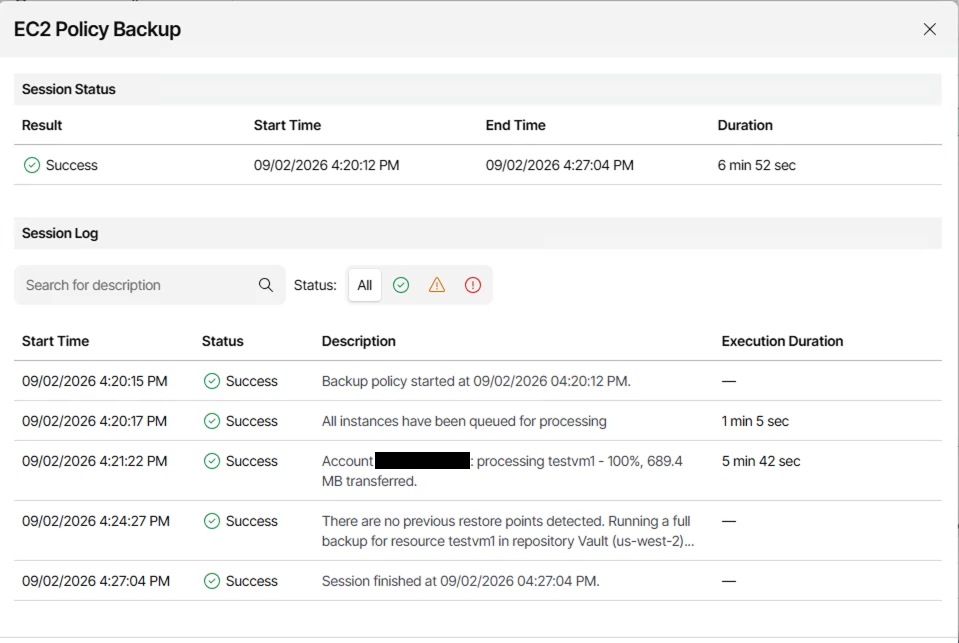
Once the prefix-list route is in place, the backup policy completes successfully. Workers in a fully isolated subnet, backing up to Veeam Vault with no public internet path 😎.
Going Cross-Region
Some customers can't keep workers and Veeam Vault in the same region. To show what changes, I kept the workers in one region and put a Veeam Vault repository in a second region. Good news: only one thing changes.
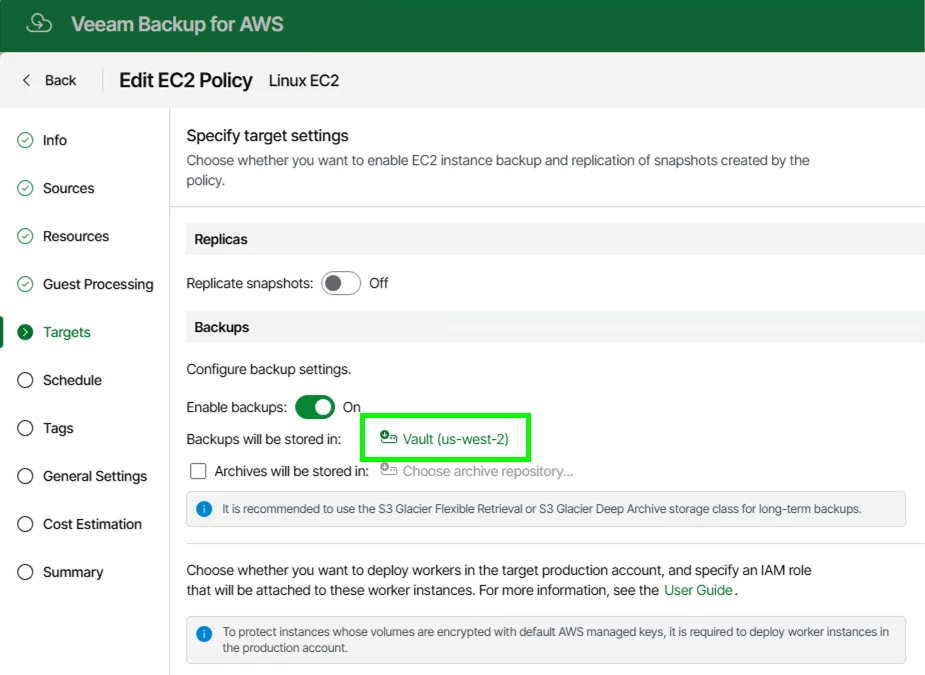
Step 1: Add the cross-region Veeam Vault repository and retarget the policy
Register a Veeam Vault repository in the second region and point the backup policy at it. The workers stay right where they are; only the repository region changes.

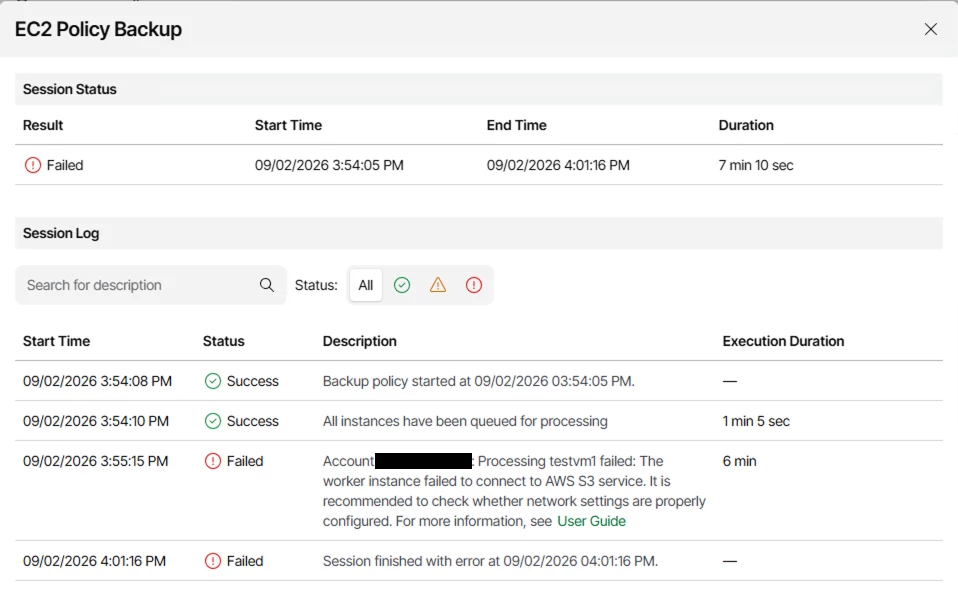
Step 2: Confirm the gateway endpoint doesn't cross regions
With only the same-region S3 gateway endpoint in place, the cross-region job fails. That's expected: gateway endpoints are region-local by design and can't route to Amazon S3 in another region.
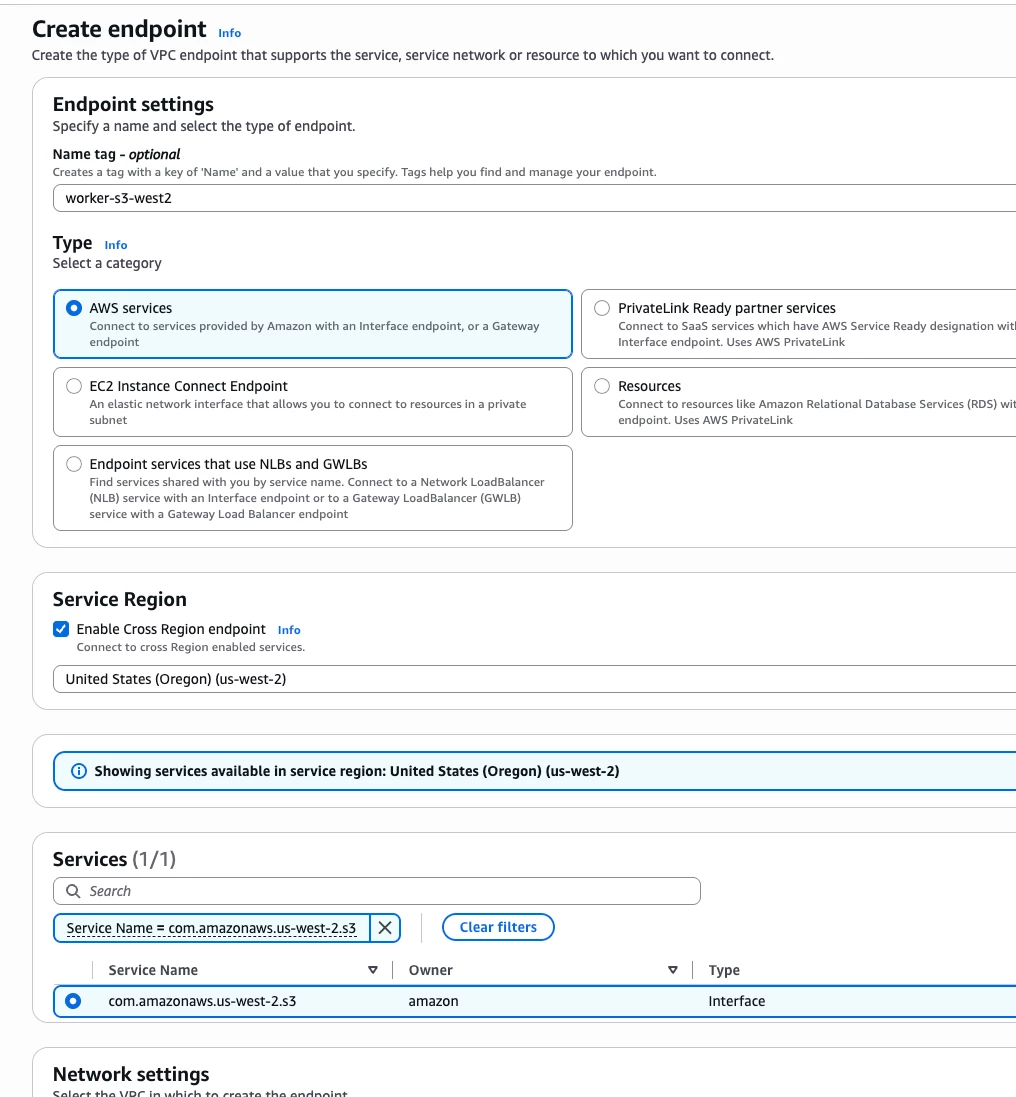
Step 3: Deploy an S3 interface endpoint for the cross-region connection
Swap the S3 path for an S3 interface endpoint (PrivateLink) in the worker VPC, region-matched to the Veeam Vault region. Leave the orchestration interface endpoints exactly as they were.

Step 4: Run the backup and confirm cross-region success
With the interface endpoint in place, the cross-region backup completes successfully, still with fully isolated worker networking. That's the whole difference between same-region and cross-region: one endpoint type.
Things to Watch
- Region-scope everything. S3 Interface Endpoints are region-scoped. For cross-region, the endpoint’s target region has to match the Veeam Vault region.
- Prefix-list propagation. Build the propagation delay into any runbook: add the gateway endpoint, confirm the route, then run the job.
- Verify the traffic actually stayed private. A successful backup alone doesn't prove the write stayed off the public internet, because the appliance itself usually has internet egress for licensing and updates. To confirm the data path traversed the endpoint and didn't fall back to a NAT or internet route, check VPC flow logs on the worker subnet.
- Don't confuse this with Private Network Deployment mode. This pattern leaves the appliance in standard network mode. Enabling Veeam's Private Network Deployment feature is a different design, and it isn't compatible with Veeam Vault on the same appliance in the current release.
Conclusion
By keeping the appliance in standard network mode and providing our own VPC endpoints, we can send fully isolated Veeam Backup for AWS worker traffic to Veeam Data Cloud Vault with no public internet path. Same-region connectivity is a free S3 gateway endpoint plus a few interface endpoints for orchestration; going cross-region just swaps the gateway endpoint for a region-matched S3 interface endpoint. Build in the prefix-list propagation delay, verify with VPC flow logs, and remember that Private Network Deployment mode and Veeam Vault are still mutually exclusive today.
This was validated in a lab and behaves exactly as the AWS endpoint model predicts. Before you build a production design on it, confirm the current supportability statement in the Veeam Backup for AWS user guide and with Veeam support, since documentation for the Veeam Vault-as-target scenario is still catching up to the product. If you give it a try, drop a comment and let me know how it goes 😁.