

Hi team,
Thank you for building and maintaining the Veeam Calculators.
I'm reaching out because a partner re-ran a NAS sizing with the exact same inputs as before and got noticeably different results after the recent update. They need to explain the difference internally before requesting additional resources, so I'd like to understand what changed in the logic.
Inputs (identical in both runs)
- Source: 40 TB, 4 shares, 1M files, 5% daily change rate
- Backup window: 8 hours, retention: 60 dailies (no GFS)
- Immutability: enabled, 60 days, block generation 10 days
- Storage: Block Storage, compress by 10%
- Growth rate: 0%, forecast: 0 years
- New in the latest run (Advanced, defaults): network speed 40 Gbps, array max IOPS 400,000, array count 1
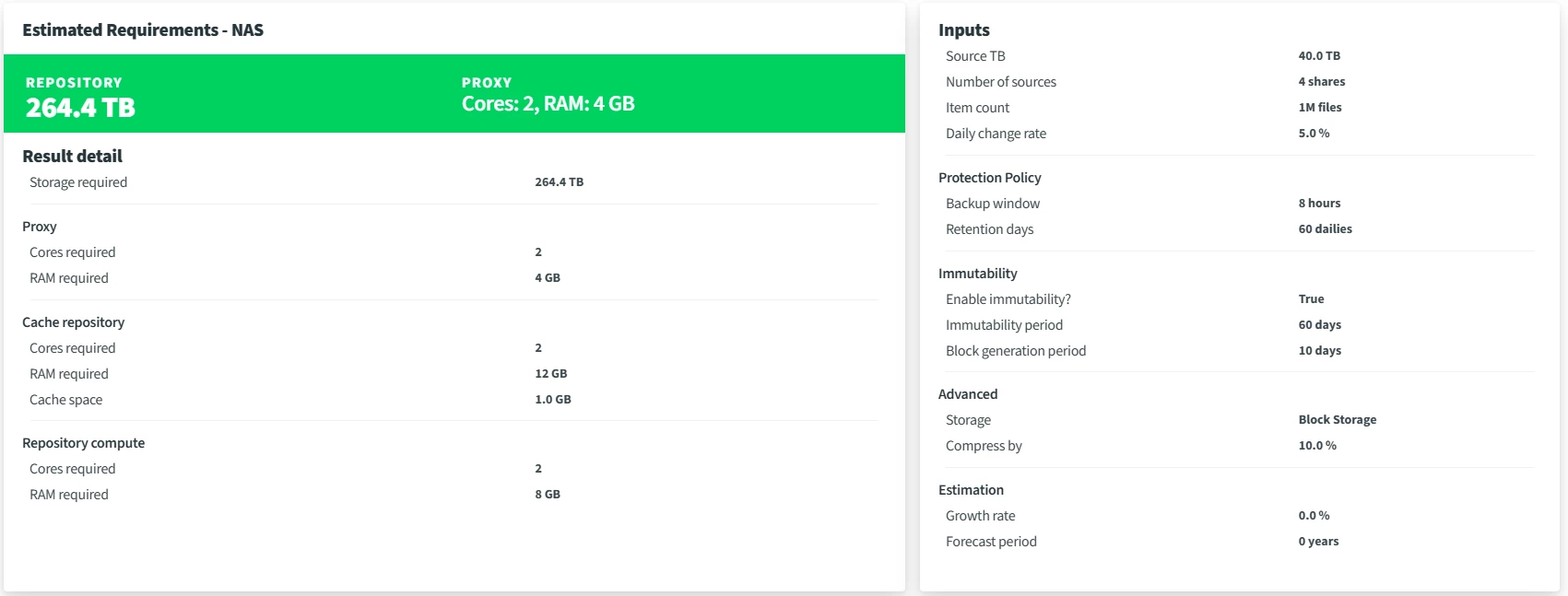
Previous result
- Repository: 264.4 TB
- Proxy: 2 cores / 4 GB
- Cache repository: 2 cores / 12 GB, cache space 1.0 GB
- Repository compute: 2 cores / 8 GB
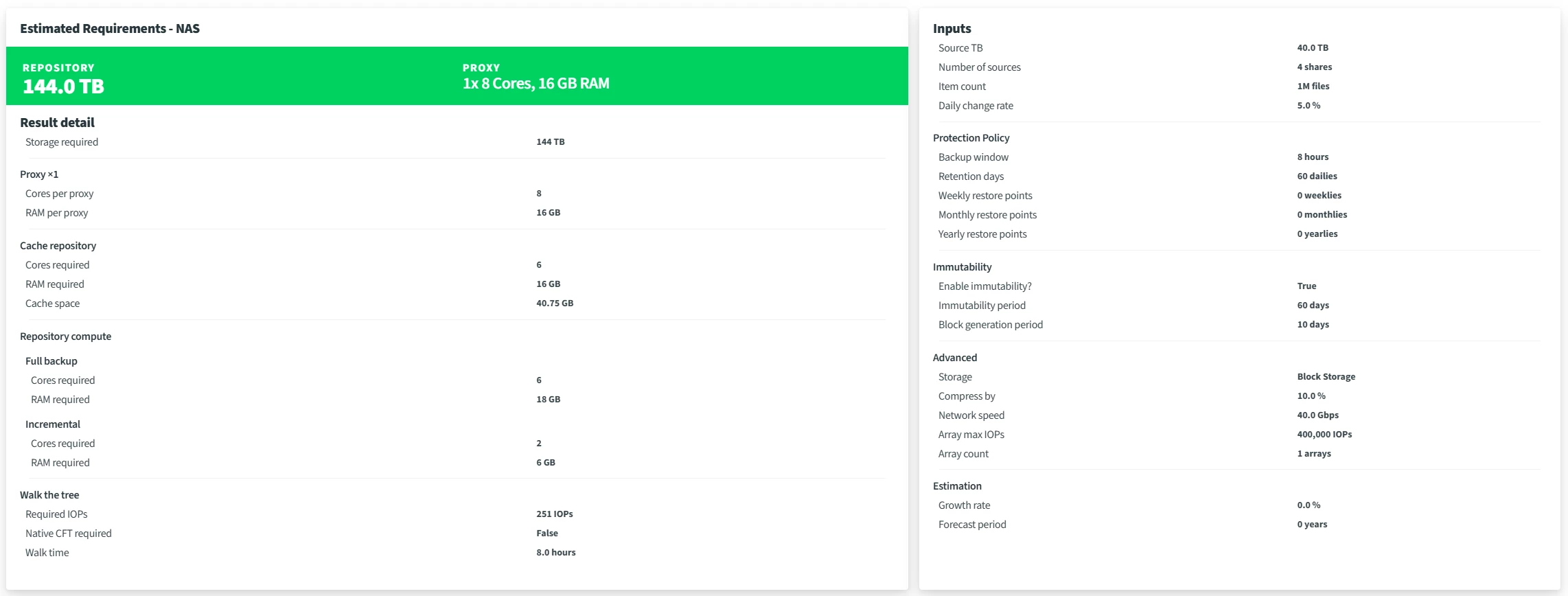
Current result
- Repository: 144 TB
- Proxy: 1x 8 cores / 16 GB
- Cache repository: 6 cores / 16 GB, cache space 40.75 GB
- Repository compute: Full 6 cores / 18 GB, Incremental 2 cores / 6 GB
- Walk the tree: 251 IOPS, native CFT not required, walk time 8.0 hours
Questions
1. What changed in the NAS sizing logic in this update that led to the higher proxy, cache repository, and repository compute requirements? Our reading is that the proxy is now sized to complete the initial full backup (40 TB) within the 8-hour window, whereas it was previously sized on incremental throughput. Is that correct?
2. Repository capacity dropped from 264.4 TB to 144 TB. 144 TB matches "one full + 60 incrementals" (36 TB + 60 x 1.8 TB). Was the previous figure an overestimate, and does the current figure account for the immutability / block generation settings?
3. How is the 40.75 GB cache space calculated? The Best Practice Guide says no disk sizing is needed for the cache repository unless backing up to object storage, and that cache files usually stay under 4 GB. Similarly, how is the 16 GB cache repository RAM derived?
4. If the incremental backups fit in the 8-hour window but the initial full can run longer, is the previous configuration still considered sufficient? Or do you recommend always sizing for the Full backup figures?
5. When all roles are co-located on one server, is it correct to add proxy + cache repository + repository compute (Full) for a total of 20 cores / 50 GB? Should OS overhead be added on top?
6. Walk time is shown as 8.0 hours, the same as the backup window. Does this indicate a walk-the-tree constraint we should be aware of?
Any clarification, or a pointer to documentation of the calculation logic, would be greatly appreciated.
Thank you again for your work on these tools.
Best regards,

