
Hi Calculator team ,
First of all, thank you for providing such a great set of calculators. We use them all the time for customer sizing and really appreciate the continuous improvements.
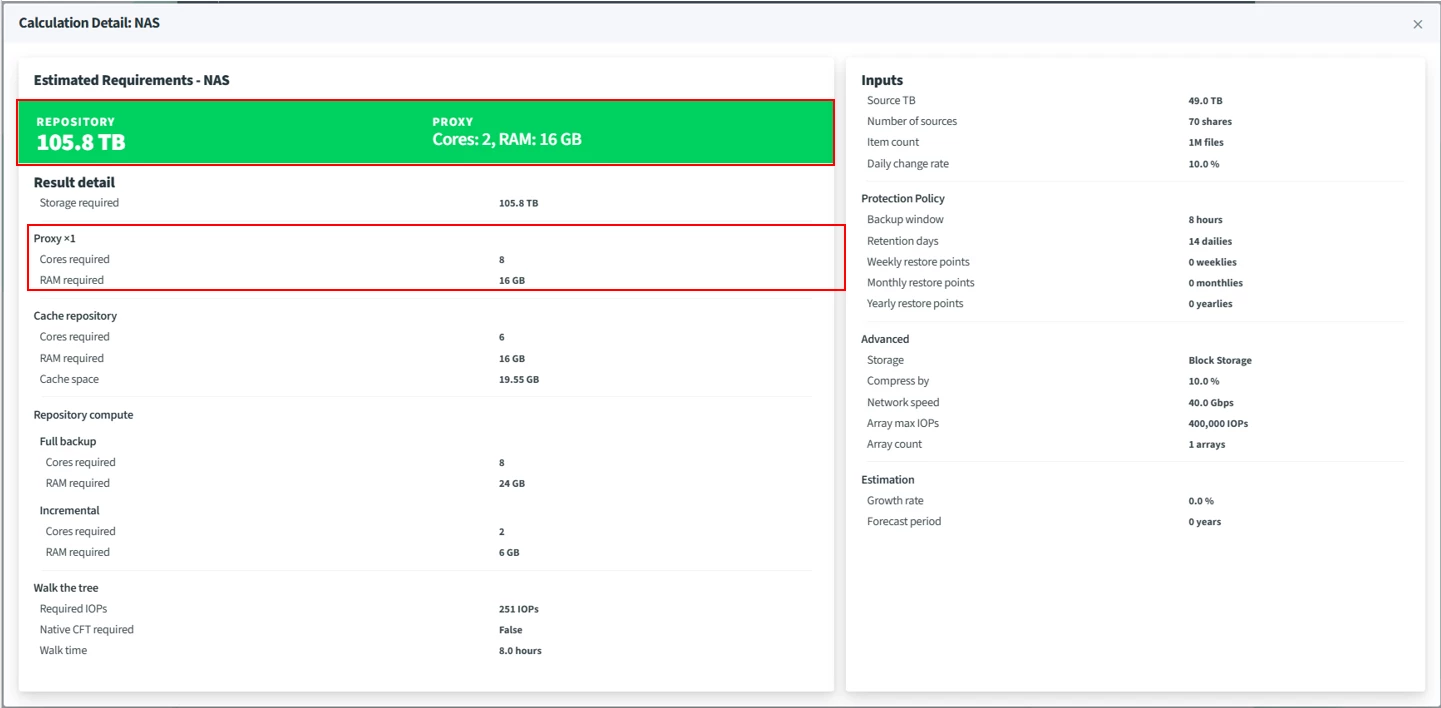
I'm sizing a NAS backup with the Veeam Calculator (v1.7.0.1, Advanced mode) and noticed that the proxy requirements shown on the result card differ from the values in the Result Detail dialog.
Result card (summary): Proxy – Cores 2, RAM 16 GB
Result Detail: Proxy x1 – Cores required 8, RAM required 16 GB
Screenshot attached.
Questions:
1.Is this difference a bug, or is it intended?
2.If it is intended, how should the two values be interpreted? For example, is one of them a per-proxy minimum or recommended spec, and the other the total compute required? Or are they based on different criteria, such as incremental vs. full, or throughput vs. walk-the-tree?
3.Which value should we use when presenting the proxy sizing to customers?
Optional:
4.For "Network speed", should we enter the link speed per proxy or the aggregate bandwidth between all proxies and the source arrays?
5.Is "Array max IOPS" used only for the walk-the-tree estimation, or does it also affect throughput and proxy sizing?
I noticed the v1.7.0 release notes mention "the details dialog no longer repeats the proxy figure," so I wanted to check whether this is related.
Thanks in advance.
Hirohito