

Introduction
I had been dealing with an intermittent VMware backup issue that was difficult to explain from a single failed session. A job could complete successfully on one run and fail on the next with the same message: DiskLib error 13, followed by a failure to create an NFC download stream.
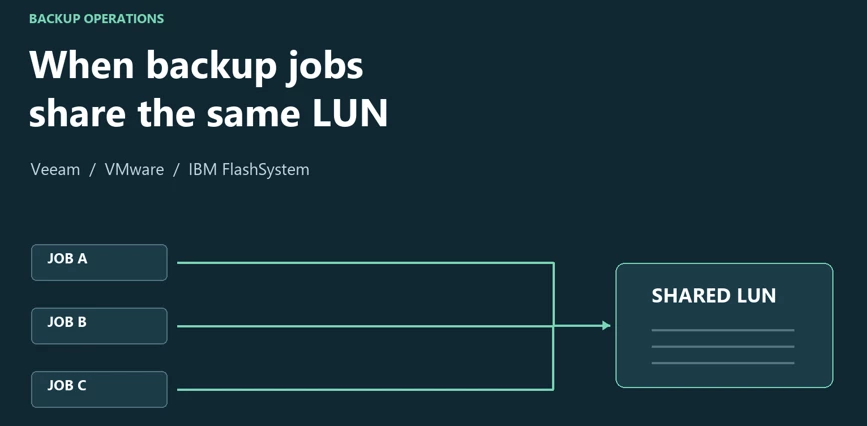
As I investigated, I noticed that the failures were part of a wider operational problem. Backup jobs overlapped, some sessions waited for resources, and DRS movements became noticeable around backup execution. Storage snapshots were also remaining after backup activity, while physical storage capacity was approaching its limit.
The environment had 27 VMware backup jobs with hourly schedules and more than 300 VMs. For version context, the environment was reported as running Veeam Backup & Replication 13.0.1.1071, VMware vCenter 8.0.3, and an IBM FlashSystem FS5200.
The investigation led me to reconsider how the jobs shared hosts, datastores, and storage volumes. Discussing protection requirements with the infrastructure administrator was as important as examining the error itself. The changes that followed combined parallel execution across three datastore groups with sequential jobs inside each group.
The Problem
The original error occurred while Veeam was preparing a VM for processing. This excerpt preserves the message, with infrastructure identifiers replaced by generic labels and long lines wrapped for readability:
Failed to prepare VM for processing: DiskLib error: [13].The file is locked or in use -- File open failed: File not open
Failed to create NFC download stream.
NFC path: [nfc://conn:[VCENTER],nfchost:[HOST-ID],stg:[DATASTORE-ID]@[VM]/[VM].vmx].
Agent failed to process method {Transfer.FileToText}.
The failure appeared across the VMware backup jobs, but not on every execution. Successful sessions and failed sessions existed side by side. That made a persistent configuration problem less obvious, although intermittency alone could not rule out problems affecting particular hosts or access paths.
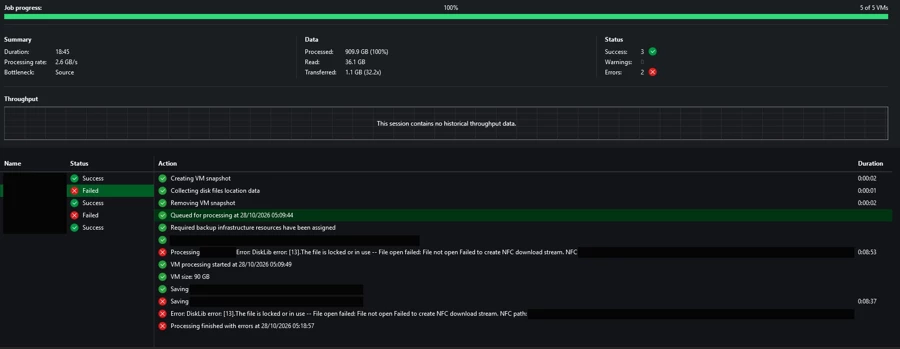
One session illustrates why I needed to look beyond the progress bar: it ended with three successful VM tasks and two failed tasks. Progress had reached 100%, but two VMs had not been backed up successfully in that session.
Investigation
Beyond the Failed Session
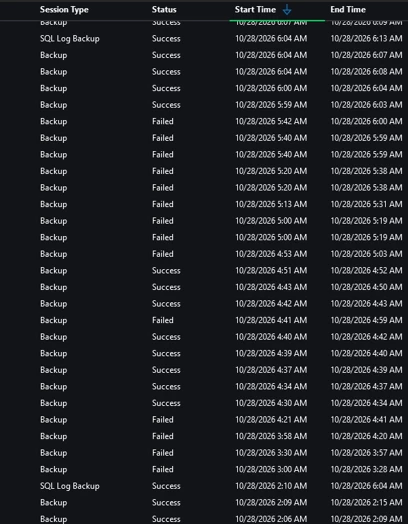
The jobs had independent schedules, and many were active at the same time. Task limits were already configured, but those limits did not turn the combined workload into a sequence of complete backup and cleanup cycles.
Some sessions processed data while others waited for resources or completed other operations. Waiting for a resource is an expected consequence of a task limit; it does not, by itself, prove that the infrastructure is overloaded. The important observation was the combination of overlapping execution, intermittent failures, retained storage snapshots, and limited physical headroom.
The question became how to organize those jobs so that their timing and scope reflected the infrastructure they shared.
Investigating DRS Activity
I also noticed DRS activity around backup execution. Here, DRS refers to VM placement and compute resource balancing across ESXi hosts, with vMotion used for host migrations. It is different from Storage DRS and Storage vMotion, which concern storage placement and migration.
Those movements were a useful clue, but I could not connect a particular migration to a particular lock. To establish that relationship, I would need the VM's host at the time of failure, migration timestamps, the host serving the NFC request, and evidence identifying the lock owner.
DRS therefore remained part of the investigation, rather than a confirmed cause. Normal vMotion activity alone was not evidence that something was wrong.
When Storage Capacity Became Critical
Storage snapshots were remaining after backup activity, and capacity became the more urgent concern. The earlier storage view showed 19.68 TiB physically used out of 19.94 TiB, with 267.90 GiB available: approximately 98.7% physical utilization.

At that point, I needed to consider the backup workflow, storage snapshot lifecycle, and physical capacity together. A successful job on its own would not resolve the wider operational risk.
Technical Analysis
What the NFC Error Established
NFC means Network File Copy in this VMware context. The original message targeted a .vmx configuration file. In Figure 1, saving the .vmx completed, while access to the .nvram file failed. These were examples of failures while retrieving VM configuration or state files.
The accompanying message reported a locked or in-use file. Veeam KB1198 documents this error family and distinguishes DNS, connectivity, permissions, and file locks as investigation paths. The complete message matters more than interpreting the number 13 in isolation.
This did not establish virtual disk corruption or identify the lock owner. It also did not identify the transport used to read the VMDKs: an NFC error involving a configuration file is not proof that the disk data was being read through NBD or that a transport fallback occurred.
Two Snapshot Lifecycles
Backup from Storage Snapshots involves both VMware snapshots and snapshots at the storage layer. In simplified form, the workflow for a group or batch is:
1. Create VMware snapshots for the VMs being processed.
2. Capture a storage snapshot of the relevant volume or LUN.
3. Remove the VMware snapshots.
4. Read VM data from the storage snapshot.
5. Remove the temporary storage snapshot after processing.
The VMware snapshot can therefore be gone while the storage snapshot is still needed. The successful VMware snapshot removal in Figure 1 did not prove that storage cleanup had completed.
Reassessing the Snapshot Dependency Model
During the investigation, I used a parent and child analogy to describe the retained snapshots. The useful part of that explanation was the possibility of dependencies. The part that needed correction was treating individual VMs as the parents or children.
If FlashCopy was in use, the relevant objects were source and target volumes and their mappings. Dependencies can require data to be preserved or copied before a relationship can be stopped or removed safely. Multiple snapshots of one volume do not, by themselves, prove a cleanup defect or establish the exact dependency chain.
There is also an important distinction in the IBM integration. Veeam KB4650 explains that supported configurations can use storage volume snapshot functionality instead of FlashCopy, including automatic selection on systems that support it. Firmware, capabilities, and the plug-in implementation matter. An FS5200 model name alone does not identify the mechanism used by a job.
My hypothesis was that overlapping activity against shared volumes contributed to longer-lived snapshots and more difficult cleanup. Confirming a specific dependency mechanism would require the IBM firmware and plug-in versions, storage object relationships, and cleanup logs.
Three Different Concurrency Controls
I found it helpful to separate three controls that can otherwise sound interchangeable:
- Proxy and repository task limits regulate work at those components.
- Job scheduling determines when different workflows become active.
- The number of VMs per storage snapshot controls how VMs are divided into snapshot batches.
The last control deserves particular care. Veeam's current documentation describes batches being processed in parallel. A smaller batch can reduce how long VMware snapshots remain open, while introducing additional storage snapshots. It is not a guarantee of one active snapshot per LUN. I do not have the historical setting for that option in this case.
The design objective was to coordinate work against shared storage, while retaining an appropriate level of concurrency for the environment.
The Solution
Rebuilding the Schedule Around Protection Requirements
Before changing the organization of the jobs, I discussed the servers' protection requirements with the infrastructure administrator. We needed to understand which workloads required frequent protection and how the backup schedule could meet those needs.
I organized the jobs into three chains, one for each datastore and its underlying LUN. The three chains ran in parallel. Inside each chain, a job started after its predecessor finished.
This preserved parallel execution across the three groups while reducing overlapping jobs against the same LUN. It did not serialize the entire backup environment, and it was a scheduling arrangement rather than a storage-level lock. Hourly backups were not inherently the problem; the issue was whether the combined workload could complete reliably against the available resources.
Job chaining has trade-offs. A longer run or retries can delay the jobs that follow, affect the calendar for full backups, and leave other resources underused. Veeam documents these limitations and describes task limits as another way to balance infrastructure load. Chaining was the approach I used here; it is not a universal recommendation to serialize every backup job.
Aligning Jobs with Datastore and LUN Boundaries
Working with the administrator, I also reorganized groups of VMs across three datastores backed by different LUNs. I followed those same groups when organizing the backup jobs.
Previously, jobs with independent schedules could operate on VMs sharing an underlying LUN. In the revised arrangement, job grouping followed the datastore and LUN layout. Each group ran its own sequential chain, alongside the chains for the other two datastores. The final design used groups of VMs per datastore, rather than one datastore for every VM.
Veeam's storage integration guidance recommends datastore-based job organization and also discusses parallel jobs to sustain throughput. The practical objective is to coordinate snapshot operations against shared volumes while using the available infrastructure effectively.
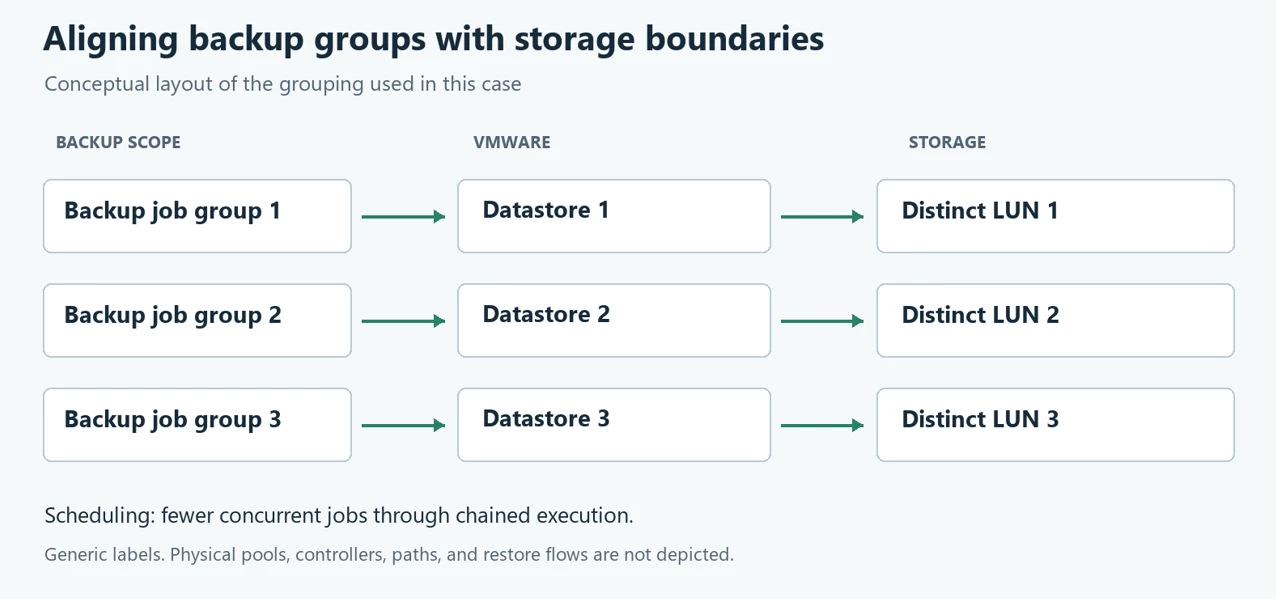
Two boundaries still matter when applying this approach. First, check the placement of all relevant VM files and VMDKs: disks on other LUNs can preserve overlap between groups. Second, separate LUNs may still share a pool, controllers, cache, disks, or paths. Organizing snapshot activity does not create independent physical resources.
Addressing the Existing Accumulation
The objects that had already accumulated required separate attention. The infrastructure administrator performed a manual cleanup through the storage CLI, identifying objects by the naming convention used by the Veeam integration. I do not have the command history or an inventory showing exactly which object types were removed.
That cleanup was a separate action from the scheduling and layout changes. I cannot describe it as a verified snapshot or FlashCopy removal procedure. A naming prefix alone does not establish that an object is unused or safe to delete; reproducing a cleanup requires checking the actual objects, dependencies, and supported procedure.
The Results
For approximately three weeks after the correction, I observed no recurrence of either the NFC error or the retained-snapshot accumulation. The three datastore job chains continued to run in parallel, with jobs sequenced inside each chain.
This observation followed the combined changes and the administrator's manual cleanup. It establishes an operational observation window, rather than isolating the separate effect of each action.
The retained capacity views provide a numerical comparison:
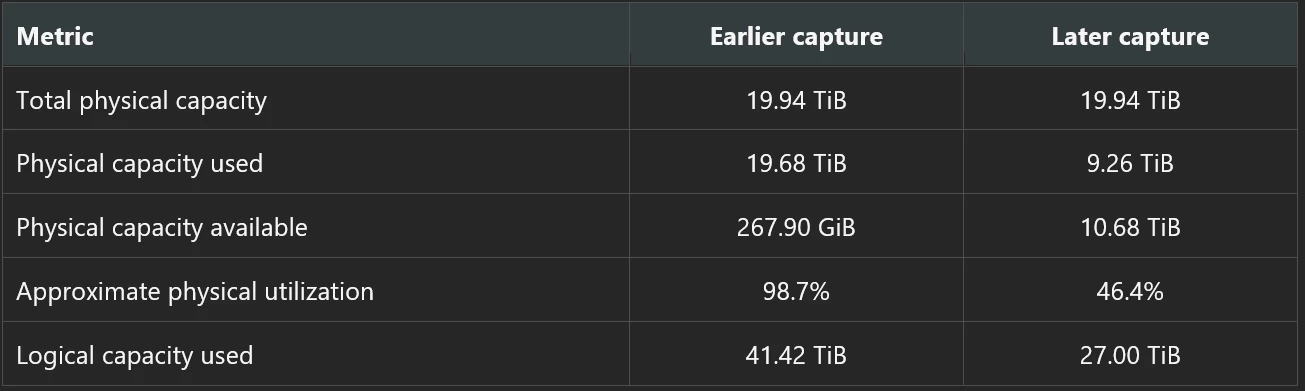
The capacity values are transcribed from the interface. Totals and used capacity are displayed in TiB with limited decimal precision, while the earlier available value is displayed in GiB. Subtracting those rounded TiB values will not necessarily reproduce the separately displayed available figure.

Displayed physical usage fell by approximately 10.42 TiB, or 52.9% relative to the earlier used capacity. That is a capacity comparison, not a measured performance improvement or an attribution of all released space to snapshots.
The two views do not isolate the capacity effect of the manual cleanup from other changes. They show the overall difference in displayed physical usage. The exact storage objects removed and the cleanup sequence cannot be reconstructed from these captures.
The remaining limits are important: I do not have a counted series of sessions to calculate a before-and-after failure rate, the lock owner, the exact storage dependency mechanism, or the IBM firmware and plug-in version numbers. The records also do not include a restore test or measured RPO/RTO. The supported conclusion is that neither symptom recurred during approximately three weeks of observation after the combined actions, and the displayed physical capacity position improved substantially.
Lessons Learned
- Start with the failed operation. A configuration-file access error requires a different investigation from a virtual disk read or repository write failure.
- Review schedules as a combined workload, including retries, preparation, and cleanup.
- Distinguish expected resource queues from evidence of excessive or sustained demand.
- Track VMware and storage snapshots separately, including creation, age, processing, and removal.
- Align job groups with the actual placement of VM files and disks, then coordinate concurrency against the resources those groups share.
- Check the consequences of job chains for later workloads, full-backup schedules, and recovery point requirements.
- Record the observation window and snapshot cleanup outcome. Those records make a stabilization result much easier to explain and defend.
Conclusion
The most useful change in my approach was evaluating the backup jobs as a combined infrastructure workload. The intermittent NFC error prompted the investigation, but the wider problem involved scheduling, VMware operations, storage snapshots, and physical capacity.
Working with the infrastructure administrator helped me organize the jobs around protection requirements and the storage layout. Three parallel chains preserved concurrency across the datastore groups, while sequential jobs within each chain reduced overlap against the same LUN. The administrator also addressed the existing accumulation through a separate manual cleanup.
Over approximately three weeks, neither symptom recurred. The later capacity view also showed substantially more physical headroom.
The exact lock and storage dependency mechanisms remain unresolved in this account. The operational lesson is still clear: the scope and timing of storage-integrated backups need to reflect the resources they share, and validation should include cleanup and capacity as well as job status.
If you have investigated similar NFC errors, which evidence helped you correlate the failed file access with host migration or storage cleanup activity?