
During a recent implementation, I ran into one of those problems that looks simple after you find the cause, but takes much longer to understand while you are still in the middle of it.
The request was to configure Application-Aware Processing for a Linux VM running Oracle and protect its archived redo logs every five minutes.
The VM backup was working.
Oracle was detected by Veeam.
The redo log job was showing success.
The problem was that it was transferring exactly 0 B.
In this article, I will share the full troubleshooting process, including a few parallel issues we found along the way. They were not all responsible for the 0 B behavior, but they still had to be corrected before the environment could be considered healthy.
The environment
The environment included:
- VBR 12.3;
- VMware vSphere;
- Red Hat Enterprise Linux 8;
- Oracle Database;
- Application-Aware Processing;
- archived redo log backups every five minutes;
- key-based Linux authentication;
- an Oracle account with SYSDBA privileges;
- a VM with multiple network interfaces;
- an existing RMAN routine;
- an immutable repository.
Another important detail was that the Oracle server was managed by a third-party company.
This made the investigation more sensitive.
Even simple validations had to be discussed with the responsible team, and any change to the operating system or Oracle configuration had to be handled carefully.
The teams were also working in different time zones, which reduced the time available for live troubleshooting.
Once the root cause was identified, the correction looked straightforward. However, the entire context made the investigation slower, more controlled and more detailed.
Prerequisites requested before the implementation
Before starting the configuration, we aligned the main Oracle processing requirements with the team responsible for the server.
These included:
- the database running in ARCHIVELOG mode;
- an operating system account with elevated privileges;
- connectivity between VBR and the Linux guest;
- an Oracle account with SYSDBA privileges;
- access to the directories and files required by the backup process;
- archived redo logs remaining available for collection;
- validation of any existing RMAN routines in the environment.
In theory, these requirements were already in place when we started the implementation.
However, the tests revealed several points that still required adjustments.
The Oracle account could not create the required session, the hostname was not resolving, Veeam selected an unsuitable network interface, Linux privilege elevation had not been fully configured in Veeam, and the same operating system account could not read the archived redo log files under /ora_arch.
This was one of the most time-consuming parts of the case.
Because the server was managed by another team, we could not simply change users, groups, permissions or Oracle routines to test a hypothesis. Each finding had to be demonstrated, shared and then handled by the responsible team.
Some of these issues could likely have been identified earlier with a deeper prerequisite validation. However, as often happens in real environments, receiving confirmation that an account “has elevated privileges” or that a database “is running in ARCHIVELOG mode” does not always mean that the complete workflow required by the application has already been tested.
Configuring Application-Aware Processing
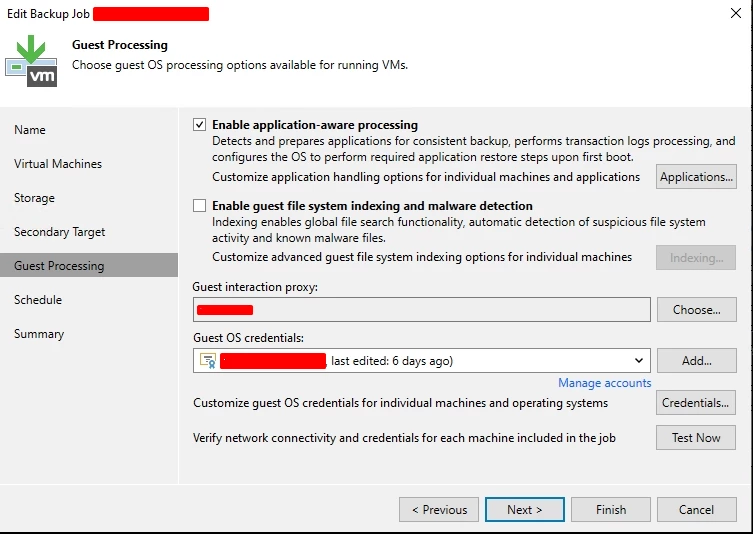
The first step was to enable Application-Aware Processing in the VM backup job.
The guest operating system credential used key-based authentication with a dedicated Linux account.
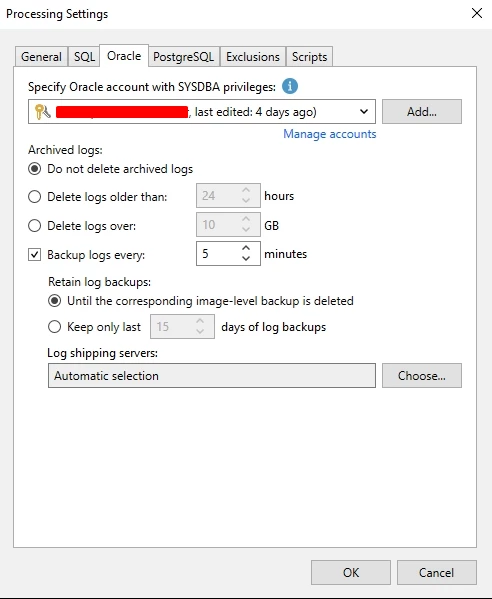
In the Oracle processing settings, we configured:
- an Oracle account with SYSDBA privileges;
- the option not to delete archived logs;
- log backups every five minutes;
- retention linked to the image-level backup;
- automatic log shipping server selection.
The first issue was related to the Oracle account
During the first execution, the VM backup was created, but Oracle processing finished with a warning:
ORA-01017: invalid username/password; logon denied
Failed to create oracle session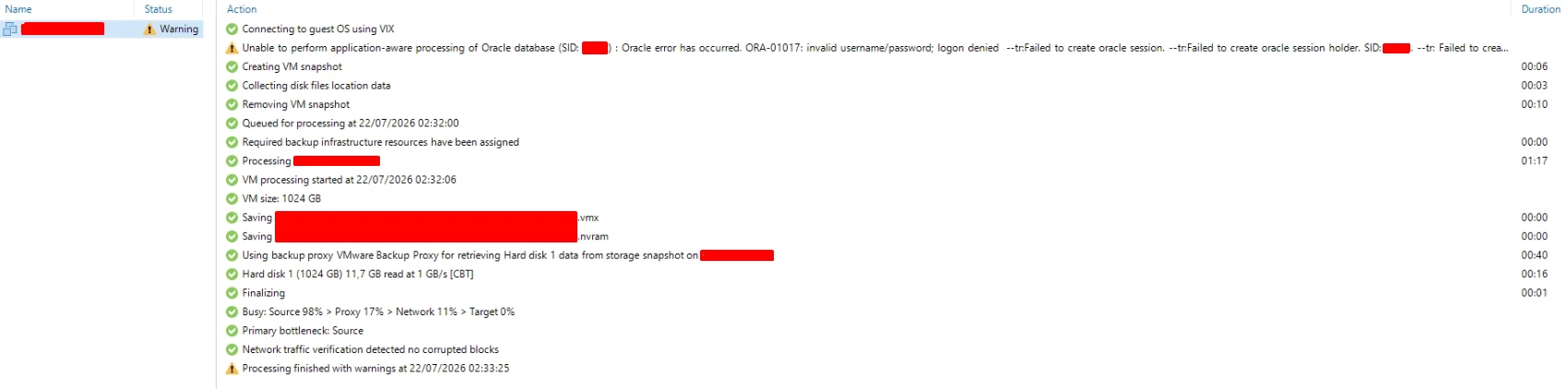
The guest operating system credential was working.
The issue was with the account Veeam used to open the Oracle session.
That account was not yet correctly prepared for the required processing privileges.
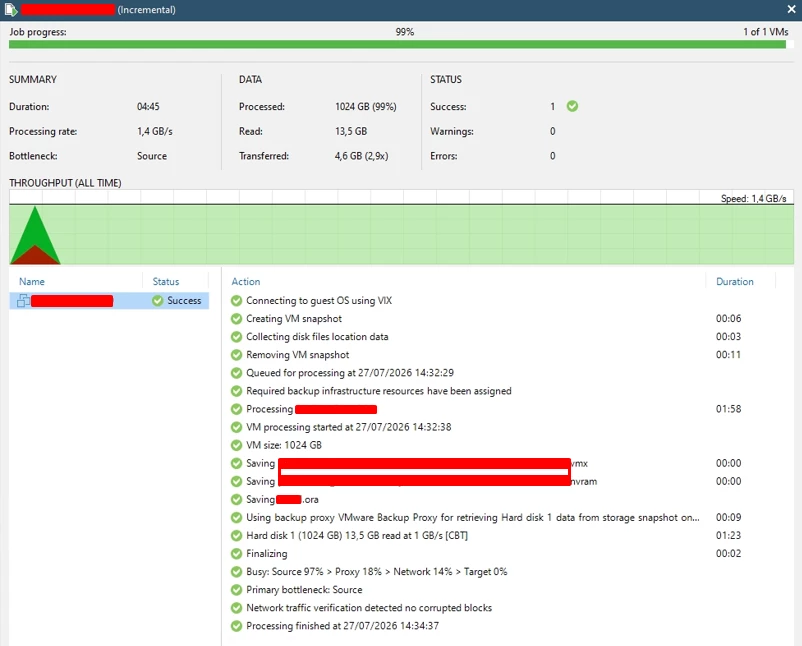
After the Oracle account was corrected, the image-level backup started completing successfully.
Veeam also started saving the Oracle metadata file:
Saving PEEM.oraThe restore point could also be opened in Veeam Explorer for Oracle, and the database was displayed correctly.
At that point, the configuration looked complete.
Then the next problem appeared.
The job was green, but it transferred 0 B
The Oracle Redo Log Backup child job started normally, but it did not transfer any data.
The first message we saw was:
Collected redo log does not match any existing database backup: PEEMEvery session showed:
Read: 0 B
Transferred: 0 B
We created a new image-level backup to establish a fresh reference point for the logs.
After that, the mismatch message disappeared.
However, the main behavior remained:
Saving 0 B of redo logs to backup repository
Backed up 0 B of redo logs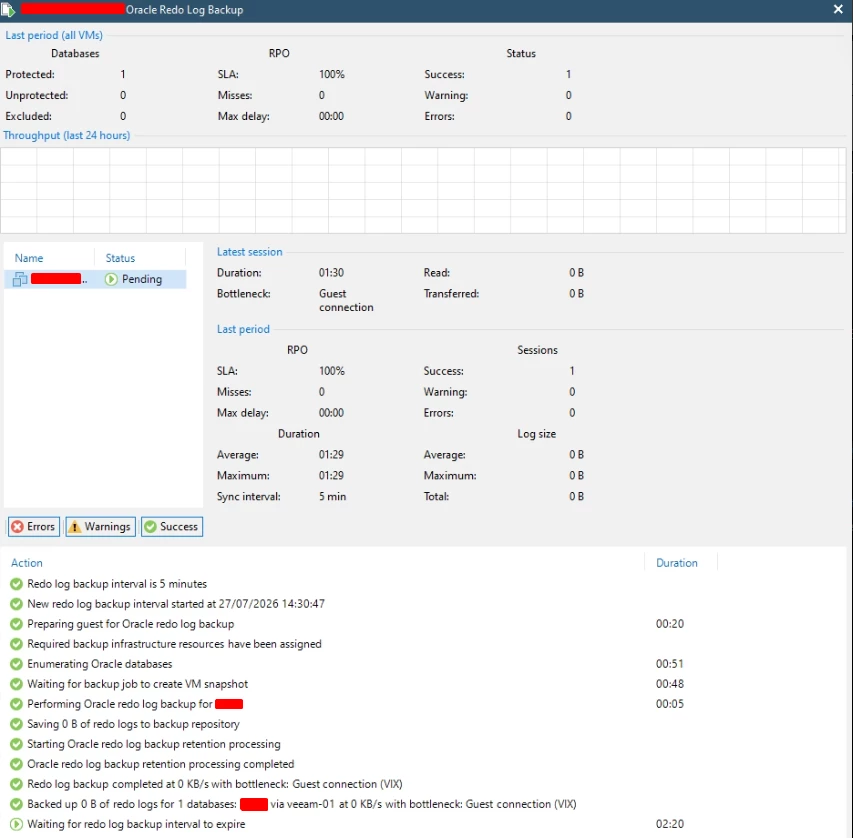
This was one of the strangest parts of the case.
The job did not report an error.
It was shown as successful.
But no archived redo logs were being protected.
Looking only at the final job status was not enough.
Could the existing RMAN routine be interfering?
The environment already had an RMAN routine managed by the team responsible for Oracle.
Because RMAN can also copy, catalog, move or delete archived logs, this was one of the first possibilities we considered.
Maybe Veeam was discovering the logs, but RMAN was processing them before the copy.
To isolate the scenario, the RMAN routine was temporarily stopped and a new image-level backup was created.
The redo log sessions still transferred 0 B.
RMAN interference was a valid hypothesis and had to be investigated, but it was not the main cause.
Were archived redo logs actually being generated?
The DBA confirmed that the database was running in ARCHIVELOG mode and provided the configured destination:
Archive destination /ora_archWe then checked the Linux server directly.
New files were being created continuously under /ora_arch, including files generated after the new image-level backup:
1_293638_1158103504.dbf  13:55
1_293639_1158103504.dbf  13:57
1_293640_1158103504.dbf  14:02
1_293641_1158103504.dbf  14:07
1_293642_1158103504.dbf  14:11
1_293645_1158103504.dbf  14:15
1_293647_1158103504.dbf  14:21
1_293649_1158103504.dbf  14:25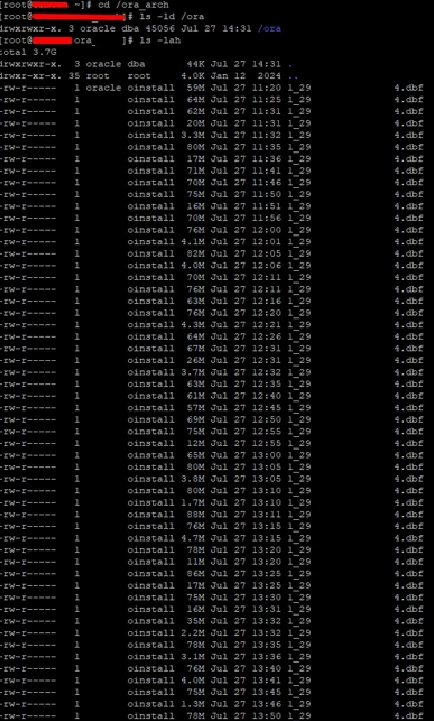
This test proved that:
- Oracle was generating archived redo logs;
- the files were stored in the path provided by the DBA;
- the files remained physically available;
- new logs were created after the image-level backup.
The problem was not a lack of log switches, and during this test the files were not being removed by RMAN.
Multiple IP addresses and a DNS issue
The VM had four IP addresses.
During the credential test, we noticed that Veeam first tried to resolve the VM hostname.
The name did not exist in DNS:
No such host is knownBecause the hostname could not be resolved, Veeam automatically selected one of the IP addresses reported by VMware Tools.
The problem was that it selected an interface that reset the SSH connection:
Connected to 10.200.53.4
An existing connection was forcibly closed by the remote host
We tested each address separately.
SSH worked on:
10.200.52.2
192.168.3.199
SSH was reset on:
10.200.53.4
10.200.51.4
The hostname was then mapped to the management interface confirmed by the team responsible for the environment.
After the change, the Veeam credential test completed through SSH:
Connecting to the guest OS via SSH
Credentials and connectivity have been validated successfully for Network transport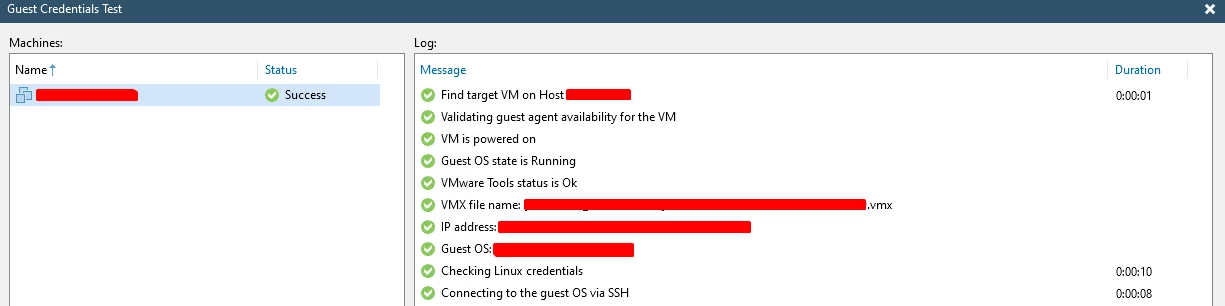
This was a real issue in the environment.
Veeam was selecting an unsuitable interface and falling back to VIX.
However, after correcting name resolution and validating SSH, the redo log job still transferred 0 B.
We had fixed one problem, but not the main one.
SSH worked, but privilege elevation failed
Once Veeam started using SSH, the backup reported a new warning:
Failed to register guest process autostart
Permission denied
Failed to create or open file [/etc/init.d/veeamagent]
The Linux account was allowed to use sudo, but it required a password:
sudo: a password is requiredVeeam could authenticate through SSH, but the credential was not yet configured correctly for automatic privilege elevation.
The account configuration was corrected in Veeam and a new backup was executed.
This time, guest processing finished successfully:
Connecting to guest OS using SSH
Saving PEEM.ora
Processing finished successfully
Another inconsistency had been fixed.
The Oracle Redo Log Backup still transferred 0 B.
The detail that changed the investigation
The job-specific log shipping log showed something important.
Veeam successfully authenticated to the guest with the Linux account:
Validating host credentials for guest user [bkp-user]. Ok.However, when it tried to inspect the archived redo log files, the log showed:
Getting item info [/ora_arch/1_293722_1158103504.dbf]. Failed.The same message was repeated for every sequence.
This changed the direction of the investigation.
Veeam already knew:
- which database it was processing;
- which sequences existed;
- where the files were located;
- which files should be evaluated.
The failure happened when it tried to access the files.
The account could list the file, but it could not read it
We checked the Linux permissions:
drwxrwxr-x oracle dba /ora_arch
-rw-rw---- oracle oinstall 1_293722_1158103504.dbf
The account used for Guest Processing belonged only to:
bkp-user
wheel
It was not a member of oinstall.
We then ran a simple test using the same account configured in Veeam:
head -c 1024 /ora_arch/1_293722_1158103504.dbf > /dev/nullThe result was:
Permission deniedThe exit code was:
1
This was the turning point.
The account could enter the directory and run ls.
It could see the file name.
But it could not open and read the file content.
That was exactly what the Veeam log showed: authentication succeeded, but file access failed.
The root cause
The archived redo logs were created with the following owner and group:
oracle:oinstallThe file permissions did not allow read access to users outside the owner and group.
Because the Guest Processing account did not have read access, Veeam could authenticate, query Oracle and discover the sequences.
However, it could not open the files under /ora_arch.
The result was a session that looked successful but transferred 0 B.
This was an interesting part of the case because the issue did not appear as a clear authentication failure.
Authentication worked.
Access to the file content did not.
The fix
The team responsible for the server corrected the Veeam account’s access to the archived redo logs.
Because the server was managed by another company, we did not change group membership or file permissions ourselves.
We first gathered the evidence and shared the behavior with the responsible team.
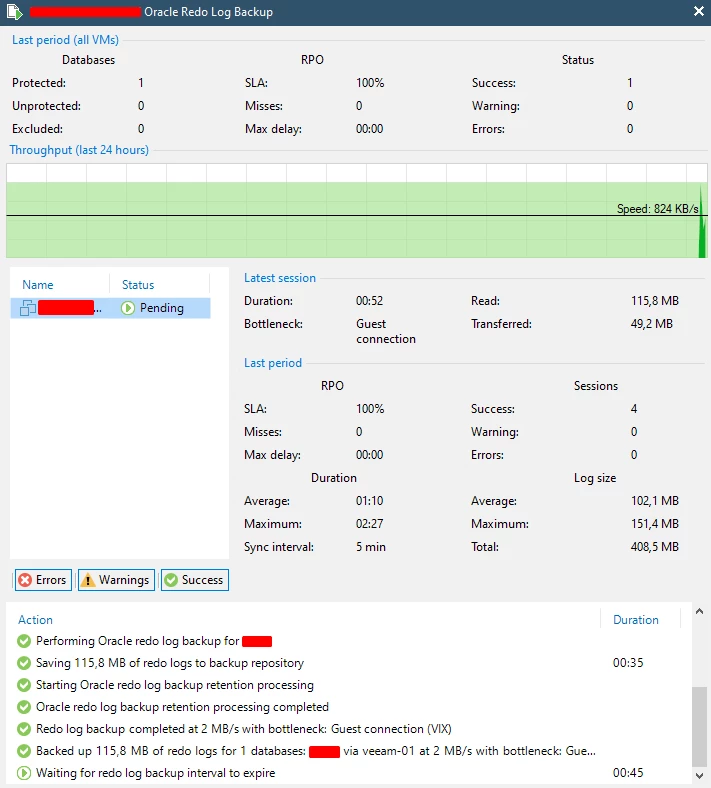
After read access was corrected, the redo log sessions started transferring data normally:
Saving 235.1 MB of redo logs to backup repository
Backed up 235.1 MB of redo logs for 1 database
After six sessions, Veeam reported:
Total log size: 1.5 GB
Warnings: 0
Errors: 0
The job was still green, but this time the data was actually being protected.
Conclusion
Veeam detected the Oracle database, created the image-level backup and started the archived redo log sessions.
The job showed success.
However, the account used for Guest Processing could not read the files under /ora_arch.
Veeam could identify the sequences, but it could not access the files to copy them to the repository.
After read access was corrected, the logs started transferring normally every five minutes.
This case was a good reminder that sometimes a job is green and looks healthy.
But we still need to confirm that the data is actually being protected.