



So I managed to get great feedback on my first Blog post here in the Veeam Community, and now that I have access to Claude Code i think it is time to update with my current version of the script. I now call it Get-RepositoryV2.ps1
This blog post is an update to the first blog post I did 8 months ago (Part 1 / Version 1):
https://community.veeam.com/blogs-and-podcasts-57/veeam-update-repository-mirror-on-iis-windows-server-12327 where the guide on how to set up the IIS and using the download script has not changed.
So what changes in the new version 2? Well, I focus a bit on performance and the option to run in batch mode with a nice interface, and still have the option to output into a log file.
I had the help of Claude to re-write most of the code, because getting performance means downloading multiple files at the same time.
But I also found it nice to have a kind of process bar to see all the download status in parallel, that is why I made a “Live Panel” when downloading.
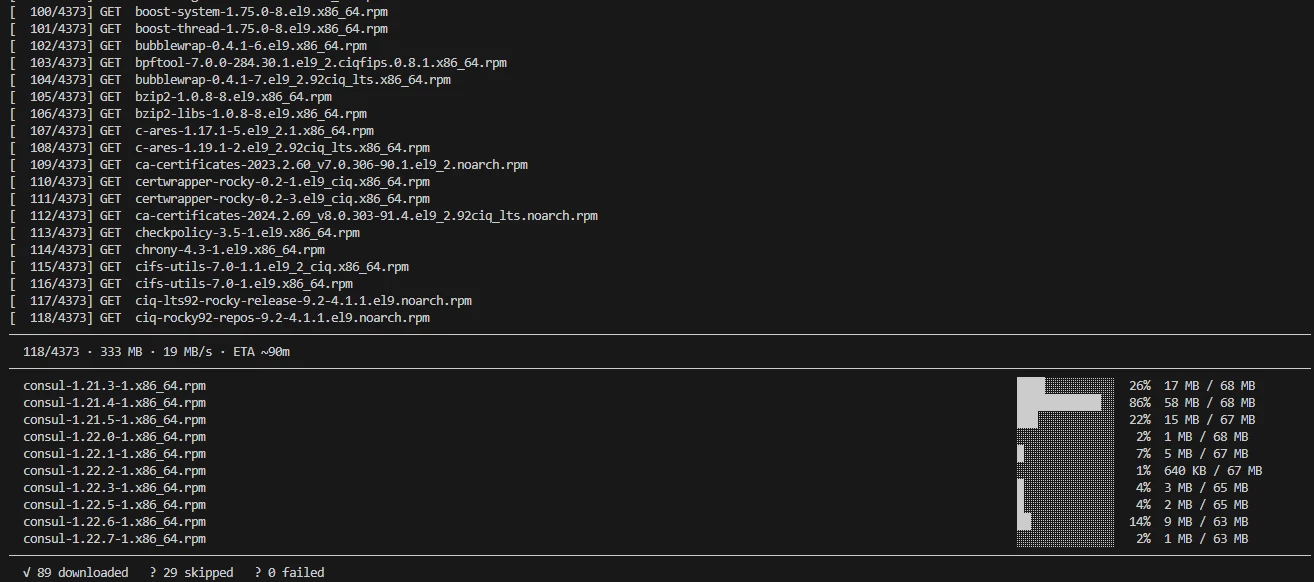
Here are the steps:
1. Enumerate - walk the whole directory tree serially (cheap: one request per folder) and build a flat work list of every file to fetch.
2. Prepare - create every target folder up front, so concurrent workers never race on New-Item.
3. Download - fetch that list concurrently, up to -ParallelTasks files at a time, showing every in-flight transfer at once in a live panel.
#Download the full VSA mirror
.\Get-Repositoryv2.ps1 -BaseUrl 'http://repository.veeam.com/vsa/' -OutRoot 'C:\Downloads\veeam-vsa' -ZipPath 'C:\Downloads\veeam-vsa.zip' -MaxRetries 3 -ParallelTasks 4

#Download only part of the VSA mirror.
.\Get-Repositoryv2.ps1 -BaseUrl 'https://repository.veeam.com/vsa/9.2/' -OutRoot 'C:\Downloads\veeam-vsa\9.2' -ParallelTasks 4
Here are the full Get-RepositoryV2.ps1 script:
<#
.SYNOPSIS
  Fetch the entire content (recursively) from https://repository.veeam.com/vsa/
  in parallel, with a live progress panel, and optionally zip it afterwards.

.DESCRIPTION
  PowerShell 7 only. Works in three phases:

    1. Enumerate - walk the whole directory tree serially (cheap: one request
       per folder) and build a flat work list of every file to fetch.
    2. Prepare   - create every target folder up front, so concurrent workers
       never race on New-Item.
    3. Download  - fetch that list concurrently, up to -ParallelTasks files at
       a time, showing every in-flight transfer at once in a live panel.

  The panel pins itself to the bottom of the console: one row per in-flight
  file with its own progress bar, a header carrying overall count, throughput
  and ETA, and completed files scrolling away above it so the log survives.
  It replaces the flicker you get from concurrent Invoke-WebRequest progress
  bars fighting over the same console region - those are suppressed outright,
  which also makes Invoke-WebRequest measurably faster.

  What it does, in short:
  - Preserves folder structure locally.
  - Stays inside BaseUrl: absolute off-site links and root-relative parent links
    are ignored, and every listing URL is visited at most once.
  - Skips files that have already been downloaded with the same size.
  - Retries on temporary network errors, downloading to a .part sidecar so a
    failed attempt cannot destroy a previously complete local file.
  - Reports every file it could not fetch and refuses to zip an incomplete
    mirror unless -Force is given.
  - Pre-flight size estimate, warning when the tree will not fit on the drive.
  - Honours Retry-After on HTTP 429/503.
  - Zips the full local copy into a single .zip at the end.

  When stdout is redirected to a file, or the host has no virtual-terminal
  support, the panel is skipped automatically and one line per finished file is
  written instead - so piping to a log or running from a scheduled task still
  produces sensible output.

.PARAMETER BaseUrl
  Root URL for the mirror (default: https://repository.veeam.com/vsa/).
  A trailing slash is added if missing.

.PARAMETER OutRoot
  Local root folder for download (default: C:\Downloads\veeam-vsa)

.PARAMETER ZipPath
  Location of the zip file after sync (default: C:\Downloads\veeam-vsa.zip)

.PARAMETER MaxRetries
  Number of attempts per file on error (default: 5)

.PARAMETER ParallelTasks
  How many files to download at once, and therefore how many rows the panel has
  (default: 4, maximum: 10). Keep this modest against a public CDN.

.PARAMETER RefreshMs
  How often the panel redraws, in milliseconds (default: 500). This also sets
  how often finished files are collected, so completion lines can lag by up to
  one interval. Lower feels more live but busier; higher is calmer.

.PARAMETER NoLiveDisplay
  Skip the panel and write one line per finished file instead.

.PARAMETER Ascii
  Draw the panel with plain ASCII instead of block and arrow glyphs. Use this if
  the default renders as boxes in your console font.

.PARAMETER Zip
  Create the zip without prompting. Without this switch (and without -NoZip)
  the script asks interactively.

.PARAMETER NoZip
  Skip the zip step entirely, without prompting.

.PARAMETER Force
  Overwrite an existing zip without prompting, and zip even if some downloads
  failed.

.EXAMPLE
  .\Get-Repositoryv2.ps1 -Verbose

.EXAMPLE
  .\Get-Repositoryv2.ps1 -BaseUrl 'https://repository.veeam.com/vsa/9.2/' `
                        -OutRoot 'C:\Downloads\veeam-vsa\9.2' -ParallelTasks 4 -NoZip
  Sync one subtree with four concurrent downloads and no zip step.

.EXAMPLE
  .\Get-Repositoryv2.ps1 -NoLiveDisplay *> sync.log
  Unattended run with plain line-per-file output suitable for a log file.

.EXAMPLE
  .\Get-Repositoryv2.ps1 -ParallelTasks 8 -Zip -Force
  Mirror the whole tree eight files at a time, then create the zip without
  prompting, overwriting any zip already at ZipPath.

.EXAMPLE
  .\Get-Repositoryv2.ps1 -ParallelTasks 2 -NoZip
  Re-run gently after an interrupted or partly failed sync. Files already
  present locally at the same size are skipped, so only the gaps are fetched.

.NOTES
  Tested only in PowerShell 7.

  DISCLAIMER:
  This script is provided as-is for informational and assistance purposes
  only. It has been created independently and does not represent, and is
  not affiliated with, endorsed by, or supported by Veeam Software in any
  official capacity. Use of this script is entirely at your own discretion
  and risk. No warranty, express or implied, is provided regarding its
  accuracy, reliability, or fitness for a particular purpose. Veeam
  Software bears no responsibility for any issues, data loss, or damages
  that may arise from the use of this script.
  ---
  I recommend testing the script in a non-production environment before
  running it in production.
#>

#Requires -Version 7.0

[CmdletBinding()]
param(
  [string]$BaseUrl   = "https://repository.veeam.com/vsa/",
  [string]$OutRoot   = "C:\Downloads\veeam-vsa",
  [string]$ZipPath   = "C:\Downloads\veeam-vsa.zip",
  [ValidateRange(1, 20)][int]$MaxRetries    = 5,
  [ValidateRange(1, 10)][int]$ParallelTasks = 4,
  [ValidateRange(100, 5000)][int]$RefreshMs = 500,
  [switch]$NoLiveDisplay,
  [switch]$Ascii,
  [switch]$Zip,
  [switch]$NoZip,
  [switch]$Force
)

Set-StrictMode -Version Latest

# Concurrent Invoke-WebRequest progress bars fight over one console region and
# make the display flicker. Suppressing them is also a real speed-up. This must
# be set again inside each parallel runspace - they do not inherit it.
$ProgressPreference = 'SilentlyContinue'

if ($Zip -and $NoZip) { throw "-Zip and -NoZip are mutually exclusive." }

# Normalise the base URL: the trailing slash is what makes the same-origin
# prefix test below meaningful.
if (-not $BaseUrl.EndsWith('/')) { $BaseUrl += '/' }
$script:BaseUrl = $BaseUrl

# No ServicePointManager/TLS setup here: PowerShell 7 talks HTTP through
# SocketsHttpHandler, which negotiates TLS from the OS and ignores those
# legacy knobs entirely.

# Use a fixed User-Agent so directory listing isn't denied
$script:DefaultHeaders = @{
  "User-Agent" = "PowerShell/7 (Sync-VeeamVSA)"
}

# Listing URLs already walked, so a parent link cannot send us round in circles
$script:Visited = [System.Collections.Generic.HashSet[string]]::new(
  [System.StringComparer]::OrdinalIgnoreCase)

# URLs we gave up on, reported at the end. Enumeration runs on the main thread
# only, so a plain List is fine here; download failures come back as results.
$script:Failed = [System.Collections.Generic.List[string]]::new()

$script:InvalidNameChars = [System.IO.Path]::GetInvalidFileNameChars()

#region Main-thread helpers -----------------------------------------------------

# Helper: ask a yes/no question, falling back to the default when there is no
# interactive host (scheduled task, CI, redirected stdin).
function Read-YesNo {
  param(
    [Parameter(Mandatory=$true)][string]$Caption,
    [Parameter(Mandatory=$true)][string]$Message,
    [string]$YesHelp = 'Yes',
    [string]$NoHelp  = 'No',
    [int]$Default    = 1
  )
  $choices = [System.Management.Automation.Host.ChoiceDescription[]]@(
    (New-Object System.Management.Automation.Host.ChoiceDescription '&Yes', $YesHelp),
    (New-Object System.Management.Automation.Host.ChoiceDescription '&No',  $NoHelp)
  )
  try {
    return ($Host.UI.PromptForChoice($Caption, $Message, $choices, $Default) -eq 0)
  } catch {
    $assumed = if ($Default -eq 0) { 'Yes' } else { 'No' }
    Write-Warning "No interactive host available; assuming '$assumed' for: $Caption"
    return ($Default -eq 0)
  }
}

# Helper: create absolute URI from base + relative. [Uri]::new handles absolute,
# root-relative, relative and '../' hrefs in one step.
function Join-Uri {
  param(
    [Parameter(Mandatory=$true)][string]$Base,
    [Parameter(Mandatory=$true)][string]$Href
  )
  try {
    return ([System.Uri]::new([System.Uri]$Base, $Href)).AbsoluteUri
  } catch {
    Write-Verbose "Unresolvable href '$Href' against '$Base'"
    return $null
  }
}

# Helper: turn a URL segment into a safe local file/folder name.
function ConvertTo-SafeName {
  param([Parameter(Mandatory=$true)][string]$Segment)

  $name = [System.Uri]::UnescapeDataString($Segment)
  foreach ($c in $script:InvalidNameChars) { $name = $name.Replace($c, '_') }
  $name = $name.Trim()
  # '', '.' and '..' would escape or collide with the target directory
  if ($name -eq '' -or $name -eq '.' -or $name -eq '..') { return $null }
  return $name
}

# Helper: parse the size column nginx puts at the end of an autoindex line.
# Exact bytes under 'autoindex_exact_size on', otherwise 702K / 3M / 1.5G.
# Used ONLY for the pre-flight estimate and progress totals - never to decide
# whether a local file is up to date. That stays on HEAD Content-Length.
function ConvertFrom-ListingSize {
  param([Parameter(Mandatory=$true)][AllowEmptyString()][string]$Text)

  $m = [regex]::Match($Text, '(\d+(?:\.\d+)?)\s*([KMGT])?\s*$')
  if (-not $m.Success) { return -1 }

  $n = [double]::Parse($m.Groups[1].Value, [System.Globalization.CultureInfo]::InvariantCulture)
  switch ($m.Groups[2].Value) {
    'K' { $n *= 1KB }
    'M' { $n *= 1MB }
    'G' { $n *= 1GB }
    'T' { $n *= 1TB }
  }
  return [int64]$n
}

# Fetch and parse one directory listing into files and folders
function Get-DirectoryItems {
  param([Parameter(Mandatory=$true)][string]$Url)

  Write-Verbose "Fetching listing: $Url"

  $resp = Invoke-WebRequest -Uri $Url -Headers $script:DefaultHeaders `
                            -MaximumRedirection 10 -ErrorAction Stop

  $items = [System.Collections.Generic.List[psobject]]::new()

  # Walk line by line so the trailing size column stays attached to its href.
  foreach ($line in ($resp.Content -split "`r?`n")) {
    foreach ($m in [regex]::Matches($line,
              'href\s*=\s*"([^"]+)"(?<rest>[^<]*(?:<[^>]*>[^<]*)*)$',
              [System.Text.RegularExpressions.RegexOptions]::IgnoreCase)) {

      $href = $m.Groups[1].Value
      $rest = $m.Groups['rest'].Value

      # Exclude parent, sorting links, fragments and non-http schemes
      if ($href -eq '../' -or $href.StartsWith('?') -or $href.StartsWith('#')) { continue }
      if ($href -match '^(mailto|javascript|ftp|data):') { continue }

      $abs = Join-Uri -Base $Url -Href $href
      if ([string]::IsNullOrWhiteSpace($abs)) { continue }

      # An entry in this listing must live strictly below this listing's URL.
      # That one test drops header/footer links to other sites, sideways links
      # elsewhere on the host, and the root-relative 'Parent Directory' link
      # that resolves to an ancestor (or to the listing itself). Because $Url is
      # always at or below $script:BaseUrl, it also keeps us inside the mirror.
      if ($abs -eq $Url -or
          -not $abs.StartsWith($Url, [System.StringComparison]::OrdinalIgnoreCase)) {
        Write-Verbose "Not below $Url, skipping: $abs"
        continue
      }

      if ($href.EndsWith('/')) {
        $name = ConvertTo-SafeName -Segment (($href.TrimEnd('/') -split '/')[-1])
        if ($null -eq $name) { continue }
        $items.Add([pscustomobject]@{ Type='Directory'; Name=$name; Url=$abs; SizeHint=-1 })
      } else {
        $name = ConvertTo-SafeName -Segment (($href -split '/')[-1])
        if ($null -eq $name) { continue }
        # Exclude plain listing files
        if ($name -match '^index\.html?$') { continue }
        $items.Add([pscustomobject]@{
          Type='File'; Name=$name; Url=$abs
          SizeHint = (ConvertFrom-ListingSize -Text $rest)
        })
      }
    }
  }

  return $items
}

# Phase 1: walk the tree and return a flat list of files to fetch.
# Downloads nothing - this is the serial, cheap part (one request per folder).
function Get-RemoteFileList {
  param(
    [Parameter(Mandatory=$true)][string]$Url,
    [Parameter(Mandatory=$true)][string]$LocalRoot,
    # AllowEmptyCollection: on the first call the accumulator is still empty,
    # and Mandatory would otherwise reject it.
    [Parameter(Mandatory=$true)][AllowEmptyCollection()]
    [System.Collections.Generic.List[psobject]]$Work
  )

  # A listing we have already walked means a link pointed back up the tree.
  if (-not $script:Visited.Add($Url)) {
    Write-Verbose "Already visited, skipping: $Url"
    return
  }

  try {
    $items = Get-DirectoryItems -Url $Url
  } catch {
    Write-Warning "Could not list $Url : $($_.Exception.Message)"
    $script:Failed.Add($Url)
    return
  }

  # @() so a folder with no files yields 0 rather than tripping StrictMode on $null
  Write-Verbose "  $Url -> $(@($items | Where-Object { $_.Type -eq 'File' }).Count) file(s)"

  foreach ($f in $items | Where-Object { $_.Type -eq 'File' }) {
    $Work.Add([pscustomobject]@{
      Url      = $f.Url
      OutFile  = (Join-Path -Path $LocalRoot -ChildPath $f.Name)
      SizeHint = $f.SizeHint
    })
  }

  foreach ($d in $items | Where-Object { $_.Type -eq 'Directory' }) {
    Get-RemoteFileList -Url $d.Url `
                       -LocalRoot (Join-Path -Path $LocalRoot -ChildPath $d.Name) `
                       -Work $Work
  }
}

#endregion

#region Live panel --------------------------------------------------------------

# Glyph set. -Ascii swaps in plain characters for consoles whose font renders
# the block-drawing and arrow glyphs as boxes.
if ($Ascii) {
  $script:Glyph = @{ Fill='#'; Empty='.'; Rule='-'; Ok='ok'; Skip='->'; Bad='!!'; Dot='|'; Retry='r'; Ell='...' }
} else {
  $script:Glyph = @{ Fill='█'; Empty='░'; Rule='─'; Ok='✓'; Skip='↷'; Bad='✗'; Dot='·'; Retry='↻'; Ell='…' }
}

function Format-Size {
  param([Parameter(Mandatory=$true)][double]$Bytes)
  if ($Bytes -ge 1GB) { return ('{0:N2} GB' -f ($Bytes / 1GB)) }
  if ($Bytes -ge 1MB) { return ('{0:N0} MB' -f ($Bytes / 1MB)) }
  if ($Bytes -ge 1KB) { return ('{0:N0} KB' -f ($Bytes / 1KB)) }
  return ('{0} B' -f [int]$Bytes)
}

function Format-Duration {
  param([Parameter(Mandatory=$true)][double]$Seconds)
  if ($Seconds -lt 0 -or [double]::IsInfinity($Seconds) -or [double]::IsNaN($Seconds)) { return '--' }
  if ($Seconds -lt 90)   { return ('{0:N0}s' -f $Seconds) }
  if ($Seconds -lt 5400) { return ('{0:N0}m' -f ($Seconds / 60)) }
  return ('{0:N1}h' -f ($Seconds / 3600))
}

# Middle-ellipsis: keeps the package name AND the version/arch tail readable,
# which matters when every file starts with "veeam-platform-service-".
function Format-Fit {
  param(
    [Parameter(Mandatory=$true)][string]$Text,
    [Parameter(Mandatory=$true)][int]$Width,
    [string]$Ellipsis = '…'
  )
  if ($Width -le $Ellipsis.Length) { return '' }
  if ($Text.Length -le $Width) { return $Text.PadRight($Width) }
  $keep = $Width - $Ellipsis.Length
  $head = [math]::Ceiling($keep / 2)
  $tail = [math]::Floor($keep / 2)
  return ($Text.Substring(0, $head) + $Ellipsis + $Text.Substring($Text.Length - $tail)).PadRight($Width)
}

function Get-ConsoleWidth {
  try {
    $w = [Console]::WindowWidth
    if ($w -gt 20) { return [math]::Min($w, 200) }
  } catch { }
  return 100
}

# Builds the whole frame as an array of strings. Pure function of its inputs,
# so it can be unit-tested without a console.
function Format-DownloadPanel {
  param(
    [Parameter(Mandatory=$true)][AllowEmptyCollection()][array]$Active,
    [Parameter(Mandatory=$true)][int]$Slots,
    [Parameter(Mandatory=$true)][int]$Done,
    [Parameter(Mandatory=$true)][int]$Total,
    [Parameter(Mandatory=$true)][double]$MovedBytes,
    [Parameter(Mandatory=$true)][double]$Rate,
    [Parameter(Mandatory=$true)][double]$RemainBytes,
    [Parameter(Mandatory=$true)][int]$NGet,
    [Parameter(Mandatory=$true)][int]$NSkip,
    [Parameter(Mandatory=$true)][int]$NFail,
    [Parameter(Mandatory=$true)][hashtable]$Glyph
  )

  $w    = Get-ConsoleWidth
  $rule = ($Glyph.Rule * ($w - 1))

  # ETA leans on SizeHint from the listing, which nginx serves human-readable
  # (702K / 3M) in part of the tree - hence the tilde.
  $eta = if ($Rate -gt 1) { Format-Duration -Seconds ($RemainBytes / $Rate) } else { '--' }
  $head = '  {0}/{1} {4} {2} {4} {3}/s {4} ETA ~{5}' -f `
            $Done, $Total, (Format-Size $MovedBytes), (Format-Size $Rate), $Glyph.Dot, $eta

  $lines = [System.Collections.Generic.List[string]]::new()
  $lines.Add($rule)
  $lines.Add($head)
  $lines.Add($rule)

  $barW  = 14
  $sizeW = 20
  $nameW = [math]::Max(16, $w - $barW - $sizeW - 12)

  for ($i = 0; $i -lt $Slots; $i++) {
    if ($i -lt $Active.Count) {
      $a = $Active[$i]
      if ($a.Total -gt 0) {
        $pct  = [math]::Min(100, [int](100 * $a.Done / $a.Total))
        $fill = [int]($barW * $pct / 100)
        $bar  = ($Glyph.Fill * $fill) + ($Glyph.Empty * ($barW - $fill))
        $pctS = '{0,3}%' -f $pct
        $sz   = '{0} / {1}' -f (Format-Size $a.Done), (Format-Size $a.Total)
      } else {
        # No Content-Length: show movement, not a meaningless percentage.
        $bar  = $Glyph.Empty * $barW
        $pctS = '  ??'
        $sz   = '{0} / ?' -f (Format-Size $a.Done)
      }
      # Retry marker stays short and unpadded so it cannot be clipped.
      $note = if ($a.Attempt -gt 1) { ' ' + $Glyph.Retry + $a.Attempt } else { '' }
      $lines.Add(('  {0} {1} {2}  {3}{4}' -f `
        (Format-Fit -Text $a.Name -Width $nameW -Ellipsis $Glyph.Ell), $bar, $pctS, $sz, $note))
    } else {
      $lines.Add('')      # pad so the panel height never changes
    }
  }

  $lines.Add($rule)
  $lines.Add(('  {0} {1} downloaded   {2} {3} skipped   {4} {5} failed' -f `
    $Glyph.Ok, $NGet, $Glyph.Skip, $NSkip, $Glyph.Bad, $NFail))

  # Never let a row wrap - wrapping breaks the cursor arithmetic on redraw.
  return $lines | ForEach-Object {
    $l = $_.TrimEnd()
    if ($l.Length -ge $w) { $l.Substring(0, $w - 1) } else { $l }
  }
}

$script:PanelHeight = 0
$script:CanPanel = (-not $NoLiveDisplay) -and
                   (-not [Console]::IsOutputRedirected) -and
                   $Host.UI.SupportsVirtualTerminal

function Hide-Panel {
  if (-not $script:CanPanel -or $script:PanelHeight -le 0) { return }
  [Console]::Write("`e[{0}A" -f $script:PanelHeight)   # up to the panel's first line
  for ($i = 0; $i -lt $script:PanelHeight; $i++) { [Console]::Write("`e[2K`e[1B") }
  [Console]::Write("`e[{0}A" -f $script:PanelHeight)   # back to where it started
  $script:PanelHeight = 0
}

function Show-Panel {
  param([Parameter(Mandatory=$true)][AllowEmptyCollection()][array]$Lines)
  if (-not $script:CanPanel) { return }
  foreach ($l in $Lines) { [Console]::Write("`e[2K"); [Console]::WriteLine($l) }
  $script:PanelHeight = $Lines.Count
}

# A finished file writes into normal scrollback, above the panel.
function Write-Completion {
  param([Parameter(Mandatory=$true)][string]$Line)
  Hide-Panel
  [Console]::WriteLine($Line)
}

#endregion

#region Runspace-portable workers ----------------------------------------------
# These three run inside ForEach-Object -Parallel runspaces, where script-scope
# variables and script-defined functions do not exist. Everything they need
# comes in as a parameter, and everything they report goes out as the return
# value. No $script: reads, no Write-Host.

# Helper: read one response header. In PowerShell 7 the value is always a
# string collection, so take the first entry.
function Get-HeaderValue {
  param(
    [Parameter(Mandatory=$true)]$Response,
    [Parameter(Mandatory=$true)][string]$Name
  )
  if ($null -eq $Response) { return $null }
  $headers = $Response.Headers
  if ($null -eq $headers) { return $null }

  foreach ($key in $headers.Keys) {
    if ($key -eq $Name) {          # -eq on strings is case-insensitive
      foreach ($item in $headers[$key]) { return [string]$item }
      return $null
    }
  }
  return $null
}

# Helper: how long the server told us to wait, or 0 if it did not.
# PowerShell 7 throws HttpResponseException, whose .Response is an
# HttpResponseMessage - so Retry-After arrives already parsed.
function Get-RetryAfterSeconds {
  param([Parameter(Mandatory=$true)]$ErrorRecord)

  $resp = $null
  try { $resp = $ErrorRecord.Exception.Response } catch { return 0 }
  if ($null -eq $resp) { return 0 }

  $code = 0
  try { $code = [int]$resp.StatusCode } catch { $code = 0 }
  if ($code -ne 429 -and $code -ne 503) { return 0 }

  # RetryAfter is a RetryConditionHeaderValue: either a delta or an absolute date.
  try {
    $ra = $resp.Headers.RetryAfter
    if ($null -ne $ra) {
      if ($null -ne $ra.Delta) {
        return [Math]::Min(60, [Math]::Max(1, [int]$ra.Delta.TotalSeconds))
      }
      if ($null -ne $ra.Date) {
        $secs = ($ra.Date.UtcDateTime - [DateTime]::UtcNow).TotalSeconds
        if ($secs -gt 0) { return [Math]::Min(60, [int]$secs) }
      }
    }
  } catch {
    # fall through to the default below
  }
  # Rate limited but no usable Retry-After: back off a sane default.
  return 10
}

# HEAD to get Content-Length (may be missing on some endpoints)
function Get-RemoteContentLength {
  param(
    [Parameter(Mandatory=$true)][string]$Url,
    [Parameter(Mandatory=$true)][hashtable]$Headers
  )

  # 1) Try HEAD first
  try {
    $head = Invoke-WebRequest -Uri $Url -Method Head -Headers $Headers `
                              -ErrorAction Stop
    $clStr = Get-HeaderValue -Response $head -Name 'Content-Length'
    if ($clStr -and ($clStr -match '^\d+$')) {
      return [int64]$clStr
    }
  } catch {
    Write-Verbose "HEAD failed for $Url ($($_.Exception.Message)); trying Range."
  }

  # 2) Fallback: GET a single byte and parse Content-Range (e.g. "bytes 0-0/123456")
  try {
    $rangeHeaders = @{}
    foreach ($kv in $Headers.GetEnumerator()) { $rangeHeaders[$kv.Key] = $kv.Value }
    $rangeHeaders['Range'] = 'bytes=0-0'

    $resp = Invoke-WebRequest -Uri $Url -Method Get -Headers $rangeHeaders `
                              -ErrorAction Stop

    # Without a 206 the server ignored Range and is sending the whole body,
    # which Invoke-WebRequest buffers in memory. Bail out rather than pull a
    # multi-gigabyte file into RAM just to learn its size.
    if ([int]$resp.StatusCode -ne 206) {
      Write-Verbose "Range not honoured for $Url (status $($resp.StatusCode)); size unknown."
      return $null
    }

    $crStr = Get-HeaderValue -Response $resp -Name 'Content-Range'
    if ($crStr -and ($crStr -match '/(\d+)$')) {
      return [int64]$Matches[1]
    }
  } catch {
    Write-Verbose "Range request failed for $Url ($($_.Exception.Message)); size unknown."
  }

  return $null
}

# Download one file with retry, skipping when the local size already matches.
# The parent directory is created by the caller before this runs, so concurrent
# workers never race on New-Item.
function Save-RemoteFile {
  param(
    [Parameter(Mandatory=$true)][string]$Url,
    [Parameter(Mandatory=$true)][string]$OutFile,
    [Parameter(Mandatory=$true)][hashtable]$Headers,
    [int]$MaxRetries = 5,
    # Shared ConcurrentDictionary the renderer reads to draw in-flight rows.
    # Optional so the worker stays usable, and testable, without a panel.
    $Progress = $null
  )

  # Suppress this runspace's own Invoke-WebRequest progress bar - runspaces do
  # not inherit $ProgressPreference from the caller.
  $ProgressPreference = 'SilentlyContinue'

  $result = [pscustomobject]@{
    Url      = $Url
    OutFile  = $OutFile
    Status   = 'Failed'
    Bytes    = [int64]0
    Attempts = 0
    Error    = $null
  }

  $remoteLen = Get-RemoteContentLength -Url $Url -Headers $Headers

  if (Test-Path -LiteralPath $OutFile -PathType Leaf) {
    try {
      $localLen = (Get-Item -LiteralPath $OutFile).Length
      if ($null -ne $remoteLen -and $localLen -eq $remoteLen) {
        # A size-matched skip never becomes an in-flight row.
        $result.Status = 'Skipped'
        $result.Bytes  = $localLen
        return $result
      }
    } catch {
      Write-Verbose "Could not stat $OutFile ($($_.Exception.Message)); re-downloading."
    }
  }

  # Download to a sidecar and commit on success, so a failed attempt cannot
  # truncate a previously complete local copy.
  $tmpFile = "$OutFile.part"
  $attempt = 0
  try {
    while ($attempt -lt $MaxRetries) {
      $attempt++
      $result.Attempts = $attempt

      if ($null -ne $Progress) {
        # Announce this transfer. The renderer reads bytes-so-far straight off
        # the .part file, so nothing else needs reporting during the transfer.
        $null = $Progress[$OutFile] = [pscustomobject]@{
          Name    = (Split-Path -Path $OutFile -Leaf)
          Total   = $(if ($null -ne $remoteLen) { [int64]$remoteLen } else { [int64]0 })
          Attempt = $attempt
          Part    = $tmpFile
        }
      }

      try {
        Invoke-WebRequest -Uri $Url -Headers $Headers `
                          -OutFile $tmpFile -ErrorAction Stop

        # Validate size if we know remoteLen
        $gotLen = (Get-Item -LiteralPath $tmpFile).Length
        if ($null -ne $remoteLen -and $gotLen -ne $remoteLen) {
          throw "Size mismatch: local=$gotLen, remote=$remoteLen"
        }

        Move-Item -LiteralPath $tmpFile -Destination $OutFile -Force
        $result.Status = 'Downloaded'
        $result.Bytes  = $gotLen
        $result.Error  = $null
        return $result
      } catch {
        $result.Error = $_.Exception.Message
        Remove-Item -LiteralPath $tmpFile -Force -ErrorAction SilentlyContinue

        if ($attempt -ge $MaxRetries) {
          $result.Status = 'Failed'
          return $result
        }

        # Honour Retry-After on 429/503; otherwise linear backoff capped at 15s.
        $wait = Get-RetryAfterSeconds -ErrorRecord $_
        if ($wait -le 0) { $wait = [math]::Min(15, 3 * $attempt) }
        Start-Sleep -Seconds $wait
      }
    }
  } finally {
    # Always clear the row, on success, failure or Ctrl-C.
    if ($null -ne $Progress) {
      $discard = $null
      $null = $Progress.TryRemove($OutFile, [ref]$discard)
    }
  }

  return $result
}

#endregion

# ==== Execution ================================================================

$swTotal = [System.Diagnostics.Stopwatch]::StartNew()

Write-Host "Starting sync from: $script:BaseUrl"
Write-Host "Local root folder:  $OutRoot"

# --- Phase 1: enumerate -------------------------------------------------------
Write-Host ""
Write-Host "Phase 1/3: enumerating tree..."
$swEnum = [System.Diagnostics.Stopwatch]::StartNew()

$work = [System.Collections.Generic.List[psobject]]::new()
Get-RemoteFileList -Url $script:BaseUrl -LocalRoot $OutRoot -Work $work

$swEnum.Stop()
# Summed by hand: Measure-Object emits nothing at all for an empty pipeline, so
# (...).Sum would trip StrictMode when no size could be parsed.
$estBytes = [int64]0
foreach ($w in $work) { if ($w.SizeHint -ge 0) { $estBytes += $w.SizeHint } }

Write-Host ("  {0} listing(s), {1} file(s), ~{2:N2} GB, in {3:N1}s" -f `
  $script:Visited.Count, $work.Count, ($estBytes / 1GB), $swEnum.Elapsed.TotalSeconds)

if ($work.Count -eq 0) {
  Write-Warning "Nothing to download."
}

# Pre-flight disk check. The estimate comes from the listing, so treat it as
# indicative: warn, do not block.
try {
  $outQualifier = Split-Path -Path ([System.IO.Path]::GetFullPath($OutRoot)) -Qualifier
  $freeBytes = (Get-PSDrive -Name $outQualifier.TrimEnd(':') -ErrorAction Stop).Free
  Write-Host ("  free space on {0} {1:N2} GB" -f $outQualifier, ($freeBytes / 1GB))
  if ($estBytes -gt $freeBytes) {
    Write-Warning ("Tree is ~{0:N2} GB but only {1:N2} GB is free on {2}. Already-downloaded files are skipped, so the run may still fit - but it can fill the disk." -f `
      ($estBytes / 1GB), ($freeBytes / 1GB), $outQualifier)
  }
} catch {
  Write-Verbose "Could not check free space: $($_.Exception.Message)"
}

# --- Phase 2: pre-create directories -----------------------------------------
# Doing this here on one thread is what lets the workers skip New-Item entirely,
# so concurrent downloads can never race creating the same folder.
if ($work.Count -gt 0) {
  Write-Host ""
  Write-Host "Phase 2/3: creating folders..."
  $dirs = $work | ForEach-Object { Split-Path -Path $_.OutFile -Parent } | Sort-Object -Unique
  $made = 0
  foreach ($d in $dirs) {
    if (-not (Test-Path -LiteralPath $d)) {
      New-Item -ItemType Directory -Path $d -Force | Out-Null
      $made++
    }
  }
  Write-Host "  $($dirs.Count) folder(s), $made created"
}

# --- Phase 3: download --------------------------------------------------------
$results = [System.Collections.Generic.List[psobject]]::new()

if ($work.Count -gt 0) {
  Write-Host ""
  Write-Host "Phase 3/3: downloading $($work.Count) file(s), $ParallelTasks at a time..."
  if (-not $script:CanPanel) {
    if ($NoLiveDisplay)                    { Write-Host "  (plain output: -NoLiveDisplay)" }
    elseif ([Console]::IsOutputRedirected)  { Write-Host "  (plain output: stdout is redirected)" }
    else                                    { Write-Host "  (plain output: host has no VT support)" }
  }
  Write-Host ""

  $swDl   = [System.Diagnostics.Stopwatch]::StartNew()
  $total  = $work.Count
  $done   = 0
  $nSkip  = 0
  $nGet   = 0
  $nFail  = 0

  # Rebuild the worker functions inside each runspace from a single source of
  # truth. ${function:Name} yields the body text; dot-sourcing it defines the
  # function locally. $using: shares reference types by instance.
  $workerFuncs = @"
function Get-HeaderValue { $(${function:Get-HeaderValue}) }
function Get-RetryAfterSeconds { $(${function:Get-RetryAfterSeconds}) }
function Get-RemoteContentLength { $(${function:Get-RemoteContentLength}) }
function Save-RemoteFile { $(${function:Save-RemoteFile}) }
"@

  $hdrs = $script:DefaultHeaders
  $mr   = $MaxRetries
  # Written by every worker, read by the renderer on this thread.
  $live = [System.Collections.Concurrent.ConcurrentDictionary[string,object]]::new()

  # -AsJob so this thread stays free to draw while the workers run.
  $job = $work | ForEach-Object -ThrottleLimit $ParallelTasks -AsJob -Parallel {
    Set-StrictMode -Version Latest
    $ProgressPreference = 'SilentlyContinue'
    . ([scriptblock]::Create($using:workerFuncs))

    Save-RemoteFile -Url $_.Url -OutFile $_.OutFile `
                    -Headers $using:hdrs -MaxRetries $using:mr -Progress $using:live
  }

  # Rolling window so the reported rate does not jitter frame to frame.
  $rateWin    = [System.Collections.Generic.Queue[object]]::new()
  $lastSeen   = [int64]0
  $graceTicks = 0
  # Grace is a duration, not a tick count - keep it ~3s whatever RefreshMs is.
  $maxGraceTicks = [math]::Max(2, [int][math]::Ceiling(3000 / $RefreshMs))

  if ($script:CanPanel) { [Console]::Write("`e[?25l") }   # hide cursor
  try {
    while ($true) {
      # 1. drain whatever finished since the last frame
      foreach ($r in @(Receive-Job -Job $job -ErrorAction SilentlyContinue)) {
        if ($null -eq $r -or -not $r.PSObject.Properties['Status']) { continue }
        $done++
        $results.Add($r)
        switch ($r.Status) {
          'Skipped'    { $nSkip++ }
          'Downloaded' { $nGet++  }
          default      { $nFail++ }
        }
        $tag  = switch ($r.Status) { 'Skipped' {'SKIP'} 'Downloaded' {'GET '} default {'FAIL'} }
        $line = '[{0,5}/{1}] {2} {3}' -f $done, $total, $tag, (Split-Path -Path $r.OutFile -Leaf)
        if ($script:CanPanel) {
          Write-Completion -Line $line
          if ($r.Status -eq 'Failed') {
            Write-Completion -Line ('              {0} {1}' -f $script:Glyph.Bad, $r.Error)
          }
        } else {
          Write-Host $line
          if ($r.Status -eq 'Failed') { Write-Warning "  $($r.Url) : $($r.Error)" }
        }
      }

      # 2. gather in-flight rows, reading bytes-so-far off each .part sidecar
      $active = [System.Collections.Generic.List[object]]::new()
      $inflight = [int64]0
      foreach ($kv in $live.ToArray()) {
        $e = $kv.Value
        $got = [int64]0
        try {
          $fi = Get-Item -LiteralPath $e.Part -ErrorAction Stop
          $got = $fi.Length
        } catch { $got = 0 }
        $inflight += $got
        $active.Add([pscustomobject]@{
          Name = $e.Name; Total = $e.Total; Done = $got; Attempt = $e.Attempt
        })
      }
      # Stable row order, so rows do not jump around between frames.
      $activeSorted = @($active | Sort-Object Name)

      # 3. throughput over the last ~5s of committed + in-flight bytes
      $committed = [int64]0
      foreach ($r in $results) { if ($r.Status -eq 'Downloaded') { $committed += $r.Bytes } }
      $seen = $committed + $inflight
      $now  = $swDl.Elapsed.TotalSeconds
      $rateWin.Enqueue([pscustomobject]@{ T = $now; B = [math]::Max(0, $seen - $lastSeen) })
      $lastSeen = $seen
      while ($rateWin.Count -gt 0 -and ($now - $rateWin.Peek().T) -gt 5) { $null = $rateWin.Dequeue() }
      $winB = [double]0
      foreach ($e in $rateWin) { $winB += $e.B }
      $winT = [math]::Max(0.5, $now - $(if ($rateWin.Count) { $rateWin.Peek().T } else { $now }))
      $rate = $winB / $winT

      # 4. remaining work, for the ETA
      $remain = [double]0
      for ($i = $done; $i -lt $total; $i++) {
        if ($work[$i].SizeHint -ge 0) { $remain += $work[$i].SizeHint }
      }

      if ($script:CanPanel) {
        $frame = Format-DownloadPanel -Active $activeSorted -Slots $ParallelTasks `
                   -Done $done -Total $total -MovedBytes $seen -Rate $rate `
                   -RemainBytes $remain -NGet $nGet -NSkip $nSkip -NFail $nFail `
                   -Glyph $script:Glyph
        Hide-Panel
        Show-Panel -Lines @($frame)
      }

      # Stop once every result is in. If the job has ended but results are
      # missing (cancelled, or a worker crashed), keep draining for a short
      # grace period and then give up rather than spinning forever.
      if ($done -ge $total) { break }
      if ($job.State -eq 'Running') {
        $graceTicks = 0
      } else {
        $graceTicks++
        if ($graceTicks -gt $maxGraceTicks) { break }
      }

      Start-Sleep -Milliseconds $RefreshMs
    }
  } finally {
    Hide-Panel
    if ($script:CanPanel) { [Console]::Write("`e[?25h") }   # restore cursor
    Remove-Job -Job $job -Force -ErrorAction SilentlyContinue
  }

  $swDl.Stop()

  # Only newly fetched bytes count towards throughput; skips did no transfer.
  # Summed by hand for the same reason as $estBytes above: an all-skipped run
  # leaves this pipeline empty, and Measure-Object would emit nothing.
  $gotBytes = [int64]0
  foreach ($r in $results) { if ($r.Status -eq 'Downloaded') { $gotBytes += $r.Bytes } }
  $secs = [math]::Max($swDl.Elapsed.TotalSeconds, 0.001)

  Write-Host ""
  Write-Host ("Downloaded {0} file(s) ({1:N2} GB), skipped {2}, failed {3}" -f `
    $nGet, ($gotBytes / 1GB), $nSkip, $nFail)
  Write-Host ("Transfer time {0:N1}s, average {1:N1} MB/s" -f `
    $swDl.Elapsed.TotalSeconds, (($gotBytes / 1MB) / $secs))
}

# Download failures join any listings that could not be read.
foreach ($r in $results) {
  if ($r.Status -eq 'Failed') { $script:Failed.Add($r.Url) }
}

$swTotal.Stop()
Write-Host ""
Write-Host ("Sync finished in {0:N1}s. Listings visited: {1}" -f `
  $swTotal.Elapsed.TotalSeconds, $script:Visited.Count)
if ($script:Failed.Count -gt 0) {
  Write-Warning "$($script:Failed.Count) item(s) could not be fetched:"
  foreach ($u in $script:Failed) { Write-Warning "  $u" }
} else {
  Write-Host "All items fetched successfully."
}

# === Zip ===
$wantZip = $false
if ($NoZip) {
  Write-Host "Skipping compression (-NoZip)."
} elseif ($Zip) {
  $wantZip = $true
} else {
  $wantZip = Read-YesNo -Caption "Create ZIP" `
    -Message "Do you want to create a new zip file at `"$ZipPath`" from `"$OutRoot`"?" `
    -YesHelp 'Create or overwrite the zip file.' -NoHelp 'Skip creating the zip file.' -Default 1
  if (-not $wantZip) { Write-Host "Skipping compression per user choice." }
}

if ($wantZip -and $script:Failed.Count -gt 0 -and -not $Force) {
  Write-Warning "Refusing to zip an incomplete mirror ($($script:Failed.Count) failed item(s)). Re-run to retry, or pass -Force to zip anyway."
  $wantZip = $false
}

if ($wantZip) {
  try {
    if (-not (Test-Path -LiteralPath $OutRoot -PathType Container)) {
      throw "Source folder does not exist: $OutRoot"
    }

    # A zip written inside the folder being zipped would try to include itself.
    $outFull = (Resolve-Path -LiteralPath $OutRoot).ProviderPath.TrimEnd('\', '/')
    $zipFull = [System.IO.Path]::GetFullPath($ZipPath)
    if ($zipFull.StartsWith($outFull + [System.IO.Path]::DirectorySeparatorChar,
                            [System.StringComparison]::OrdinalIgnoreCase)) {
      throw "ZipPath must not be inside OutRoot ($zipFull is under $outFull)."
    }

    $doCompress = $true
    if (Test-Path -LiteralPath $ZipPath) {
      if ($Force) {
        Write-Host "Overwriting existing zip (-Force): $ZipPath"
      } else {
        $doCompress = Read-YesNo -Caption "Overwrite existing ZIP?" `
          -Message "A zip file already exists at `"$ZipPath`". Do you want to overwrite it?" `
          -YesHelp 'Overwrite the existing zip file.' `
          -NoHelp  'Keep the existing zip and skip compression.' -Default 1
      }
      if (-not $doCompress) {
        Write-Host "Skipping compression: existing zip kept."
      } else {
        # Only remove it once we know we are going to write a new one.
        Remove-Item -LiteralPath $ZipPath -Force
      }
    }

    if ($doCompress) {
      $zipDir = Split-Path -Path $zipFull -Parent
      if ($zipDir -and -not (Test-Path -LiteralPath $zipDir)) {
        New-Item -ItemType Directory -Path $zipDir -Force | Out-Null
      }

      Write-Host "Compressing: $OutRoot -> $zipFull"
      # ZipFile instead of Compress-Archive: Compress-Archive fails outright on
      # entries over 2 GB in Windows PowerShell, and is slow and memory-hungry
      # on a repo-sized tree either way. 'Fastest' because RPMs and ISOs are
      # already compressed. $false = contents at the zip root, no wrapper folder.
      [System.IO.Compression.ZipFile]::CreateFromDirectory(
        $outFull,
        $zipFull,
        [System.IO.Compression.CompressionLevel]::Fastest,
        $false)

      $zipMB = [math]::Round((Get-Item -LiteralPath $zipFull).Length / 1MB, 1)
      Write-Host "ZIP created: $zipFull ($zipMB MB)"
    }
  } catch {
    Write-Error "Could not compress: $($_.Exception.Message)"
  }
}

if ($script:Failed.Count -gt 0) { exit 1 }
I cost me 22$ of AI credit. Money saved for you ;-)
Happy downloading!

