
Welcome to My First Technical Blog Post
Over the past several years, I have had the opportunity to work with a wide range of Veeam technologies, including Veeam Backup & Replication, Veeam Backup for Microsoft 365, Veeam ONE, and the Veeam Service Provider Console (VSPC). Throughout these projects, I repeatedly encountered features that are incredibly powerful, yet often overlooked in day-to-day operations.
One such feature is API Proxying via Veeam Service Provider Console (VSPC).
In this article, I would like to share practical experience, technical insights, and real-world use cases around this capability. My goal is to demonstrate how service providers can simplify automation, reduce complexity, and leverage existing infrastructure more efficiently.
If you have worked with VSPC API Proxying yourself, I would be happy to exchange ideas and experiences.
Let's dive in! 👉
What is VSPC API Proxying?
Most Veeam users know the Veeam Service Provider Console as a centralized management platform for customer environments. However, VSPC can do much more than monitoring and administration.
One of its lesser-known capabilities is its ability to function as an API Gateway for managed Veeam products.
Instead of communicating directly with:
- Veeam Backup & Replication (VBR)
- Veeam Backup for Microsoft 365 (VB365)
- Veeam ONE
applications can send API requests to VSPC, which then securely proxies these requests to the target system through the already deployed Veeam Management Agent.
This creates a centralized and scalable approach for accessing distributed Veeam environments.
The Traditional Challenge
In many managed service provider environments, API integrations are built around direct communication with individual customer systems.
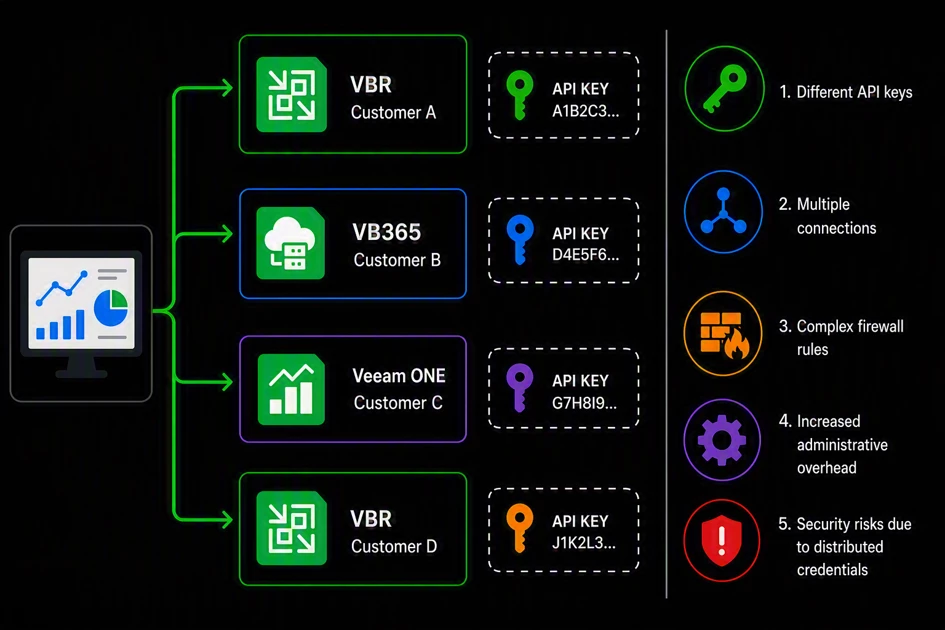
This approach typically introduces several challenges:
- Multiple API endpoints
- Different API-Keys
- VPN dependencies
- Complex firewall requirements
- Increased operational overhead
- Security concerns related to credential management
While this may be manageable in smaller environments, complexity grows rapidly as the number of managed customers increases.
The VSPC Approach
API Proxying introduces a much cleaner architecture.
Instead of communicating with every managed Veeam server individually, applications only communicate with the VSPC instance.
VSPC is responsible for:
- Authentication
- Request routing
- Proxy session establishment
- Communication with the target system
- Returning the response to the client
This eliminates the need for direct network connectivity to every managed backup server and significantly simplifies automation scenarios.
How Does It Work?
Every managed Veeam server already maintains a connection to VSPC through the Veeam Management Agent.
When an API proxy request is submitted, the following process occurs:
- VSPC receives the API request.
- VSPC identifies the target system using the Management Agent UID.
- The Veeam Management Agent establishes a proxy session.
- The request is forwarded to the local product API.
- The API response is returned to VSPC.
- VSPC delivers the response back to the requesting application.
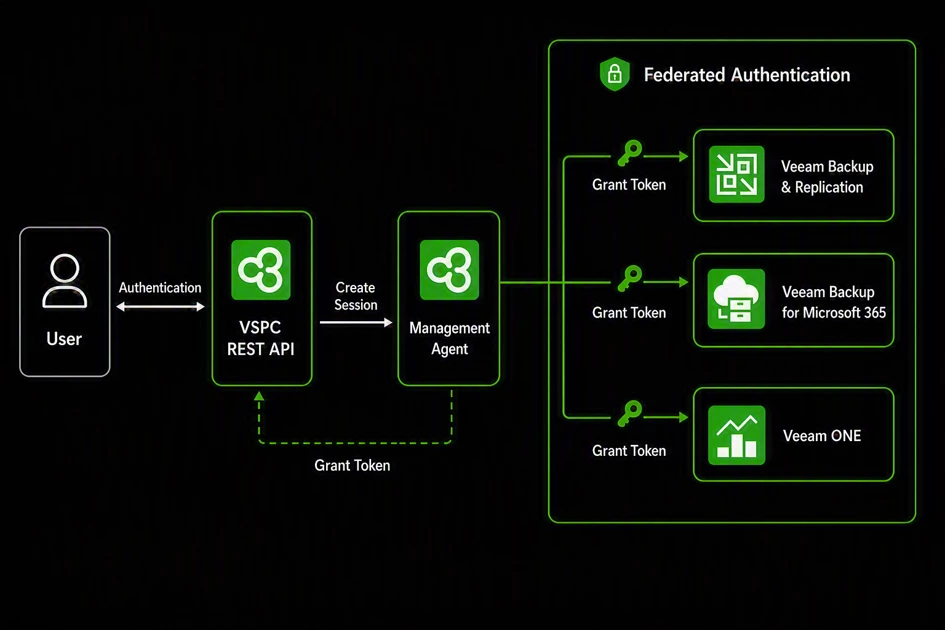
The entire process is transparent to the client application and requires only a single connection point.
Technical Examples
By now, you're probably thinking: "All right, enough theory... where are the examples?" 😊 Fair point! Let's get hands-on and walk through the process step by step using real API endpoints.
We'll start by defining the variables required for a query and exploring the data that can be retrieved. After that, I'll show practical API Proxying examples in action.
Authentication: With Great Power Comes Great Responsibility
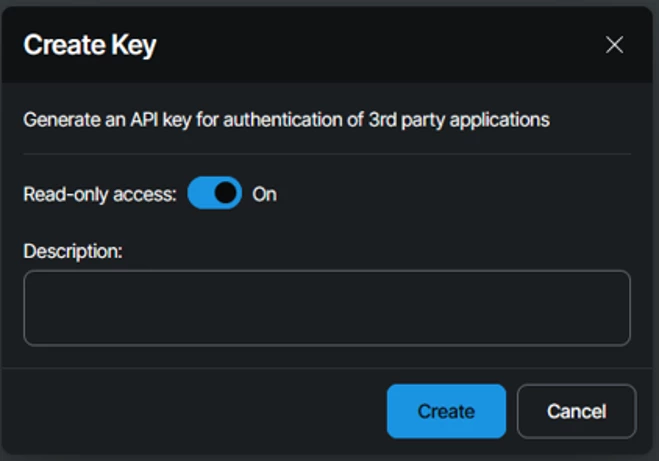
Before using API Proxying, a REST API key must be created within VSPC.
Since API Proxying can potentially provide access to connected Veeam infrastructures, organizations should follow the principle of least privilege whenever possible.
For monitoring, reporting, and inventory applications, a Read-Only API Key is strongly recommended.
Step 1: Gather Information (Retrieve the Management Agent UID)
Before a proxied API request can be executed, the target Veeam component must first be identified.
The following VSPC endpoints can be used to retrieve the corresponding Management Agent UID:
- Veeam Backup & Replication
- “/api/v3/infrastructure/backupServers/{backupServerUid}”
- Veeam Backup for Microsoft 365
- “/api/v3/infrastructure/vb365Servers/{backupServerUid}”
- Veeam ONE
- “/api/v3/infrastructure/voneServers/{backupServerUid}”
Within the response, locate and store the value:
"managementAgentUid": "<managementAgentUid>"
This identifier will be required when building the proxy request.
Step 2: Gather Information (Retrieve the Product URL Representation)
The second required parameter is the product-specific URL representation used by the proxy endpoint.
This information can be retrieved through:
“/api/v3/infrastructure/managementAgents/{managementAgentUid}/proxyableProducts“
Typical values include:
| Product | URL Representation |
| Veeam Backup & Replication | vbr |
| Veeam Backup for Microsoft 365 | vb365 |
| Veeam ONE | vone |
These values define which product API VSPC should forward the request to.
Step 3: Execute the Proxy Request
Once both values have been collected, the proxy request can be constructed.
Generic API Proxy Request:
“https//{ServerUrl}:1280/proxy/{managementAgentUid}/{proxyProductUrlRepresentation}/{targetProductEndpointPath}”
The final path consists of:
- Management Agent UID
- Product URL representation
- Native API endpoint of the target product
From this point forward, interacting with the remote product API becomes straightforward.
Example: Retrieving Backup Jobs from Veeam Backup & Replication
The following request retrieves job information directly from a VBR server through VSPC:
“https//{ServerUrl}:1280/proxy/{managementAgentUid}/vbr/api/v1/jobs/states”
type              : VSphereBackup
status            : Stopped
lastResult        : Success
workload          : Vm
id                : "<<ID>>"
name              : "<<Name>>"
description       : "<<Description>>"
lastRun           : 04.05.2026 02:00:17
nextRun           : 06.05.2026 02:00:00
nextRunPolicy     : 06.05.2026 02:00
repositoryId      : "<<repositoryId>>"
repositoryName    : ScaleOut-Repository
objectsCount      : 4
sessionId         : "<<sessionId>>"
highPriority      : False
progressPercent   : 100
sessionProgress   : @{bottleneck=Source; duration=00:10:54; processingRate=232,9 MB/s; processedSize=138069147648; readSize=61157146624; transferredSize=12990861422; progressPercent=100}
isStorageSnapshot : False
This demonstrates how VSPC effectively acts as a transparent gateway between applications and managed backup infrastructures.
Usecase: License Reporting for Veeam Backup for Microsoft 365
In many scenarios such as billing and reporting, I faced the challenge of collecting and evaluating data from multiple sources. Since some information is already available through dedicated product APIs in a processed format, it often makes sense to consume this data directly.
One use case that helped me significantly was identifying licensed users on a Veeam Backup for Microsoft 365 server through VSPC API Proxying. Licensed users can also be obtained directly via the VSPC API, but this requires multiple API calls and additional logic. So why not simply use the dedicated API endpoint already available on the Veeam Backup for Microsoft 365 server?
Queries and their outputs using the VSPC API vs. VSPC API proxying to VB365 Server.
- VSPC-API
- “https//{ServerUrl}:1280/api/v3/protectedWorkloads/vb365ProtectedObjects“
-
{
      "id": "<<ID>>",
      "name": "labadmin",
      "repositoryUid": "<<ID>>",
      "repositoryName": "<<repositoryName>>",
      "archiveRepositoryUid": null,
      "archiveRepositoryName": null,
      "protectedDataType": "User",
      "restorePointsCount": 8,
      "archiveRestorePointsCount": 0,
      "latestRestorePointDate": "2026-05-04T17:16:37.8000000+00:00",
      "vb365ServerUid": "<<ID>>",
      "vb365ServerName": "<<SV-Name>>",
      "organizationUid": "<<ID>>",
      "vb365OrganizationUid": "<<ID>>",
      "vb365OrganizationName": "<<orgName>>",
      "siteUid": null,
      "siteName": null,
      "locationUid": "<<ID>>",
      "locationName": "Hosted",
      "consumesLicense": true,
      "isEducationalUser": false,
      "fileRestorePortalUrl": "<<Restore-URL>>",
      "isFileRestorePortalEnabled": true
}
- VSPC-API-Proxying – VB365
- “https//{ServerUrl}:1280/proxy/{managementAgentUid}/vb365/v8/licensedUsers”
-
{
      "id": "<<ID>>",
      "name": "<<name>>",
      "isBackedUp": true,
      "lastBackupDate": "2026-05-04T17:16:37.8131018Z",
      "licenseState": "Licensed",
      "organizationId": "<<ID>>",
      "backedUpOrganizationId": "<<ID>>",
      "organizationName": "<<orgName>>",
      "_links": {
        "organization": {
          "href": "/v8/organization/#####"
        }
      }
}
Conclusion
VSPC API Proxying is one of the most underrated capabilities available within the Veeam Service Provider Console.
By providing a centralized API gateway for Veeam Backup & Replication, Veeam Backup for Microsoft 365, and Veeam ONE, service providers can significantly reduce infrastructure complexity while simplifying automation and reporting solutions.
Instead of maintaining direct connectivity to every managed system, applications only need to communicate with VSPC, allowing the platform to handle authentication, routing, and secure communication behind the scenes.
For MSPs building integrations, reporting platforms, self-service portals, or automation workflows, VSPC API Proxying can become a powerful tool for reducing operational overhead and improving scalability.
If you haven't explored it yet, it may be worth taking a closer look. It could simplify your next integration project more than you expect. 🚀