



When managing backup environments, an error message does not always clearly indicate the actual cause of the problem.
In this case, several backup jobs protecting Nutanix AHV virtual machines started failing during the same execution window. Although the failures affected different jobs and VMs, the sessions reported the same error:
Failed to perform backup:
boost::thread_resource_error: Resource temporarily unavailable

Failed to upload disk '72f783a8-b305-481a-b4d7-52e3351ac6c0'

Agent failed to process method {DataTransfer.SyncDisk}.
At first, the messages related to the disk upload and the DataTransfer.SyncDisk method could suggest a storage, network, or data transfer issue.
However, after reviewing the affected sessions and the worker configuration, we identified that the failures were associated with insufficient compute resources available to the workers during a period of high concurrency.
In this article, I will explain the environment, the investigation process, the worker configuration, and the changes that allowed the affected backup jobs to complete successfully.
The environment
The Nutanix AHV environment consisted of an eight-node cluster.
To distribute backup processing across the infrastructure, eight workers had been deployed. Each worker was assigned to a specific Nutanix host through host affinity.
Each worker initially had the following configuration:
| Resource | Initial configuration |
|---|---|
| vCPU | 12 |
| RAM | 12 GB |
| Maximum concurrent tasks | 10 |
| Number of workers | 8 |
Host affinity was used to distribute the workers across the Nutanix hosts and avoid concentrating the processing workload on a single cluster node.
This architecture provided multiple workers for backup and restore processing while also keeping them distributed throughout the cluster.
Understanding the role of workers
A worker is a Linux-based virtual machine deployed inside the Nutanix AHV infrastructure.
Workers are used by Veeam to process backup and restore operations and to transfer data between the Nutanix environment and the backup repository.
In practice, workers are an important part of the processing and data transfer path.
If there are not enough workers available, or if the existing workers do not have sufficient resources for the configured workload, the backup window may increase and processing failures may occur.
The standard worker configuration provides:
| Resource | Standard configuration |
|---|---|
| vCPU | 6 |
| RAM | 6 GB |
| Concurrent tasks | 4 |
| Disk space | 100 GB |
This configuration supports up to four concurrent backup and restore tasks.
When increasing the number of concurrent tasks, the sizing guidance recommends adding 1 vCPU and 1 GB of RAM for each additional task.
Based on this recommendation, a worker configured for 10 concurrent tasks would have the following baseline:
Standard resources for 4 tasks:

6 vCPU
6 GB RAM

Additional tasks:

10 - 4 = 6 additional tasks

Additional resources:

6 vCPU
6 GB RAM

Baseline sizing for 10 concurrent tasks:

12 vCPU
12 GB RAM
This was exactly the initial configuration used in the environment.
However, sizing recommendations should be treated as a starting point.
The actual resource requirements may also be influenced by the protected workloads, the number of jobs running simultaneously, the backup window, network performance, cluster capacity, and the behavior of the applications inside the protected VMs.
The backup failures
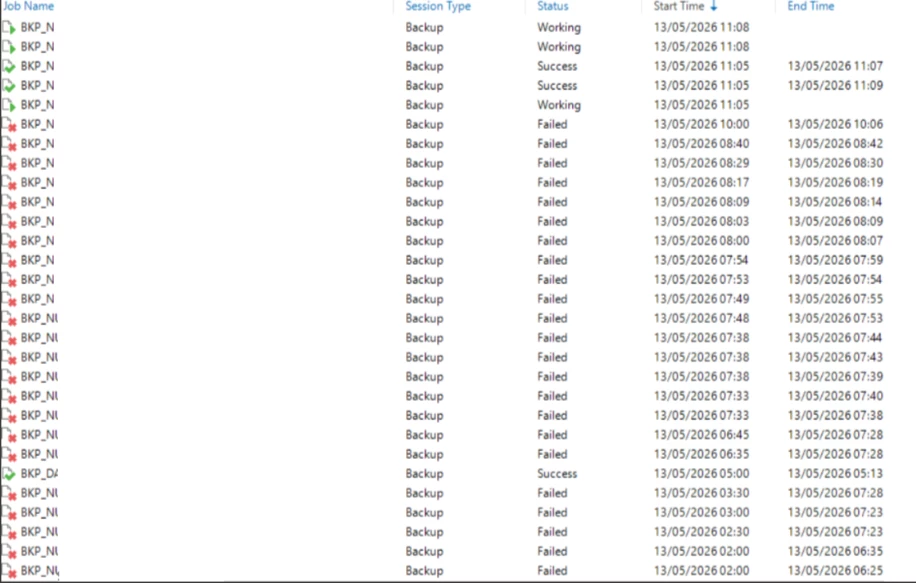
During the affected backup window, multiple jobs started failing within a short period.
Some sessions completed successfully, while others reported the same resource-related error.
The issue was not isolated to a single VM or backup job. Different jobs failed while several Nutanix AHV virtual machines were being processed simultaneously.
The primary error was:
boost::thread_resource_error: Resource temporarily unavailableThe backup session then reported:
Failed to upload disk
Agent failed to process method {DataTransfer.SyncDisk}.
The boost::thread_resource_error message indicated that the process was unable to obtain the resources required to create or continue one of the processing threads.
Because the same behavior appeared across different jobs, the investigation moved away from an issue affecting only one VM and began focusing on the shared processing components.
Reviewing the worker status
The next step was to review the Nutanix workers from the Veeam console.
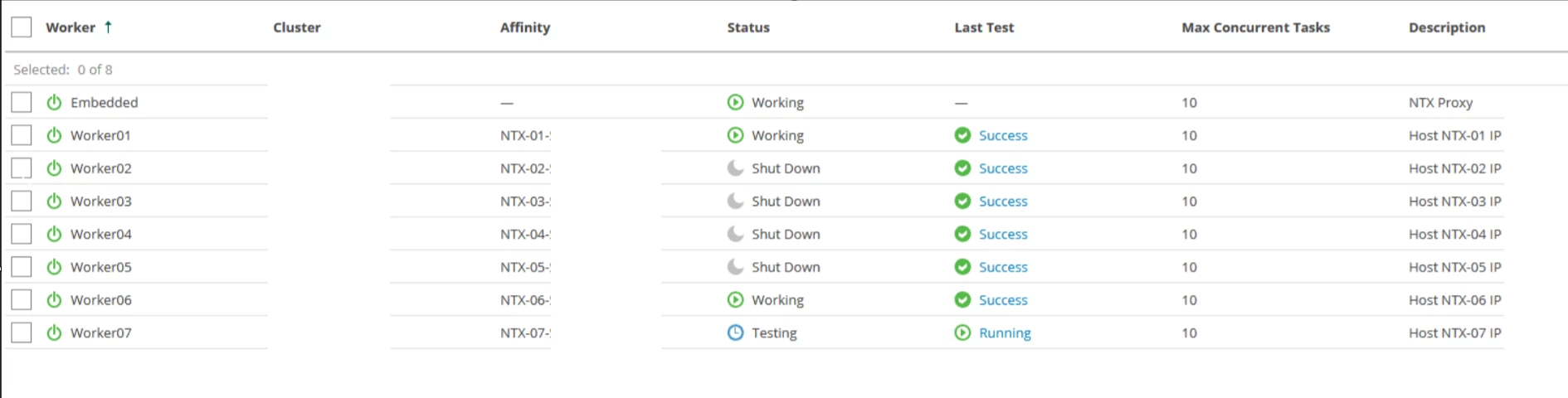
The environment had eight workers, and their configuration tests were completing successfully. This indicated that VBR could communicate with the workers and that the general worker configuration was valid.
Some workers were displayed with the Working status, while others were shown as Shut Down.
This does not necessarily indicate a problem. Workers may be powered on when they are required for backup or restore processing and powered off when they are no longer needed.
The investigation therefore needed to consider more than whether a worker was currently powered on.
We reviewed the following points:
- How many workers were processing tasks
- How many jobs were running simultaneously
- The maximum number of tasks configured for each worker
- The CPU and memory allocated to each worker
- Whether the failures occurred during the period of highest concurrency
- Whether different jobs were reporting the same error
- Whether the worker configuration tests were successful
- Whether the Nutanix cluster had enough resources available for the worker VMs
Each worker was configured to process up to 10 concurrent tasks.
The task limit controls how many operations a worker is allowed to process simultaneously. However, it does not guarantee that the allocated CPU and memory will always be sufficient for every workload profile.
A worker may be configured for a specific number of tasks while still experiencing resource pressure depending on the type of workload, the volume of concurrent processing, and the overall activity during the backup window.
Identifying the probable cause
Several points indicated resource exhaustion on the workers:
- Different backup jobs failed during the same execution window.
- The affected sessions reported
boost::thread_resource_error: Resource temporarily unavailable. - The failures occurred while several VMs were being processed simultaneously.
- The workers passed their configuration and connectivity tests.
- The issue affected shared backup processing instead of only one specific VM.
- The affected jobs completed successfully after additional CPU and memory were assigned to the workers.
The workers were already configured according to the baseline sizing for 10 concurrent tasks, with 12 vCPU and 12 GB of RAM.
For this reason, the conclusion was not that the original configuration was necessarily incorrect.
Instead, the environment required additional resource headroom during periods of higher concurrency.
This distinction is important.
Sizing documentation provides an initial reference, but the actual behavior of the environment must also be monitored and evaluated.
Two environments configured with the same number of concurrent tasks may have different CPU, memory, network, and processing requirements.
Increasing the worker resources
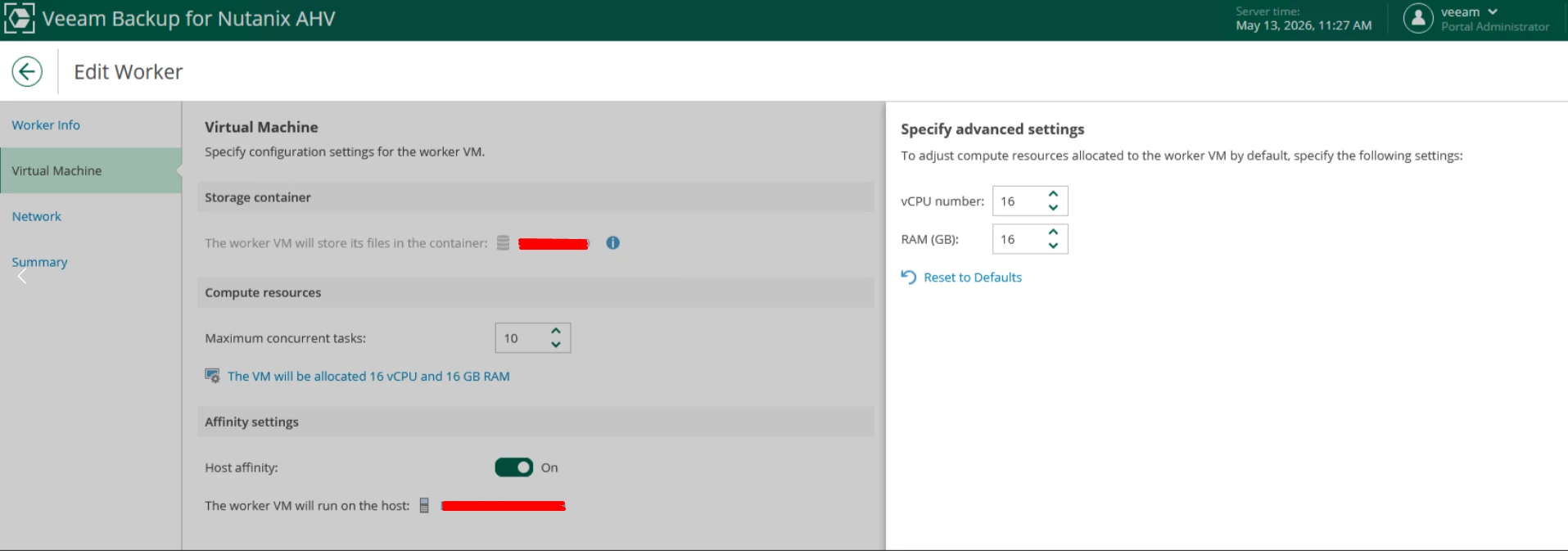
To provide additional processing headroom, the resources assigned to each worker were increased as follows:
| Resource | Before | After |
|---|---|---|
| vCPU | 12 | 16 |
| RAM | 12 GB | 16 GB |
| Maximum concurrent tasks | 10 | 10 |
The maximum number of concurrent tasks was not increased.
The objective was not to allow more VMs to be processed simultaneously. The objective was to provide more CPU and memory for the same maximum workload.
This is an important distinction because increasing the task limit without reviewing the available worker resources could create even more pressure during the backup window.
The final worker configuration was:
Maximum concurrent tasks: 10
vCPU: 16
RAM: 16 GB
The changes were performed through the Veeam console and planned outside active processing periods.
Changing worker resources, network settings, or affinity while the worker is transferring data may interrupt the operations being processed by that worker.
Validating the solution
After increasing the worker resources, the previously failed backup jobs were retried.
The sessions completed successfully, and the resource-related error was not observed during the initial validation period.
The validation process included:
- Retrying the jobs that had previously failed
- Confirming that the workers started correctly
- Reviewing the worker status
- Confirming that the worker configuration tests completed successfully
- Verifying that the backup sessions finished without the previous error
- Confirming that new restore points were created
- Monitoring the following scheduled backup windows
A successful retry is an important result, but it should not be the only validation step.
After changing worker resources, the environment should also be monitored during the next complete backup windows. This helps confirm that the new configuration supports the actual concurrency and workload behavior over time.
Additional checks for similar errors
When encountering the following error:
boost::thread_resource_error: Resource temporarily unavailableI recommend reviewing more than only the affected VM.
The complete processing path should be evaluated.
-
Worker availability
Confirm that workers are available for the Nutanix cluster and that their configuration tests complete successfully.
-
Worker resources
Review the number of vCPUs, the amount of RAM, and the maximum concurrent task configuration.
-
Job concurrency
Check whether multiple backup jobs are starting at the same time and how many VMs are being processed simultaneously.
-
Host affinity
Confirm that the workers are correctly distributed across the Nutanix hosts and that the associated hosts have enough resources available.
-
Nutanix cluster resources
Verify that the cluster has enough CPU and memory capacity to start and maintain the worker VMs during the backup window.
The worker configuration may be correct while the Nutanix host itself is experiencing resource pressure.
-
Backup window
A configuration that works normally may experience limitations when multiple jobs overlap during the busiest part of the execution window.
Reviewing job schedules may help identify unnecessary concurrency or allow the workload to be better distributed throughout the available backup window.
-
Network performance
Worker sizing should not consider only CPU and memory.
The network throughput between the Nutanix environment, workers, and backup repository should also be evaluated when defining the number of concurrent tasks.
A high task limit may create pressure on the worker resources while also exceeding the available network or repository throughput.
-
Session and worker logs
Compare logs from multiple affected jobs.
When unrelated jobs report the same error at approximately the same time, shared infrastructure components should become part of the investigation.
This correlation can help avoid spending too much time troubleshooting an individual VM when the problem is actually related to the processing infrastructure.
Conclusion
Workers are central components of the integration between Veeam and Nutanix AHV.
In this environment, several backup jobs failed with the following error:
boost::thread_resource_error: Resource temporarily unavailableThe workers were configured with 12 vCPU, 12 GB of RAM, and a limit of 10 concurrent tasks.
Although this configuration was aligned with the baseline sizing recommendation, it did not provide enough resource headroom during the busiest part of the backup window.
After increasing each worker to 16 vCPU and 16 GB of RAM while maintaining the same concurrency limit, the affected jobs were retried and completed successfully.
This case demonstrates that worker sizing should not be based only on the configured number of tasks.
The actual concurrency, backup window, Nutanix cluster capacity, network performance, repository performance, and behavior of the protected workloads must also be considered.
When multiple Nutanix AHV backup jobs fail with resource-related errors, reviewing the worker infrastructure can be just as important as reviewing the individual protected VMs.
