This week, we received two interesting questions from a customer regarding backup scheduling and archive retention in Veeam. Since these topics may be useful for others as well, I decided to share the answers in this quick post.
Q: Is it possible to configure RDS backups to run every 15 minutes?
A: No. The minimum backup frequency supported for Amazon RDS backups is once per hour. Running RDS backups every 15 minutes is not supported.
If you need more frequent recovery points, you can configure RDS snapshots with a higher frequency. In the schedule settings, select the "1 per hour" option and adjust the value to the desired number of snapshots per hour (for example, up to four snapshots per hour, resulting in a snapshot every 15 minutes).
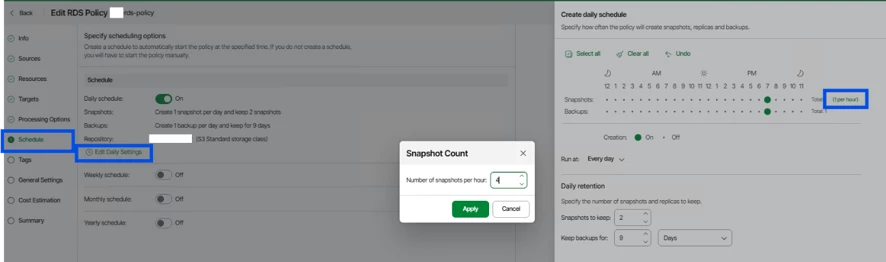
Specifying Daily Schedule - Veeam Backup for AWS User Guide
Q: Is it possible to run monthly and yearly backups without requiring a daily or weekly backup schedule, sending them directly to an archive bucket?
A: No. It is not possible to configure monthly or yearly backups without first configuring a standard backup schedule (such as daily or weekly).
Monthly and yearly backups are not created independently. They are generated from existing standard backup restore points and retained according to the configured long-term retention policy. Because of this dependency, backups cannot be sent directly to an archive bucket without first creating the corresponding standard restore point.

Enabling Backup Archiving - Veeam Backup for AWS User Guide
As a result, if no recurring backup schedule is configured, the Archive option will be unavailable (grayed out) in the policy settings.
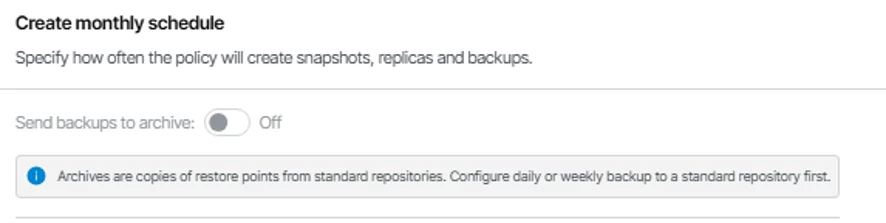
Additionally, when proceeding through the policy creation wizard, you may encounter a validation error after clicking Next, since archive retention requires standard backup restore points to exist.

I hope these quick tips help clarify some common questions around backup scheduling and archive retention in Veeam for AWS.
If you've encountered similar scenarios or have additional questions, feel free to share them in the comments.
Let's keep learning from real-world use cases and helping the community get the most out of Veeam for AWS. 🚀