VB365 - Upgrade 8.1.2.180 - PGBouncer cannot upgrade

  • July 14, 2025
  • 7 comments
  • 112 views

Chris.Childerhose
Forum|alt.badge.img+22

I wanted to post this for everyone who uses VB365 and PGBouncer with Postgres with the recent upgrade 8.1.2.180.

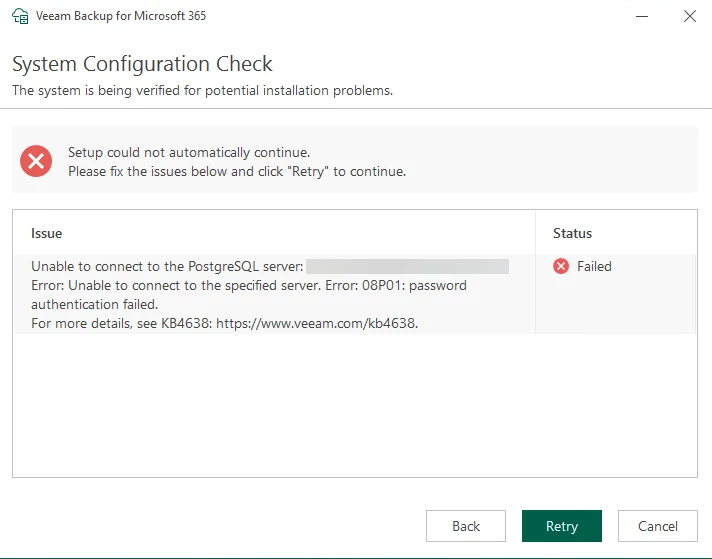
When trying to run this upgrade I ran in to an issue with the following error which was caused by connecting to Postgres via the PBBouncer 6432 port.  I had to stop services, modify the XML files back to 5432 (default PG port) and then run the upgrade.  Once complete I could then revert back to 6432 for PGBouncer and start up the services again.

Error seen during upgrade -


7 comments

Forum|alt.badge.img+1
  • Comes here often
  • August 6, 2025

I’ve done some testing on this scenario and have some feedback, Chris.  With the pgbouncer config you have there definitely is something not working right.

I ran through Veeam’s recently released PGbouncer KB and the authentication method differs from what I had configured (same issue as you).  When following the KB everything worked as expected.  Upgrade from v8.1.1 to v8.1.2 worked as expected.  No issues.

I suspect the following issues from your config (same as mine ;) ):

  • No user lookup function
    • This step in the KB allows pgbouncer to look up default Postgres users
  •  HBA auth from the KB compared to MD5 in my first pgbouncer implementations
    • MD5 does a direct lookup to the userlist file
    • HBA should use the auth_query method configured in the KB which bypasses the userlist (of pgbouncer) and authenticates against Postgresql directly

The authentication differences from your setup to the KB are the likely issue here.  I suggest adjusting your config to align with the Veeam KB and you should be good to go for current usage of PGbouncer *and* for future upgrades.  Good luck out there!


Chris.Childerhose
Forum|alt.badge.img+22
  • Author
  • Veeam Legend, Veeam Vanguard
  • August 6, 2025

I’ve done some testing on this scenario and have some feedback, Chris.  With the pgbouncer config you have there definitely is something not working right.

I ran through Veeam’s recently released PGbouncer KB and the authentication method differs from what I had configured (same issue as you).  When following the KB everything worked as expected.  Upgrade from v8.1.1 to v8.1.2 worked as expected.  No issues.

I suspect the following issues from your config (same as mine ;) ):

  • No user lookup function
    • This step in the KB allows pgbouncer to look up default Postgres users
  •  HBA auth from the KB compared to MD5 in my first pgbouncer implementations
    • MD5 does a direct lookup to the userlist file
    • HBA should use the auth_query method configured in the KB which bypasses the userlist (of pgbouncer) and authenticates against Postgresql directly

The authentication differences from your setup to the KB are the likely issue here.  I suggest adjusting your config to align with the Veeam KB and you should be good to go for current usage of PGbouncer *and* for future upgrades.  Good luck out there!

Hey ​@tim.hudson - thanks for this testing and work done.  I will review the KB again as I followed another document that I was sent which was probably “unofficial”.  😋

Let me go through the KB and fix the settings you mentioned then I will need to wait on the next update to release and then test.


DaStivi
Forum|alt.badge.img+1
  • Veeam Legend
  • July 30, 2026

hey there, i just got the exact same issue.

psql and pgbouncer on dedicated machine, pgbouncer running on 6432, vb365 server and multiple proxys running fine with this config.

but setup wizard had the same error!

in the psql logs i saw the mapping error, “no match in usermap “bouncer_peer_map” for user “1a2v3c1a2312312” (and this user or better userid, it wasent something readable , just numbers” changed all the time i retried the setup wizard!


i changed the psql port in the config.xml from 6432 back to the psql default port 5432 and even without restarting of the services the setup then accepted the connection! but its especially interessting, as of, that i also allowed the remote connection for the psql, not only the peer connection.. else this wouldn’t have worked of course..


Chris.Childerhose
Forum|alt.badge.img+22
  • Author
  • Veeam Legend, Veeam Vanguard
  • July 30, 2026

hey there, i just got the exact same issue.

psql and pgbouncer on dedicated machine, pgbouncer running on 6432, vb365 server and multiple proxys running fine with this config.

but setup wizard had the same error!

in the psql logs i saw the mapping error, “no match in usermap “bouncer_peer_map” for user “1a2v3c1a2312312” (and this user or better userid, it wasent something readable , just numbers” changed all the time i retried the setup wizard!


i changed the psql port in the config.xml from 6432 back to the psql default port 5432 and even without restarting of the services the setup then accepted the connection! but its especially interessting, as of, that i also allowed the remote connection for the psql, not only the peer connection.. else this wouldn’t have worked of course..

If you follow the KB for pgbouncer setup the updates work without issue.  I have done this and now have no issue running updates.


DaStivi
Forum|alt.badge.img+1
  • Veeam Legend
  • July 30, 2026

From my experience, the Linux PgBouncer KB does not work as expected.

The configuration uses peer authentication, which is perfectly fine and, in fact, my preferred approach. As I mentioned in my previous post, I would actually like to disable PostgreSQL network listening altogether and have it listen only locally on the server. However, with this configuration, getting a fully working PgBouncer and PostgreSQL setup is not exactly straightforward.

[databases]
* = host=/var/run/postgresql auth_user=pgbouncer

I eventually managed to configure everything correctly. VB365 components (configuration database, proxies, etc.) can connect to PgBouncer, and PgBouncer successfully forwards the connections to PostgreSQL.

However, during the setup process it seems that the stored password is either not being used correctly, or there is some issue when PgBouncer responds to the connection request. I'm not entirely sure which one it is.

As explained before, I simply changed the ports in the config.xml. Even without restarting the services (which is not required anyway, since the setup process only reads the values from the file for its pre-setup validation tests), I was able to connect successfully.

This makes me believe that the issue is related to the setup validation process rather than the actual database connectivity through PgBouncer.
 

I'm not sure which user account the setup process is actually using. On (PSQL on) Windows, I can see the logged-in user, or at least, with the user, the setup is run, appear in PostgreSQL logs, which is why that account needs to be added to pg_ident.conf.

I assume most of us have run into that issue before.

That's another reason why I'm wondering what credentials or authentication method the setup process is using behind the scenes. If it's not consistently using the credentials defined in the configuration, that could explain some of the behavior I'm seeing.

If a different random user is used every time, I simply can't make this work, because there is no way to create a proper user mapping for that scenario.

I'm also not entirely convinced that the setup process relies solely on the information stored in config.xml. There must be some difference in behavior between using Integrated Authentication and providing a dedicated PostgreSQL user during the initial setup.

Otherwise, I would expect both methods to behave exactly the same during the pre-setup validation checks, which currently does not seem to be the case.


Chris.Childerhose
Forum|alt.badge.img+22
  • Author
  • Veeam Legend, Veeam Vanguard
  • July 30, 2026

That seems odd as I followed the KB to the letter and it worked fine for me.  At least we have a way regardless to update and if this is a bug hopefully it is addressed.


Forum|alt.badge.img+1
  • Comes here often
  • July 30, 2026

hey there, i just got the exact same issue.

psql and pgbouncer on dedicated machine, pgbouncer running on 6432, vb365 server and multiple proxys running fine with this config.

but setup wizard had the same error!

in the psql logs i saw the mapping error, “no match in usermap “bouncer_peer_map” for user “1a2v3c1a2312312” (and this user or better userid, it wasent something readable , just numbers” changed all the time i retried the setup wizard!

I’ve worked with a lot of VCSPs who have struggled with PgBouncer auth.  Veeam has updated the KB a few times in the last year or so.  I suggest running through your configs with this KB in mind:  https://www.veeam.com/kb4728

You might have success dropping the KB and your ini/config files into AI and see if there is any glaring difference.  Curious what you find!