The failure that wasn't a failure
Every backup admin knows the drills for a dead array: a controller dies, a BBU gives up, a broken drive corrupts a stripe, you rebuilt, restore and move on. What almost broke us at two independent customer sites was none of those. It was worse, because nothing was actually “dead”.
The symptom: not down, just uselessly slow
Two of our customers are running fully independent 2-node HCI clusters using a 3rd party HCI solution inside VMware VMs on ESX 8. As usual, the storage-VMs are consuming all the local storage on the nodes and - while mirroring via LAN - give it back to both hosts via iSCSI. Many HCI vendors go down this path.
Both clusters ran flawlessly and fast for 7+ (!) years with roughly 40 VMs on top of each cluster.
Goal was, to have them distributed and fully redundant between two fire zones on the campus.
But suddenly and within two weeks, those two customers independently reported major outages for their systems to us. The systems never went fully offline. They stayed up, answered pings, mounted their volumes, and reported perfectly healthy disks. They were just painfully, uselessly slow. Throughput collapsed to a crawl, the mirror between the two nodes broke, applications timed out, VMs hung, and yet SMART stayed all green across the board.
Challenge: The only active maintenance was with the HCI storage vendor, which delivered perfect support here and could rule out a problem within its own system effectively. But this left us stuck with some unknown hardware issue or a software issue between ESX and the storage layer.
That "still running but useless" state is the trap. A hard failure gives you a clear signal and a clear playbook. A soft, silent throughput collapse sends you hunting through the entire stack. And because the behavior did not look a lot like a couple of other known SSD firmware bugs we had seen before, that mostly lead to a full data loss, we started down the wrong road with a lot of confidence.
Two weeks of ruling things out
We did what you are supposed to do. Methodically, and in the wrong direction:
- RAID controllers were suspected, swapped, and cleared. More than once.
- BBUs / cache batteries were checked as a possible cause of write-through fallback and slow writes.
- Power surges and PSU issues were investigated.
- Firmware, backplanes, cabling, ESXi timeouts, the usual suspects, all of it.
Nearly two weeks. The nasty part is that a RAID controller with a large write cache will happily lie to you. Any short write test smaller than the controller cache returns cache speed, not disk speed, so a quick benchmark says "fine" while the real drives behind it are choking. You only see the truth when you push a test larger than the cache and watch the drain rate fall off a cliff.
The breakthrough: a Reddit thread
The turning point was not a vendor advisory. It was this community post:
Warning: Micron 5200 fails after 65,535 hours
This very same Micron 5200 SATA SSD was sitting multiple times in every single of the affected systems. Once we pulled the drives and read the raw power-on hours over USB, the picture was unambiguous: the original disks had crossed 65,535 hours, the replacement disk that was swapped in later had not, and only the ones over the line were sick.Besides that post, there is not much to find. Why? Because the disks are 7+ years old. I would guess that many users have already decomissioned their stack.
The root cause
The bug is a textbook 16-bit integer overflow:
- The drive firmware uses a 16-bit counter for workload log entries. It maxes out at 65,535 power-on hours, roughly 7.5 years of continuous operation.
- Once the counter overflows, the firmware starts continuously generating debug log messages, which saturates the controller CPU and starves I/O processing.
- The result is throughput dropping to the order of 1 MB/s, while the drive stays accessible with no data loss and a perfectly healthy SMART status.
A detailed explanation can be found here in Chinese and fortunately also English: github.com
That is why every classic diagnostic pointed the wrong way. There was nothing wrong that any standard tool would flag. The fix that finally brought our drives back was the corrected Micron firmware (the D1MU040 branch for the 1.92 TB parts); flashing it restored full throughput even after the overflow had already occurred. Unfortunately, neither our server vendor nor Micron is offering the firmware as they state the drive to be long out of maintenance - despite the existence of the firmware.
How we solved it
As flashing the SSD firmware was not possible through the RAID controller (LSI 540i), we had to pull every single of the 16 drives from each server while it being offline, connect them one after the other to a Windows PC via an USB/SATA controller and flash the February 2026 Micron firmware with the appropriate Micron tool:
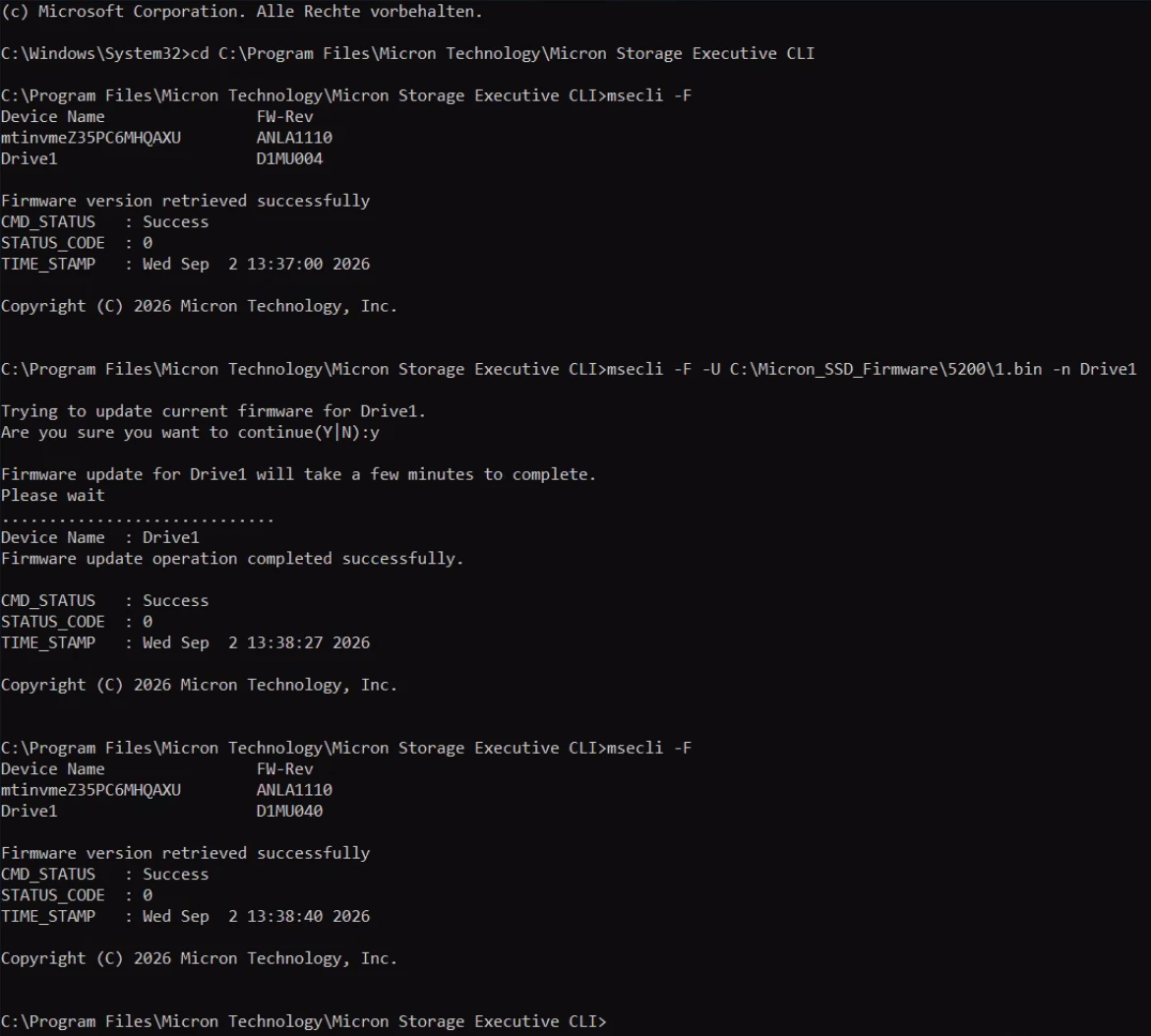
Once booting the server with all drives back inside them, the system ran flawlessly and fast again. As if nothing had happened… ;)
What I take away from this
1. Do not run hardware without vendor support. These drives were effectively end of life. When a vendor will no longer support a component, that is not a cost saving, that is an open risk. If real support is no longer possible, budget for new hardware instead of hoping. Even is those demanding times when it comes to new hardware...
2. Do not put all your eggs in one basket, but be honest about the limits. The clean textbook answer here would have been diversification: run one side on Micron and the other on, say, Samsung, so a single firmware bug cannot take out both. In practice that is not a viable option for most of us. Mixed-vendor topologies are expensive, harder to operate, and rarely justified. So the realistic mitigation is the next point.
3. Keep your Veeam backup off the same topology. This is the one that saved us. If the Veeam backup repository had lived on the same disk topology as production, the bug would have hit both at once and the backup would have been the last thing standing, and it would have been just as slow. Because the repos were on different hardware, backup remained the fallback.
During the outage we ran a reduced subset of workloads via Instant Recovery straight from Veeam to keep the essentials alive while we chased the root cause. If you rely on that, make sure your repositories actually support Instant Recovery at the performance you need. A repo that cannot serve running workloads is only half a safety net.
And a word of criticism
Micron does not provide this firmware officially. The fix exists, it is signed, it works, and yet the public EOL pages do not offer it for download; users are told the drives are obsolete. That is not acceptable for a defect this severe. And in our case Fujitsu being the server vendor did not provide it either. 7 years of runtime brought the systems beyond the maintenance window of the vendors. But, when a known, fixable firmware bug can silently take down production storage across an entire fleet, hiding the remedy behind NDAs and EOL notices is the wrong call.
Check your fleet now. If you have Micron 5100 / 5200 / 5300 drives from around 2018 to 2019 running 24/7, read the Power_On_Hours today. You may only have weeks before they cross the line.