


Veeam 13.1 can back up OpenShift Virtualization VMs from the console your team already uses, without an agent in the guest. Here's the architecture in one diagram: five components, two of them new, and the five steps a backup job takes across them.
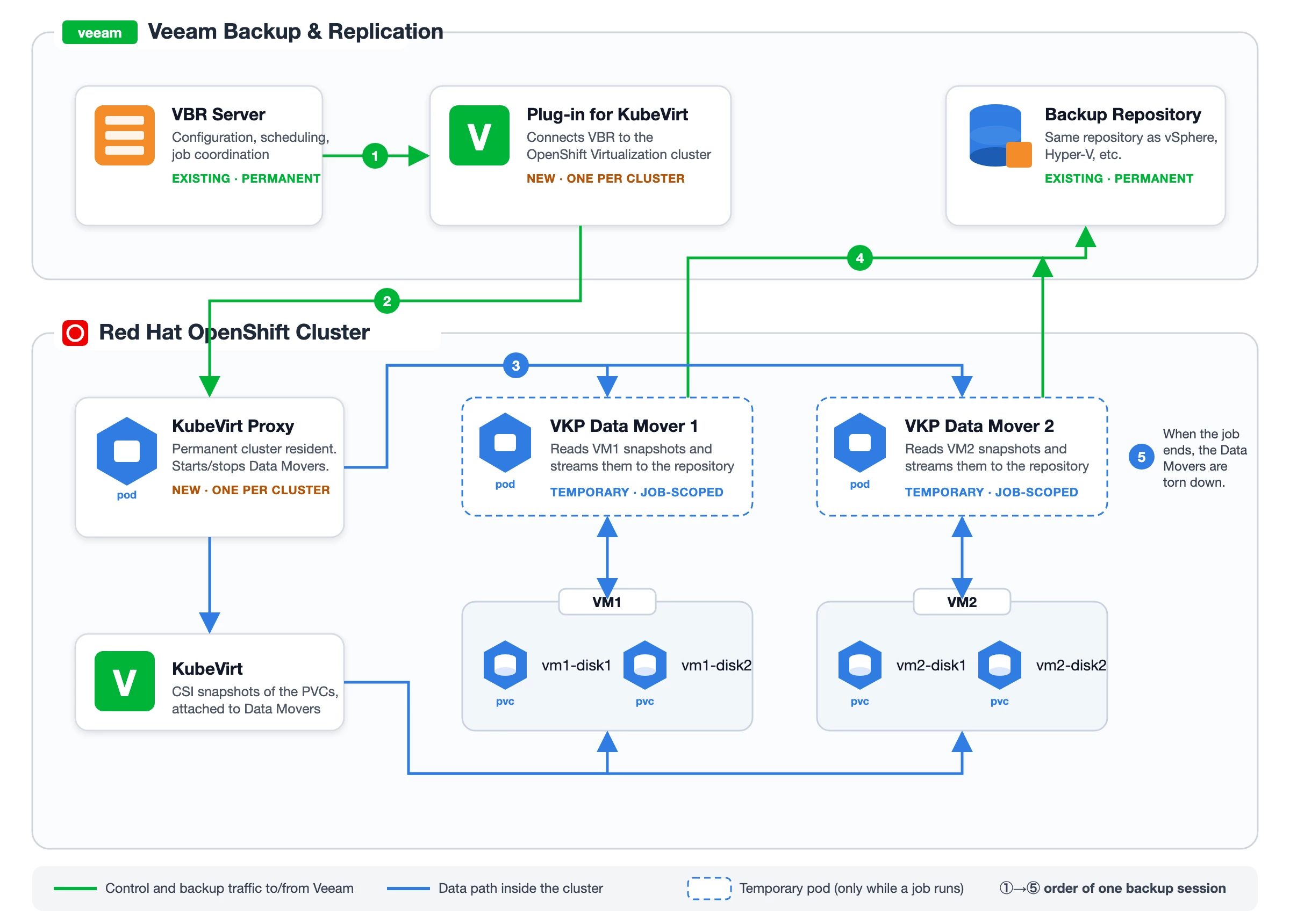
Components
VBR Server — the one giving orders
- What it is: your existing Veeam Backup & Replication machine, physical or virtual.
- Job description: holds the configuration, schedules jobs, allocates resources, and coordinates every backup and restore. It also doubles as a general-purpose backup proxy, so it can move data to and from repositories on its own.
- Where it sits in the diagram: top-left, feeding the plug-in.
- Mental model: the control tower. It decides what and when; it does not read VM disks.
Veeam Plug-in for KubeVirt — the translator
- What it is: the integration layer between VBR and everything OpenShift Virtualization.
- Job description: lets the backup server connect to an OpenShift Virtualization cluster and run data protection and disaster recovery tasks against its resources.
- Where it sits: still on the Veeam side of the line, but it's the component that reaches down into the cluster (the green arrow going into the Veeam KubeVirt Proxy).
- Mental model: a bilingual dispatcher. VBR speaks "jobs and repositories"; the cluster speaks "pods and PVCs". This is where the translation happens.
Veeam KubeVirt Proxy — the resident inside the cluster
- What it is: an ephemeral container living in a pod in the protected cluster.
- Job description: processes backup workloads when data moves to and from repositories.
- Rules of engagement: exactly one proxy per protected cluster. If you have three clusters, you deploy three proxies and one VBR can connect to all of them.
- Where it sits: left side of the OpenShift box, wired to KubeVirt (blue) and to the plug-in (green).
- Mental model: the site foreman. It's the only permanent Veeam presence in your cluster, and it's the one that hires the workers below.
VKP Data Mover — the temp worker who does the actual lifting
- What it is: a service in a pod that the proxy deploys temporarily for a job.
- Job description: on backup, it pulls the data of the protected VM disks and ships it to the repository; on restore, it pulls from the repository and writes to the target.
- Where it sits: center-right of the diagram, one per VM being processed (Data Mover 1 → VM1, Data Mover 2 → VM2), each attached to the VM's PVCs.
- Mental model: contractors that show up for the shift and leave. This is the pod your platform team will see appear and disappear during the backup window — and the reason there's no agent inside the guest.
Backup Repository — where it all lands
- What it is: the storage location where VBR keeps backups of your OpenShift Virtualization VMs.
- Job description: be the destination. Nothing exotic here — it's the same repository concept you already use.
- Where it sits: top-right, receiving green arrows straight from the data movers.
- Mental model: the warehouse. Same warehouse as your vSphere and Hyper-V backups, which is exactly the point.
Reading the diagram as a timeline
If you follow the arrows in order, the picture becomes a sequence rather than a topology:
- VBR hands the job to the plug-in.
- The plug-in reaches the proxy inside the cluster.
- The proxy spins up one data mover per VM and points each at that VM's disks through KubeVirt.
- Each data mover streams straight to the repository.
- When the job ends, the data movers are gone; the proxy stays for next time.
Two of those steps run entirely inside OpenShift, near the storage. That's the design choice worth remembering: the backup server orchestrates, the cluster does the data path.
For the entire Veeam team who released this incredible Plug-In






