

Introduction
Recently, during a backup routine using VBR in a VMware vSphere environment, we identified failures across several backup jobs.
Veeam reported that there was not enough disk space to complete the backup file Merge operation.
However, after checking the repository storage, I noticed that there was sufficient free space available to perform the operation.
In this article, I will share the scenario we encountered, the analysis performed, and the solution that resolved the issue in my environment.
Problem Identification
During job execution, Veeam displayed the following messages:
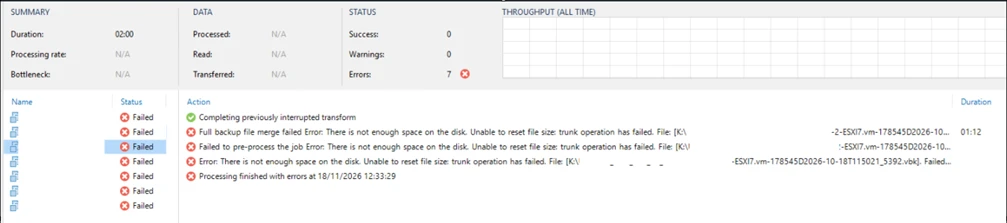
Full backup file merge failed
There is not enough space on the disk
Unable to reset file size: trunk operation has failed
The error was related to the backup chain Merge operation.
This operation is important for backup file maintenance, as it involves consolidating data between existing restore points.
What caught our attention was that, despite the error message indicating insufficient disk space, the repository still had enough available capacity to perform the operation.
Scenario Analysis
Initially, we performed a storage analysis to verify whether there was actually any disk space limitation.


During the investigation, we did not identify any lack of available capacity on the disk that could explain the failures.

This scenario led us to consider that the problem might not be exclusively related to the physical storage capacity, but could also involve the information Veeam had about the repository.
Veeam's official documentation, through KB1827, explains that the message "There is not enough space on the disk" may also be related to file system limitations, storage quotas, or other restrictions affecting file write operations.
Additionally, Merge operations have specific free space requirements that must be considered during troubleshooting.
Solution Applied
After performing the initial checks, we decided to run a Rescan on the backup repositories directly from the Veeam console.
Procedure:

- Open the Veeam Backup & Replication console.
- Navigate to Backup Infrastructure.
- Select Backup Repositories.
- Locate the repository used by the failed jobs.
- Right-click the repository.
- Select Rescan.
- Wait for the process to complete.
- Run the backup jobs again.
After performing the Rescan, we reran the backup jobs, and processing completed successfully without the insufficient disk space error occurring again.
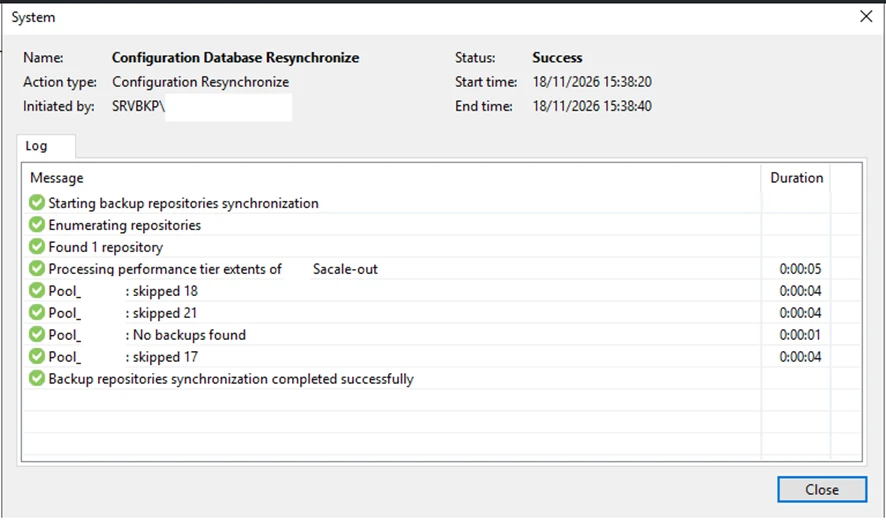
Why Can Rescan Help?
The Rescan operation allows Veeam to refresh information related to existing backups on the repository.
In the case of Scale-Out Backup Repositories (SOBR), the process also updates important information about extents, Data Mover status, and available storage capacity.
This is particularly relevant in environments with multiple repositories, file movements, or changes to the storage infrastructure.
Veeam's official documentation describes this behavior and recommends using Rescan in certain situations to refresh infrastructure information.
It is important to note that Rescan does not increase the physical storage capacity or, by itself, resolve file system limitations or storage quotas. Therefore, each scenario must be investigated individually.
Conclusion
This incident reinforces an important point when managing backup environments: an insufficient disk space error does not always mean that the storage is actually full.
Before making changes to the repository, deleting files, or modifying retention policies, it is worth investigating other possible causes.
In this case, after verifying that sufficient free space was available and performing a Rescan on the repositories, the backup jobs started working normally again.
Here is a tip for anyone managing Veeam environments:
If you encounter insufficient disk space errors during Merge operations, but the repository appears to have enough available capacity, consider investigating the repository information and evaluating whether a Rescan is appropriate.
This simple action may help identify and resolve certain issues without requiring more invasive changes to the environment.
Official References
- Veeam KB1827 – There Is Not Enough Space on the Disk: https://www.veeam.com/kb1827
- Veeam – Rescanning Backup Repositories: https://helpcenter.veeam.com/docs/vbr/userguide/rescanning_backup_repositories.html
- Veeam – Rescanning Scale-Out Repositories: https://helpcenter.veeam.com/docs/vbr/userguide/sobr_rescan.html
- Veeam – Backup File Placement for Performance Tier: https://helpcenter.veeam.com/docs/vbr/userguide/backup_repository_sobr_placement.html