With the July 2026 security updates, Microsoft will permanently disable the legacy RC4 encryption algorithm in Kerberos authentication, requiring the use of modern encryption standards such as AES128 and AES256.
I do not anticipate any significant impact on systems that are properly maintained, but I strongly recommend carrying out a proactive assessment to identify any systems that still use the RC4 algorithm.
Potential Risks
Legacy applications, older servers, hardware appliances, or service accounts configured only for RC4 authentication may fail to authenticate after Domain Controllers are updated.
How to Verify Your Environment
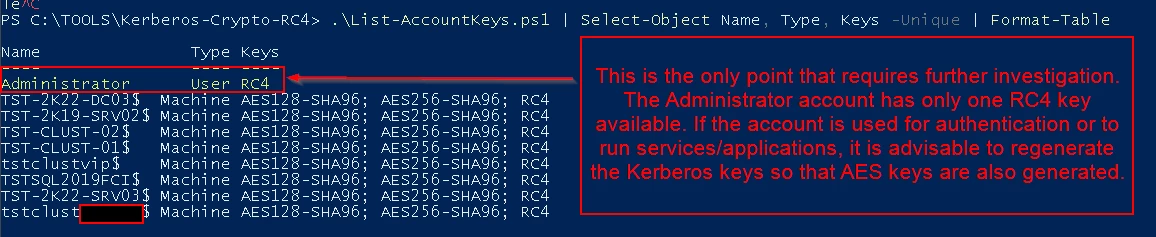
Microsoft provides tools to detect accounts and services still using RC4:
Microsoft Learn:Detect and remediate Kerberos RC4 usage
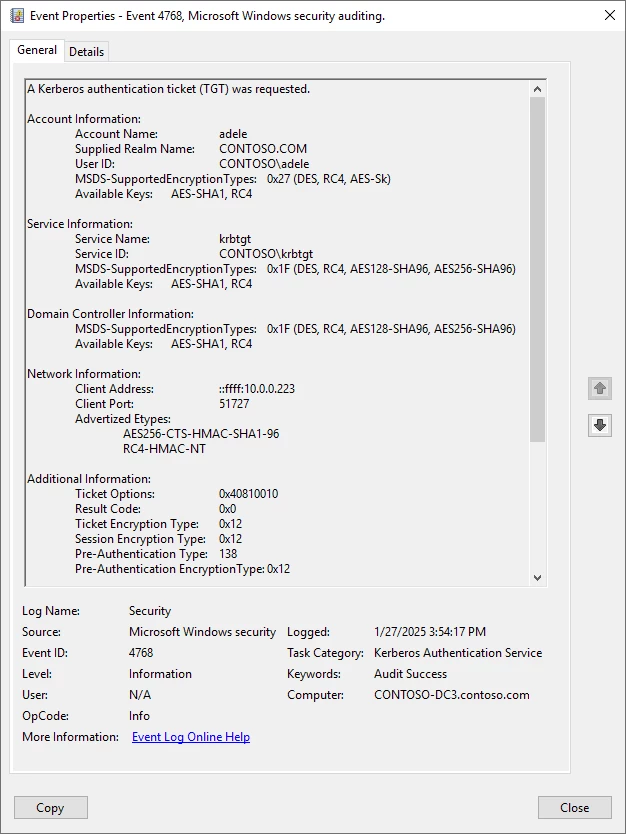
Detail about RC4 usage is stored in the Security Event Logs on Kerberos Key Distribution Centers (KDCs) for Windows Server 2019 and later. RC4 usage in Event Logs was also added to Windows Server 2016 in the January 2025 cumulative update. The following event IDs identify RC4 usage and accounts that are only able to use RC4:
Event ID 4768, which is for the requested Kerberos authentication ticket (TGT).
Event ID 4769, which is for the requested Kerberos service ticket.
Microsoft published these scripts as open source and they're available in Microsoft's Kerberos-Crypto GitHub repository. Alternatively, you can also identify RC4 usage using a security information and event management (SIEM) solution, like Microsoft Sentinel, or built-in Windows forwarding as described in our blog post
Interesting change coming from MS on security but for the better. Hopefully, our systems are maintained, but I will alert our security team to this one. Thanks for sharing it.
“With the July 2026 security updates, Microsoft will permanently disable the legacy RC4 encryption algorithm in Kerberos authentication, requiring the use of modern encryption standards such as AES128 and AES256.”
Is incorrect: Microsoft will NOT permanently disable the legacy RC4 encryption algorithm in Kerberos authentication, it will disable the offering of legacy RC4 encryption algorithm IF NOT EXPLICITLY REQUESTED BY THE CLIENT DURING THE KERBEROS TICKET NEGOTIATION.
This happen, as April patch, because they have changed the default value for DefaultDomainSupportedEncTypesto AES-SHA1 only: 0x18.
It is the April patch the first Milestone, phase that can be overriden setting RC4DefaultDisablementPhase to 1 to restore previous behavior.
But defining explicitely the DefaultDomainSupportedEncTypesto 0x27 in HKLM\System\CurrentControlSet\Services\KDC explicitely, i’ve successully implemented, on June patch, the simulation of the July Patch, simulation achieved setting RC4DefaultDisablementPhase to 2 , and the legacy Windows 2003 system of the customer continue to logon to the domain (yes Windows 2003)
The issue with July Patch is that setting RC4DefaultDisablementPhase to 1 has no effect so if RC4 is required must be implemented the downgrade of DefaultDomainSupportedEncTypes , domain wide or account for account with msds-SupportedEncryptionTypes attribute. But msds-SupportedEncryptionTypes work only on Windows pure environment, and configuration with the interaction of legacy SAMBA or NAS (Like NetApp) AD integration.
The rest of the post is spot on. 😄 But updating or replacing legacy applications and devices while keeping up with the patch schedule is basically a Mission: Impossible. We'd need Tom Cruise... and I hear he doesn't come cheap. 😄
And before everyone yell at me about RC4 insecurity and Kerberoasting… legacy system are difficult (and expensive) to kill… and RC4 compatibility was required until a year and an half ago for Microsoft ADSYNC, and also for enterprise migration tools by Quest, and DES compatibility for Kerberos Ticket was enabled in Windows 2025…
Clash between security and compatibility with legacy system, the story of my (but also our) life 8-)))
Now i must plan the final test with July patch in a Veeam virtual lab… wish me luck..
From your link:
January 13, 2026 - Initial Deployment Phase
The initial deployment phase starts with the updates released on and after January 13, 2026, and continues with later Windows updates until Enforcement phase. This phase is to warn customers of new security enforcements that will be introduced in the second deployment phase. This update:
Provides audit events to warn customers who might be negatively affected by the upcoming security hardening.
Introduces support for the registry value RC4DefaultDisablementPhase after an administrator proactively enables the change by setting the value to 2 on domain controllers when KDCSVC Audit events indicate that it is safe to do so.
April 14, 2026 - Enforcement Phase with manual rollback
This update changes the default DefaultDomainSupportedEncTypes value for KDC operations to leverage AES-SHA1 for accounts that do not have an explicit msds-SupportedEncryptionTypes active directory attribute defined.
Thanks for your comment. I actually agree with the technical details you've described, but I think we're looking at the issue from two different perspectives.
You're absolutely right that RC4 has not been physically removed from Windows. The KDC is still capable of issuing RC4 Kerberos tickets if an administrator explicitly configures DefaultDomainSupportedEncTypes or msDS-SupportedEncryptionTypes. In that sense, the RC4 implementation is still present in the product.
However, my point was about Microsoft's deprecation strategy, not the removal of the code itself.
The July 2026 update marks the final stage of Microsoft's RC4 hardening roadmap:
RC4DefaultDisablementPhase is no longer honored, so administrators can no longer opt out of the new default behavior. The default KDC behavior is now AES-only unless RC4 is explicitly configured. If RC4 is still required, administrators must deliberately configure DefaultDomainSupportedEncTypes or msDS-SupportedEncryptionTypes as compatibility exceptions.
To me, these are compatibility workarounds, not a reversal of the deprecation. Microsoft is not encouraging the continued use of RC4; it is allowing organizations to keep legacy applications running while they migrate to AES.
This is similar to other security hardening initiatives Microsoft has introduced over the years: the legacy protocol may still exist for backward compatibility, but it is no longer the default, and administrators must explicitly opt in if they need it.
So perhaps a more precise wording would be:
Microsoft has deprecated RC4 as the default Kerberos encryption type. Although RC4 is still available for explicit compatibility scenarios, the July 2026 updates remove the ability to retain the previous default behavior via RC4DefaultDisablementPhase, making any continued use of RC4 an administrator-controlled compatibility exception rather than the standard Kerberos behavior.
I think we actually agree on the technical implementation; the only difference is the terminology. My article was intended to highlight Microsoft's direction of travel: RC4 is no longer the default, its use is being progressively restricted, and the remaining configuration options exist solely to facilitate migration of legacy environments, not to preserve RC4 as a supported default encryption mechanism.