


Veeam publishes open-source Model Context Protocol (MCP) servers for Veeam Intelligence and Veeam Backup & Replication. They’re a great way to let AI tools work with your backup environment. Out of the box, though, they’re built for one person’s desktop AI client.
Veeam-MCP-Assistant (VAM) puts them behind a shared web page. Your team signs in from a browser, asks questions in plain English, and runs Veeam Backup & Replication operations. Nothing that changes or deletes anything runs until a second person approves it.
Please note: VAM is a community project. It’s not an official or supported Veeam product. It’s provided as-is under the MIT license. Try it in a lab before you point it at a production backup server.
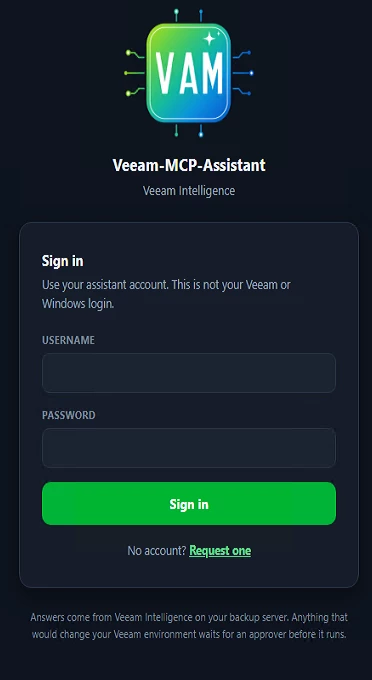
The VAM sign-in page
Why a Front End?
MCP servers offer tools, and an MCP client decides which ones to call. Desktop clients are personal: one user, one set of credentials, and no shared record of what happened.
Teams need something different:
- Shared access without sharing passwords. People sign in with their own website accounts. Your backup server credentials stay in one protected place on the server.
- A human check before anything changes. A second person sees exactly what will run, and approves or declines it.
- A record of who did what. Every question, operation and decision lands in an activity log.
That’s what VAM adds.
What You Get
| Feature | What it means for you |
|---|---|
| Two servers, one page | Pick Veeam Intelligence for written answers, or Veeam Backup & Replication for operations, from a single Server box. |
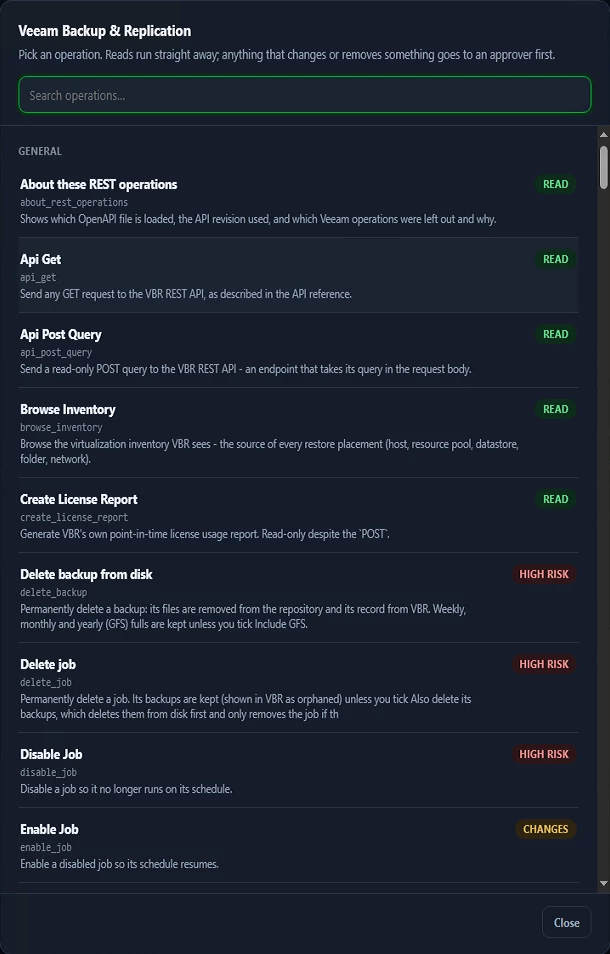
| Every REST API operation your server offers | VAM builds its operations list from your own backup server’s API definition, so the list matches your version. It also includes Veeam’s vbr-mcp operations. |
| Built-in combined operations | Find jobs, Find backups, Delete backup from disk, and Delete job. Delete job can remove the job’s backups too, and it keeps the job if any backup fails to delete. |
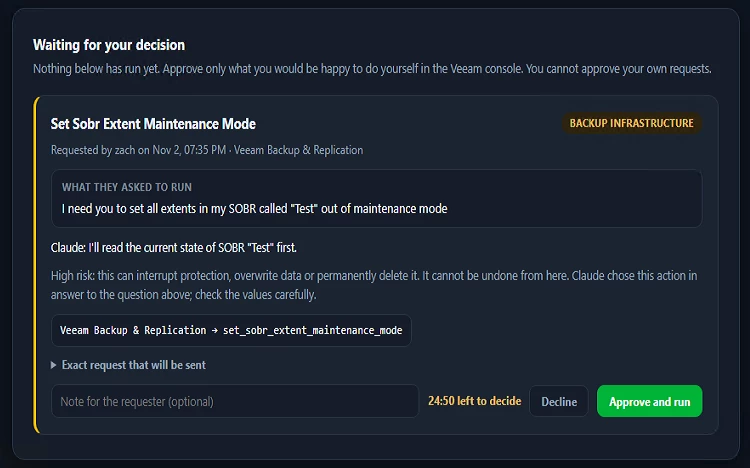
| Approvals on every change | Reads run straight away. Changes and deletions wait for an approver, in groups you choose: backup jobs, restores, infrastructure, licensing, scans, and a separate group just for deletions. |
| Named approvers and clear rules | Pick who may approve a given person’s requests. Nobody approves their own request. Anything not decided within 25 minutes simply doesn’t run. |
| Optional Claude assistant | Bring your own Claude API key and type questions in plain English. Claude picks the operations to request. Reads run, and changes still wait for a person. Read-only mode is one setting away. |
An approval request showing the exact operation and values
How It Works
Browser ──HTTPS──► Nginx ──► VAM website (Docker)
accounts · approvals · activity log
│
├── vi-mcp ─────► Veeam Intelligence on your backup server
│
└── "Veeam Backup & Replication"
├── vbr-mcp ───► REST API
└── vbr-extra ─► REST API, built from your server's own definition
Optional: Claude (Anthropic API) chooses which operations to request.
VAM runs them, after approval where needed.
The website is the MCP client. It starts the right MCP server for each question or operation, checks whether a person needs to approve it, and runs it.
Safety by Design
- It only does what the servers expose. There’s no “send any request” tool. People and Claude can request only the operations in the list.
- Claude chooses, but it can’t act alone. Claude never talks to your backup server directly, and it can’t approve anything. It’s told to treat text from your environment as data, not instructions, but the approval step doesn’t depend on that. Every change still needs a person.
- Veeam Intelligence follows Veeam’s own action policy. It refuses anything outside that policy, and it never deletes.
- No credentials in the repository. Your backup server passwords live in protected settings files on your server. If you use Claude, your own API key stays inside the website and is never passed to the MCP servers.
- You know what leaves your network. Only with Claude switched on do the question and the backup data Claude reads go to Anthropic. Leave Claude off and nothing does.
A Few Things to Try
- Ask Veeam Intelligence: “Which backup jobs failed in the last 24 hours?”
- Clean up an old backup: run Find backups, then Delete backup from disk. It goes to your deletions approvers, and you see the result once it’s approved.
- Restore a single file: mount the restore point, restore the file to a machine your backup server knows, then unmount. That’s three approvals, each showing exactly what will happen.
- Ask Claude: “Which repositories are more than 80% full?”
The Operations list, grouped by area
What It Doesn’t Do
Knowing the limits up front saves surprises:
- It can’t download files to your browser. Restores go to a machine your backup server already knows.
- It can’t do anything the REST API doesn’t offer.
- It uses its own website accounts, not single sign-on.
- Each MCP server acts as one backup server account. Keep Veeam Backup & Replication’s own four-eyes authorization on for destructive operations.
Before You Start
| You need | Notes |
|---|---|
| A Linux server | Tested on Ubuntu Server 26.04.1 LTS. The guide installs Docker and Nginx for you. |
| Veeam Backup & Replication | Tested with build 13.1.2.57 and REST API revision 1.3-rev2. Your server must be reachable on ports 443 and 9419. |
| A Veeam license | An active, non-Community license, which Veeam’s MCP servers require. |
| Veeam Intelligence | Enabled on your backup server. |
| A service account | No MFA. The Veeam Backup Administrator role is needed to delete. |
| A Claude API key | Optional, and your own. None is included. |
Getting Started
Everything you need is in the repository: https://github.com/STTGL-01/Veeam-MCP-Assistant
The README walks you through 46 copy-paste steps. Each one tells you exactly what you should see before you move on, and there’s a troubleshooting table for the common errors. In outline:
- Download Veeam’s MCP servers and your backup server’s API definition.
- Build the website image and both servers.
- Add your settings, with placeholders that the guide checks are filled in.
- Start it, then sign in and change the administrator password before you share the address.
- Choose your approvers.
- Optionally, switch on Claude.
A summary document in docs/ explains what VAM can and can’t do, if you’d like the full picture before you install.
Built on Veeam’s MCP Servers
VAM wouldn’t exist without the open-source vi-mcp and vbr-mcp servers Veeam publishes at github.com/veeam-ai/veeam-mcp-server. Setup downloads them straight from Veeam’s repository, so they aren’t copied into VAM. VAM adds the web front end, accounts, approvals and the generated operations list. Before you rely on vbr-mcp, read the safety section in its own README.
Try It and Tell Me What You Think
Spin it up in a lab, ask it a few questions, and push a change through the approval flow. I’d love to hear what works, what doesn’t, and what you’d add next. Drop a comment below.