

Part 2 of 6 | A Veeam Journey Through Technology, History, and Resilience

In Part 1, I talked about my early experiences with Veeam v7 and v8, and how features like WAN acceleration, Backup from Storage Snapshots, and Cloud Connect helped change the way we approached backup and recovery.
But as virtual environments grew, so did the challenges.
More VMs meant more backup data, additional repositories, and increasingly complicated decisions about where everything should live. What worked for 50 VMs didn't necessarily work for 500, and simply throwing more disks at the problem wasn't always the answer.
During my trip to Lisbon for the Veeam 100 Summit, another landmark caught my attention: the Monument to the Discoveries, or Padrão dos Descobrimentos.
Built to commemorate Portugal's Age of Discovery, the monument depicts explorers like Vasco da Gama preparing to venture beyond the known world. Standing in front of it, I couldn't help but think about how much progress depends on building upon what came before.
In a much less adventurous way, that's exactly what was happening with backup infrastructure around 2016. We weren't discovering new continents, but we were figuring out how to protect increasingly large and complicated environments.
2016: Veeam Backup & Replication v9
Released in January 2016, Veeam v9 introduced several significant improvements. Two of the biggest were Scale-out Backup Repository and Cloud Connect Replication.
Scale-out Backup Repository (SOBR)
For me, SOBR was one of the most important architectural changes introduced in v9 and still remains a large part of backup environments to this day.
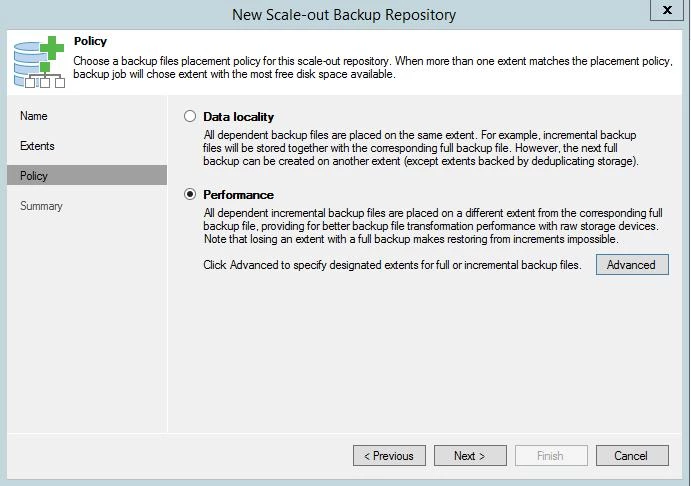
Before SOBRs, managing repositories could become a balancing act. You might have several repositories with different capacities and performance characteristics, each serving different backup jobs. As storage filled up, you had to decide whether to move jobs, relocate backup files, or add more repositories. SOBR changed that by allowing multiple backup repositories to be combined into a single logical repository. Instead of managing each repository independently, we could create a scale-out repository consisting of multiple extents and present it to backup jobs as one target.
Placement policies also provided flexibility in how backup files were distributed, including the ability to separate full and incremental backup files across different extents. This was especially useful in environments with multiple storage platforms or growing capacity requirements. It didn't eliminate the need for good design or capacity planning, but it made repository expansion considerably easier.
One lesson I've learned over the years is that adding storage is easy. Adding storage without making the environment more complicated takes a little more thought. I am a full believer in the KISS methodology and SOBRs helped with that.
Veeam Cloud Connect Replication
In Part 1, I discussed how v8 introduced Cloud Connect, allowing organizations to send backup copies to participating service providers without maintaining their own secondary data center.
V9 expanded that capability with Cloud Connect Replication.
Instead of simply storing backups offsite, organizations could replicate virtual machines to a service provider's infrastructure and use that environment as a disaster recovery destination. This was a significant advancement, particularly for smaller organizations that couldn't justify the expense of a fully equipped secondary data center.
Cloud Connect Replication provided another option for meeting those requirements without owning customers needing to own all the infrastructure or the management headache of a full DR site.
2016: Veeam v9.5 and a More Efficient Repository
Later that year, Veeam released v9.5. While v9 changed how we organized backup storage, v9.5 improved how efficiently we could use it.
One feature in particular stood out to me: ReFS Fast Clone.
What is ReFS Fast Cloning?
ReFS (Resilient File System) is Microsoft's filesystem designed for improved data integrity, resiliency, and scalability. With Windows Server 2016, Microsoft introduced block cloning, changing how files could share data on disk.
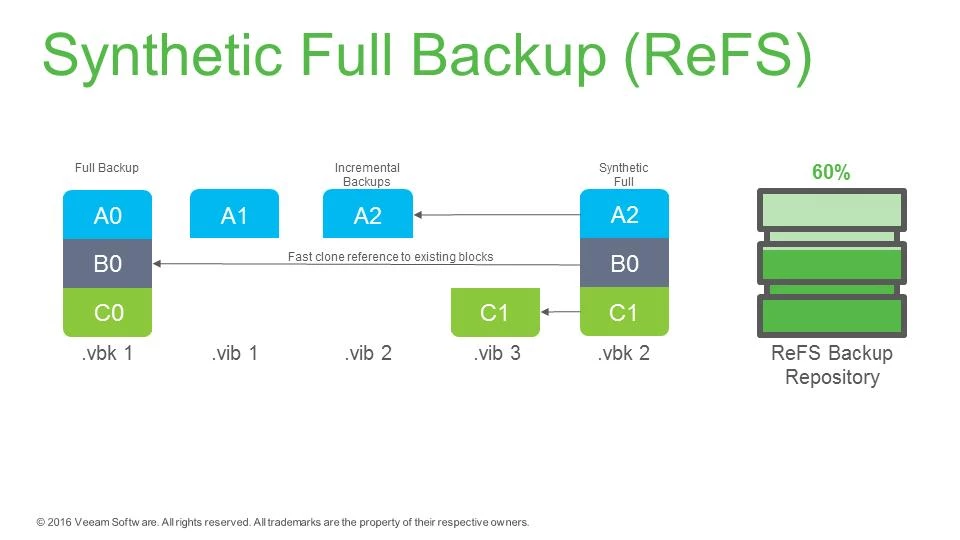
Traditionally, copying a file required reading the original data and writing a second copy, consuming additional storage and disk I/O. ReFS block cloning works differently. Instead of duplicating data, it updates filesystem metadata so multiple files can reference the same physical blocks.
ReFS uses reference counting to track shared blocks and allocate-on-write to ensure that modifying one file doesn't affect another. This significantly reduces unnecessary data movement while maintaining the independence of each file.
How Veeam v9.5 Used ReFS Fast Clone
Before v9.5, synthetic full backups could be pretty demanding on repositories. Creating a new synthetic full meant reading existing backup data and writing an entirely new full backup file, consuming significant storage I/O, capacity, and time.
Veeam v9.5 introduced Fast Clone integration with Windows Server 2016 ReFS repositories, allowing Veeam to reuse existing data blocks rather than physically copying them.
The result was faster synthetic full backups, reduced storage consumption, and significantly less disk I/O. Although the new backup appeared as a complete file, much of its underlying data could be shared with previous restore points.
That might not sound as exciting as a completely new recovery feature, but anyone who's spent time troubleshooting repository performance or capacity issues can appreciate how important it was. For larger environments, this was a major improvement in repository efficiency and scalability.
Instead of constantly adding storage or trying to squeeze operations into smaller backup windows, we had another way to make better use of the infrastructure already in place. This is important again for those customers who don’t have the resources to throw money at more disks or more servers to make the space or performance issue go away.
Looking Back
When I look back at v9 and v9.5, what stands out isn't just the features. It's how the conversation around backup architecture was changing.
With v7 and v8, the focus had been on backup performance, reducing production impact, and making offsite protection more accessible.
By v9 and v9.5, we were thinking more about scale.
How do we manage repositories as environments grow? How do we make better use of storage we've already purchased? How do we reduce the complexity of backup infrastructure while expanding our recovery options?
Those are questions I still encounter today.
SOBRs would eventually become the foundation for additional capabilities, including object storage and capacity tiering. ReFS Fast Clone demonstrated how filesystem-level efficiencies could fundamentally change repository design.
Standing in front of the Monument to the Discoveries, I was reminded that progress usually builds on what came before it. Portugal's explorers didn't begin with a complete map of the world. They built on earlier discoveries, improved their tools, and gradually pushed farther.
Backup technology has followed a similar path. Each release builds on the last, addressing challenges that become more apparent as environments grow and expectations change.
For me, v9 and v9.5 were where repository architecture and storage efficiency became a much bigger part of the Veeam conversation and those lessons would become even more important in the years ahead.
Coming Next — Part 3: A Changing Landscape
As Veeam continued to evolve, so did the challenges facing IT environments. Cloud adoption, growing data volumes, and the increasing threat of ransomware were changing what organizations expected from backup infrastructure.
With Veeam v10 and v11, we'd see major advancements in object storage, Linux repositories, immutability, and recovery capabilities.
In Part 3, we'll continue the journey through Lisbon and explore how protecting backup data itself became just as important as protecting production workloads.
Official Veeam Sources
Source: Veeam, Veeam Availability Suite v9 Is Here!, January 2016.
Source: Veeam, Veeam Availability Suite 9.5 Is Available Today, November 2016.
Source: Veeam, KB2680 — Build Numbers, Versions and Historical Release Notes.
Source: Veeam, Veeam Backup & Replication 9.5 Release Notes (PDF) (historical 9.5 update).