

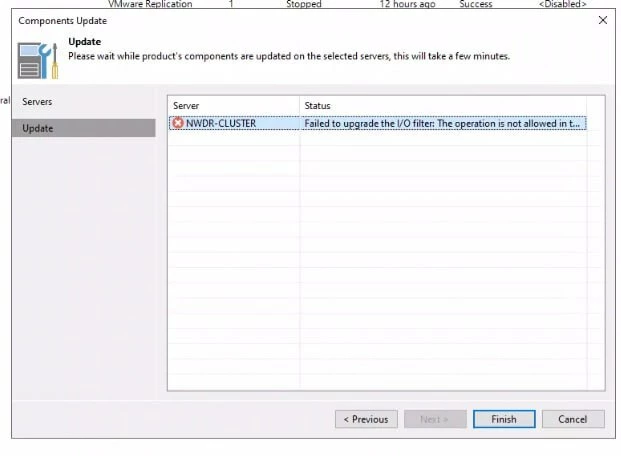
Failed to Upgrade the I/O filter (Components Update ) Veeam Versions 12.2.0

  • February 17, 2026
  • 3 comments
  • 23 views

Dear,

Have a good day!!

I would like to report an issue with Veeam Backup & Replication version 12.2.0.

I upgraded Veeam Backup & Replication from version 12.1.1 to 12.2.0. After the upgrade, I attempted to update the server components in Veeam, but the process failed, as shown in the attached picture.

Could you please assist me in resolving this issue?
 

Thank you!
 

3 comments

Mohamed Ali
Forum|alt.badge.img+2
  • VUG Leader
  • February 17, 2026

@You Menglong 

Check the DNS. Make sure the ESXi hosts, vCenter, proxies and the backup server can resolve each other correctly. Test both forward and reverse lookup.

Verify the vCenter certificate is valid and not expired.

Also confirm the required ports for the CDP components are open between VBR, vCenter and the ESXi hosts.

You can refer the Veeam KB https://www.veeam.com/kb4168


lukas.k
Forum|alt.badge.img+13
  • Influencer
  • February 17, 2026

Hi ​@You Menglong,

Please also keep in mind that this would typically be a Veeam Support case but you’re running on v12.2, the most current (and supported) v12 version is v12.3.2. Please consider upgrading to the most current v12 or the v13.0.1 to make sure to catch all security, performance and feature enhancements.


I assume that you’re trying to upgrade the I/O filter driver on a vSphere cluster? Please make sure that with the VBR version you are using the vSphere version in place is supported (for that specific release).

You can also check all the things Mohamed mentioned and additionally re-enter the vSphere credentials in VBR. In the past it happened sometimes that there were issues after a migration, credentials weren’t stored properly in the VBR config database.


Best

Lukas


  • Author
  • Not a newbie anymore
  • February 17, 2026

Dear ​@Mohamed Ali and ​@Mohamed Ali,

Thank you for your comments. I will try your suggestions.

Thank you!



