


Challenge
After upgrading a customer environment from Veeam Backup & Replication v12 to v13.0.1.1071, everything initially worked as expected. Existing SAP HANA plug‑ins on several systems (still in v12) continued to run without issues.
Problems started when we upgraded the managed HANA plug‑ins to v13 using the Protection Group. Although the upgrade completed and the plug‑in showed v13 in the GUI, backups began to fail immediately.
Error Message
Error: The issuer certificate does not have a Basic Constraints extension.
(Parameter 'issuerCertificate')
The error appeared:
- During the Protection Group rescan (post‑upgrade)
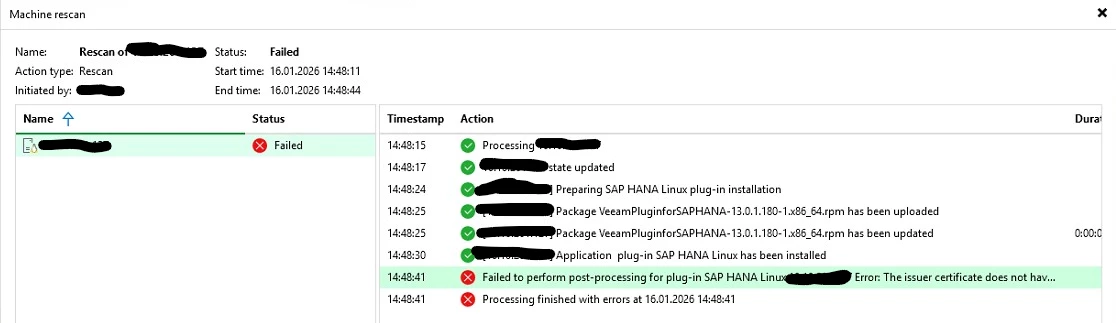
- During every backup attempt
Root Cause
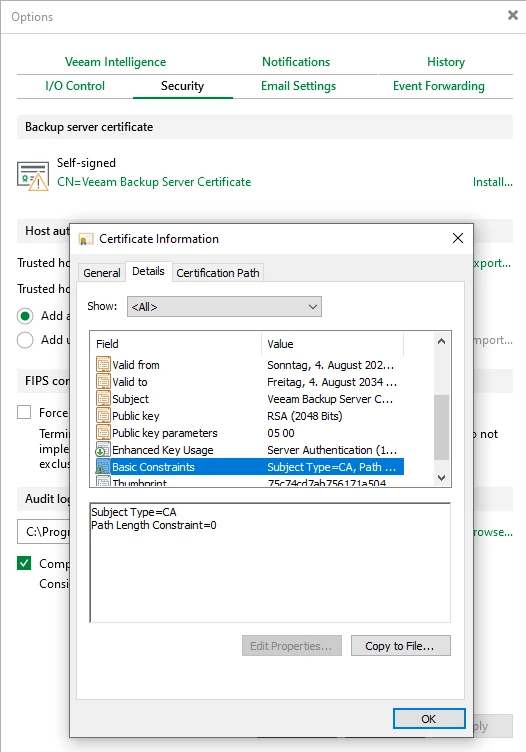
With v13, the SAP HANA plug‑in and assumedly all other enteprise plugins perform stricter certificate validation. An internal issuer certificate used for plug‑in communication was missing the required Basic Constraints (CA:TRUE) extension, which was previously tolerated in v12.
Solution
There is a KB that mentions this very error, but only relates to “Unable to Interact with Some Hypervisors and Cloud Platforms”. So first, I did not have to much attention to it.
But after regenerating the affected certificates as described in issue #2 of KB4687:
- Protection Group rescans succeeded
- SAP HANA backups worked again
- The environment was fully functional on v13
It’s easy. Just click “Install” for the backup server certificate in the general options security tab and roll out a new self-signed. This will have the additional field.
Takeaway
If your enterprise plug‑in backups fail after upgrading to v13 with a “Basic Constraints” certificate error, apply KB4687—it resolves the issue quickly and safely.




