I got this number wrong on my first pass, so this post is partly a correction to myself. While fact checking a storage economics piece, I pulled the Block Generation figure from the unstructured data immutability page: up to 10 days added on object storage. Then I found the dedicated Block Generation page giving 30 for some providers. Same user guide, different answers, and a 20 day spread between the documented values. That seemed worth running all the way down.
Short version: the feature is smart, the savings are real, and it's often missing from the capacity math I see.
What Block Generation actually is
Immutability on object storage is enforced object by object, and that creates a scale problem. A typical daily incremental reuses most of the blocks already sitting in the bucket. Veeam has walked through the math on the R&D Forums: at an ordinary daily change rate, nearly every block in a new restore point already exists in storage, so going back and pushing each one's lock forward every single day would be almost pure API spend (no one wants that).
Block Generation is the answer. Instead of managing each block's lock individually, Veeam groups blocks into generations. When a full backup lands and starts a chain, its blocks get the immutability period you configured plus the generation window on top. Every block written inside that window, full or incremental, shares one expiration date. A block offloaded on day nine expires the same moment as a block from day one, and every block in the generation still carries at least the immutability you asked for. It's automatic, and there's nothing for you to configure.
The number depends on which page you read
Here's where I went wrong, and where you can too. The v13 Backup & Replication User Guide documents Block Generation in more than one place, scoped to different features, and the values don't match (I’ll list the links at the end that were used).
For direct object storage repositories and for capacity tier, the dedicated v13 pages carry the provider split. Across them, Amazon S3, IBM Cloud object storage, and Google Cloud object storage sit in the 30-day group, and most other object storage types use 10 days.
The two pages haven't always listed the same providers, so read the one that matches the feature you're deploying.
Meanwhile the unstructured data immutability page says up to 10 days for object storage and leaves it at that. No provider split.
Step outside Backup & Replication and it keeps moving. The dedicated Agent Block Generation page gives 30 days to Amazon S3 and Google Cloud Storage and 10 days to other repository types, while companion Agent guidance adds provider and configuration specific nuances.
Veeam Backup for AWS documents 25 days. There's history here too: before 12.1.2 the value was 10 days everywhere, and Veeam raised it for the large providers specifically to cut I/O costs further.
My read is that most of this is deliberate scoping. Different features write differently, so they get tuned differently. But from where you and I sit, the practical answer is the same either way.. Don't size from memory, and don't size from the first page a search engine hands you. Read the page that matches your product, your feature, and your storage type. And if the difference funds real capacity, open a support case.
The tail it leaves on your capacity bill
Retention expiring a version does not guarantee immediate deletion. <--- Read that twice. If its associated blocks are still immutable, the restore point remains in the chain and the objects stay billable until the lock expires. Block Generation can extend that window beyond the logical retention point.
Run the documented numbers for a repository using a minimum immutability period. A 30 day setting is an effective 40 with the 10 day generation, and on S3, with its 30 day Block Generation period, the same setting works out to 60. Pick 90 because it sounded defensible in an audit and your S3 blocks can sit locked for up to 120 (oh my :)). That additional time may keep data recoverable longer, but it doesn't represent a recovery objective anyone deliberately selected or sized.
Where I'll get pushback (and rightly so)
I think most shops set immutability too long, and Block Generation is the mechanism that turns the habit into a bill. The number usually gets picked like a security setting. Someone asks how long we should lock the backups, ninety sounds safer than thirty, done.
On a hardened repository you already own, a long lock mostly consumes disk you already paid for. On metered object storage, every extra day of lock keeps billable objects in the bucket longer, and the generation window rides on top.
So pick the window from requirements you can name: what the business needs recovered and when, what regulations and contracts require you to keep locked, and how your detection timelines and tested recovery cadence actually run. Then size for the effective protection that configuration produces, with Block Generation on top.
That's not a criticism of the feature. It exists to save you API money, it does, and the behavior is documented well. My argument is with how the dial gets set, and I know plenty of security folks will land differently. Good ^^.
That's the conversation worth having before the storage is bought right?
Five checks before you trust a sizing sheet
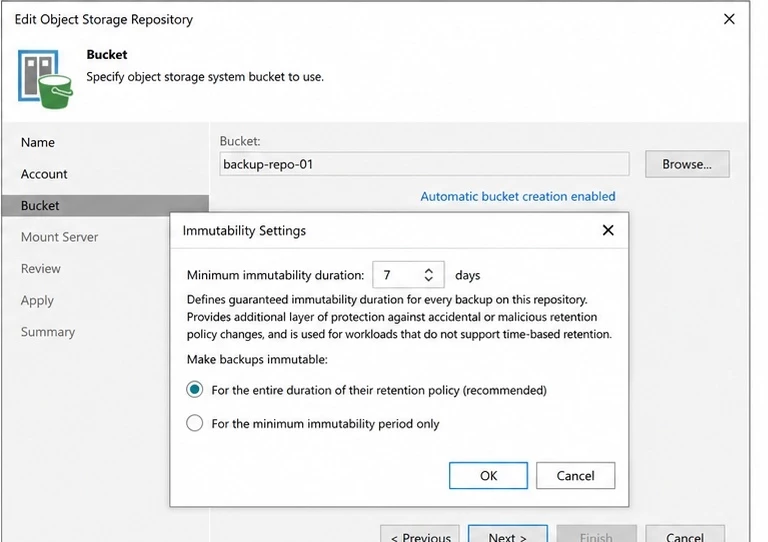
- Pull the immutability period configured on each object storage repository. The wizard, not the design doc. They drift apart, at least for me they do.
- Match the storage type to the right documentation page for the feature you're using, whether that's a direct object repository, capacity tier, or unstructured data. I worked from memory a week ago and memory lost that battle, LOL.
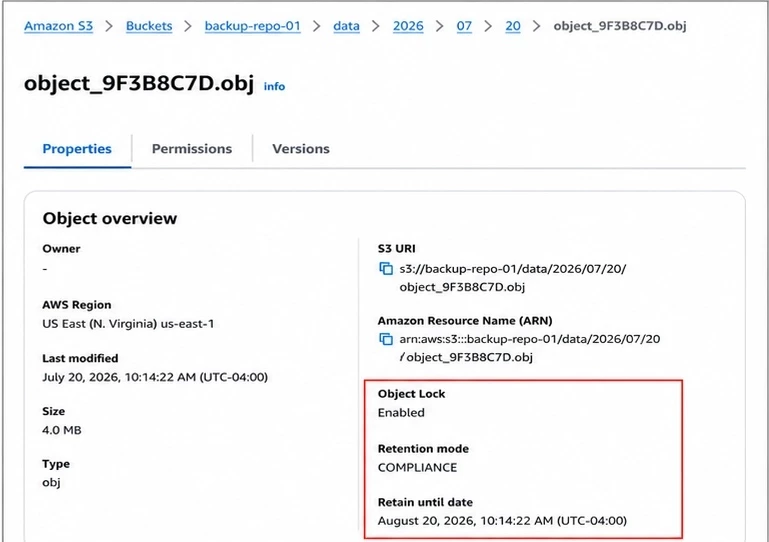
- Open a recent data object in your provider's console and put its retain until date next to its creation date. You'll likely see locking further out than your configured period alone explains at first glance. That's the real overhang in your bucket. Don't pin the whole gap on the initial generation window either, because Veeam also extends immutability on blocks that newer restore points still need, and those extensions land in the same date period.
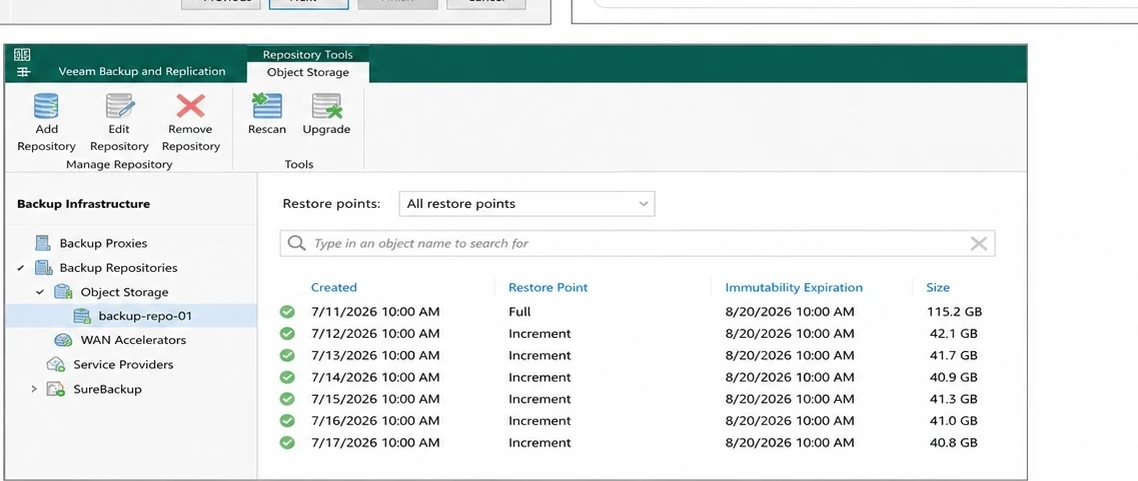
- Redo the capacity math for the mode the repository actually uses. If backups stay immutable for the whole retention policy, effective protection runs to the greater of job retention or the configured minimum, plus Block Generation.
- On a minimum immutability period, it's that period plus Block Generation. GFS, capacity tier, performance tier dependencies, and unstructured data each add their own wrinkles, so model per feature with this.
- After a retention change, watch the bucket. Now you know how long the wait is, and what the waiting costs. (Nice or maybe not nice ;))
Here are the links I pulled information from - >>
Block Generation for object storage repositories, Veeam Backup & Replication 13 User Guide. https://helpcenter.veeam.com/docs/vbr/userguide/object_storage_block_generation.html?ver=13
Block Generation for capacity tier, Veeam Backup & Replication 13 User Guide. https://helpcenter.veeam.com/docs/vbr/userguide/block_gen.html
Unstructured Data Backups in Immutable Repositories, Veeam Backup & Replication 13 User Guide. https://helpcenter.veeam.com/docs/vbr/userguide/unstructured_data_backup_in_immutable_repo.html?ver=13
Veeam blog on the Block Generation change for Amazon S3 and IBM Cloud, and the Veeam Backup for AWS value. https://www.veeam.com/blog/veeam-backup-replication-s3-immutability-block-generation.html
R&D Forums thread where Veeam explains the reasoning behind Block Generation. https://forums.veeam.com/object-storage-as-backup-target-f52/explanation-of-s3-immutability-block-generation-needed-t70527.html