Question

Special functions using "CTRL" key

  • December 2, 2024
  • 15 comments
  • 94 views

AndrePulia
Forum|alt.badge.img+9

Hello everyone,
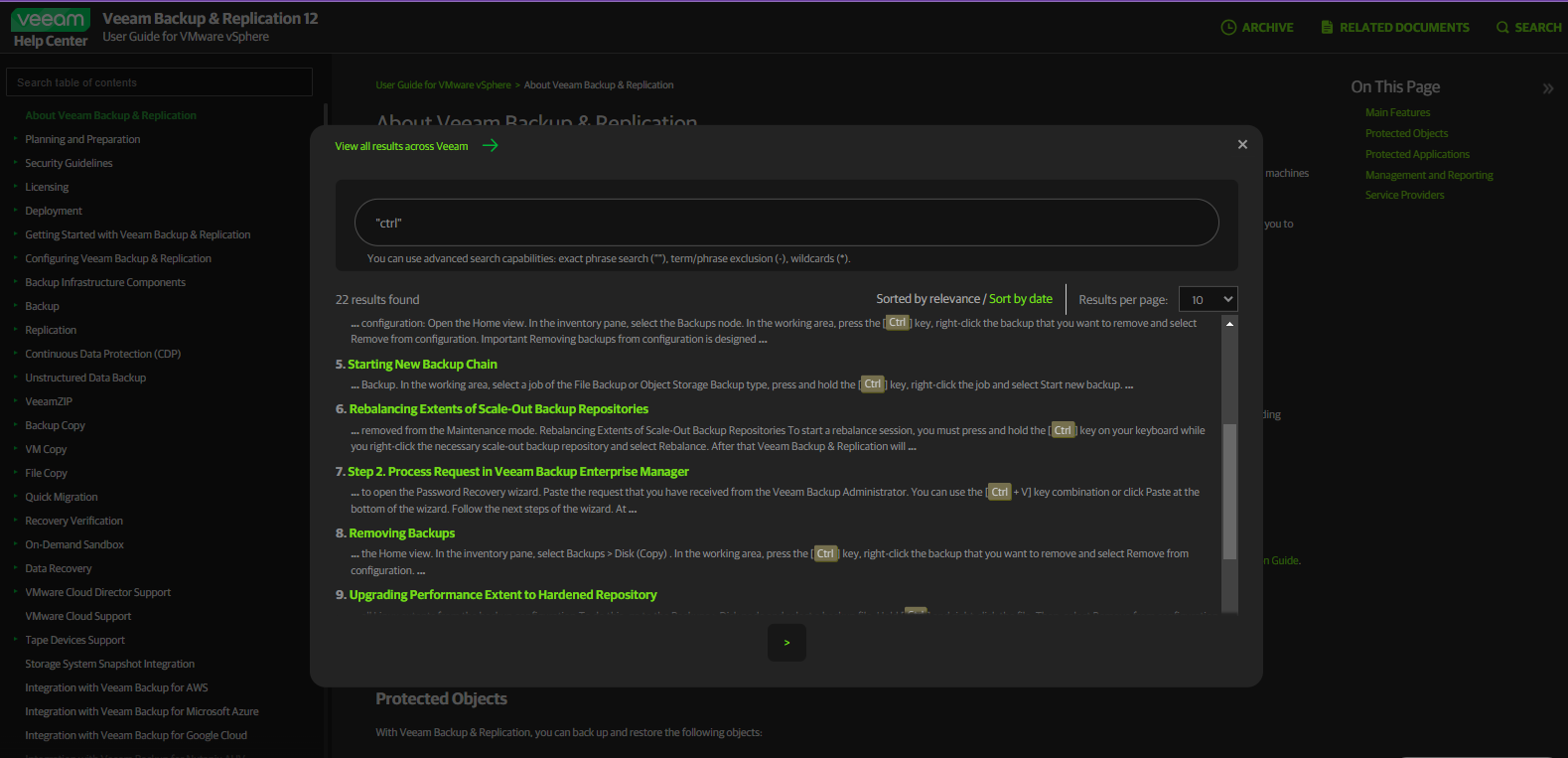
I have been looking for some options that are activated only when the "CTRL" key is used simultaneously. In a quick search on the user guide for VMware, I found 22 occurrences, but not all occurrences activate specific functions. Does anyone have a list of all the additional functions activated when using the "CTRL" key?


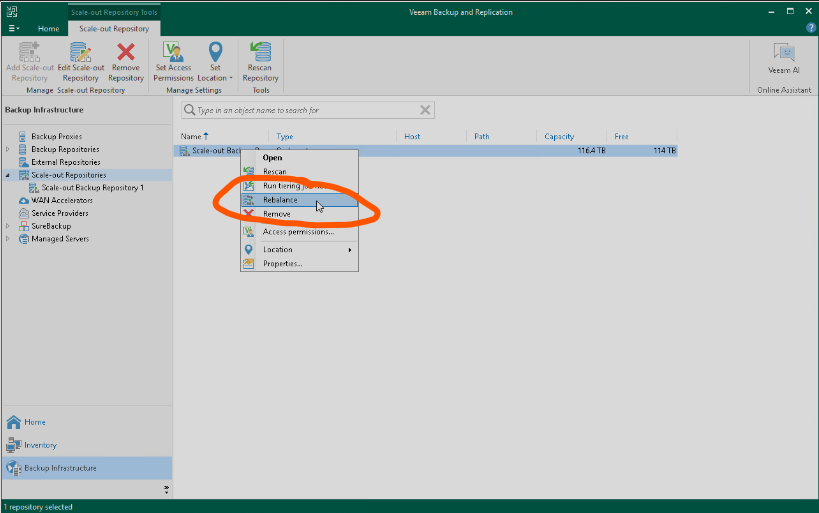
The rebalance option is available only when the “CTRL” key is used with right click pressed at the same time.


15 comments

AndrePulia
Forum|alt.badge.img+9
  • Author
  • Veeam Vanguard
  • December 2, 2024

Forgot to past the rebalance screenshot


coolsport00
Forum|alt.badge.img+21
  • Veeam Legend
  • December 2, 2024

Hi Andre - I don’t have a list myself, but am very interested in seeing what’s posted. The only one I was aware of was the Remove From Configuration option in the Home > Disk section.

Best.


Chris.Childerhose
Forum|alt.badge.img+21
  • Veeam Legend, Veeam Vanguard
  • December 2, 2024

Like Shane I don't have a list but know you can use it to run SOBR offload as well as another option.  Hopefully the community will post here to get a list going.


dloseke
Forum|alt.badge.img+8
  • Veeam Vanguard
  • December 2, 2024

It seems like most of my interactions with CTRL revolve around repositories.  Rebalance, Delete from Disk, Start Tiering job, etc.  


Mildur
Forum|alt.badge.img+12
  • Influencer
  • December 2, 2024

Delete from Disk,


Delete from disk doesn‘t require pressing CTRL. Only Remove from configuration :)


AndrePulia
Forum|alt.badge.img+9
  • Author
  • Veeam Vanguard
  • December 2, 2024

Hi Andre - I don’t have a list myself, but am very interested in seeing what’s posted. The only one I was aware of was the Remove From Configuration option in the Home > Disk section.

Best.

I see your name :-) Hi SHane, I’m starting to built the list. will share here. :-)


AndrePulia
Forum|alt.badge.img+9
  • Author
  • Veeam Vanguard
  • December 2, 2024

Like Shane I don't have a list but know you can use it to run SOBR offload as well as another option.  Hopefully the community will post here to get a list going.

Thank you Cris, I’ll build a list. :-)


AndrePulia
Forum|alt.badge.img+9
  • Author
  • Veeam Vanguard
  • December 2, 2024

Delete from Disk,


Delete from disk doesn‘t require pressing CTRL. Only Remove from configuration :)

I Think we have many others, I’ll find out. 


dloseke
Forum|alt.badge.img+8
  • Veeam Vanguard
  • December 2, 2024

Delete from Disk,


Delete from disk doesn‘t require pressing CTRL. Only Remove from configuration :)

That might be it.  It was a weird one that I had where I had restore points stored in VCC storage and they were encrypted but we didn’t have the correct encryption password so I wasn’t able to delete.  Eventually I figured out I could browse into them via the Files tab and delete them there.  Anyhow, neither here nor there...


waqasali
Forum|alt.badge.img+4
  • On the path to Greatness
  • December 3, 2024

Forgot to past the rebalance screenshot


This option is amazing to re balance SOBR.


waqasali
Forum|alt.badge.img+4
  • On the path to Greatness
  • December 3, 2024

thank you ​@AndrePulia for sharing this with us!


Scott
Forum|alt.badge.img+9
  • Veeam Legend
  • December 9, 2024

Is there any CTRL functions for VeeamONE as well? the only one I saw was rebalance SOBR, because they don’t want everyone clicking that by accident :> 


waqasali
Forum|alt.badge.img+4
  • On the path to Greatness
  • December 9, 2024

Is there any CTRL functions for VeeamONE as well? the only one I saw was rebalance SOBR, because they don’t want everyone clicking that by accident :> 


i did not find that function but if you find and if i find i will share it with you here.   


AndrePulia
Forum|alt.badge.img+9
  • Author
  • Veeam Vanguard
  • December 9, 2024

Thank you Waqas!


waqasali
Forum|alt.badge.img+4
  • On the path to Greatness
  • December 9, 2024

Thank you Waqas!

you are welcome dear ​@AndrePulia have a nice day!