Veeam retention

  • January 26, 2024
  • 27 comments
  • 1203 views

Forum|alt.badge.img+1

We have veeam backup job running and retention period is 14 days. However I see there is data for the backup job for over 20 days. What file is missing from the backup file list that is causing this issues. 
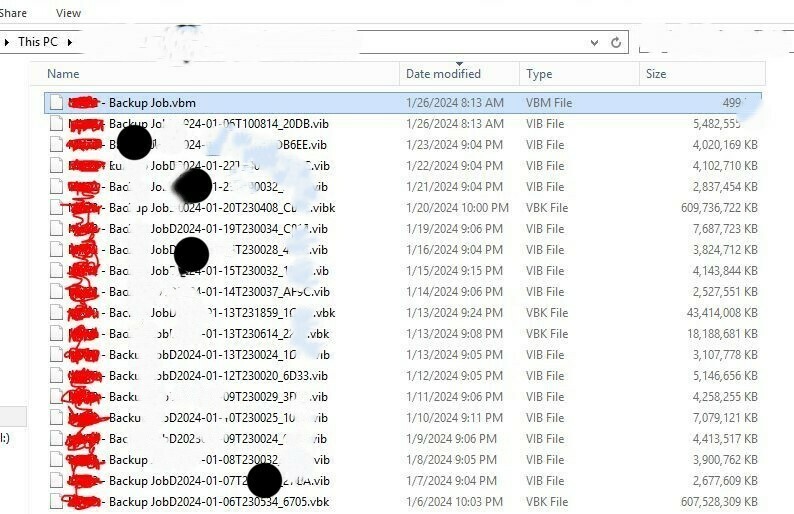
Anything you can see that is missing?

27 comments

coolsport00
Forum|alt.badge.img+21
  • Veeam Legend
  • January 26, 2024

This very well may be accurate because of the job Mode you're using. Are you taking occasional Full backups? Synthetic or Active in your Storage section > Advanced area? If so, you're running Fwd Incremental and your job has to retain older backup files to meet your retention. You need all files in a chain to perform restore operations. 


coolsport00
Forum|alt.badge.img+21
  • Veeam Legend
  • January 26, 2024

You can read more about Backup Retention here:

https://helpcenter.veeam.com/docs/backup/vsphere/backup_methods.html?ver=120

If you're referring to something different than what I explained, please elaborate/clarify. 


Chris.Childerhose
Forum|alt.badge.img+21
  • Veeam Legend, Veeam Vanguard
  • January 26, 2024

You can review the retention settings for Veeam and there are links to each job type at the bottom of this page as well - Short-Term Retention Policy - User Guide for VMware vSphere (veeam.com)


coolsport00
Forum|alt.badge.img+21
  • Veeam Legend
  • January 26, 2024

Veeam has a great KB post animating how retention works. Good stuff! See the links at the bottom for each method. 

https://www.veeam.com/kb1799


dloseke
Forum|alt.badge.img+8
  • Veeam Vanguard
  • January 29, 2024

More than likely this is as it should be, but it would be helpful if we saw what your retention policy is.  I’m confused as to why there are two full backup files on the 13th, and then only 4 incrementals, no backups on the 17th or 18 (failures?), etc. Also, if your keeping only 20 days of backups, but you have GFS retention such as keeping monthly backups for a set amount of time, etc, then it’s going to need to keep more restore points than what you have configured in order to keep a valid backup chain to transforming into those restore points assuming synthetic fulls, etc.  It’s hard to fully know what is going on here without seeing the job logs, backup retention policies, etc.  In general, I don’t get to concerned about the actual backup files though as long as I’m seeing successful backups and restore point maintenance.  And as long as you’re not looking at this due to space issues, etc.  


Scott
Forum|alt.badge.img+10
  • Veeam Legend
  • January 29, 2024

Looking at this, and the dates, this looks right. 14 days is the minimum retention. You can’t have an incremental without the active full.  I don’t know all your settings, but others have posted the retention policies and how they work.

As an example, If I ran a weekly full with incremental, and my retention was set to 8 days, Even on the 9th day running this job it can’t just delete the active full from day one or that whole week would be invalid and I’d only have 2 valid restore points. 


coolsport00
Forum|alt.badge.img+21
  • Veeam Legend
  • February 7, 2024

Hi @csaha77 -

Were any of the comments helpful with your retention query? If not, what other questions do you have? If anything was beneficial in helping you with your retention question, please mark a comment as ‘Best Answer’ so others who may come across your post with the same query are able to see what was done to best answer issues/questions on retention.

Thank you!


Chris.Childerhose
Forum|alt.badge.img+21
  • Veeam Legend, Veeam Vanguard
  • February 7, 2024

Hi @csaha77 -

Were any of the comments helpful with your retention query? If not, what other questions do you have? If anything was beneficial in helping you with your retention question, please mark a comment as ‘Best Answer’ so others who may come across your post with the same query are able to see what was done to best answer issues/questions on retention.

Thank you!

This was not a question thread 😉


coolsport00
Forum|alt.badge.img+21
  • Veeam Legend
  • February 7, 2024

@Chris.Childerhose - oops! haha Thank you, sir 😁

Obviously just going through the non-answered ones to ‘clean up’ things 😉


  • New Here
  • August 27, 2024

Where does one go to troubleshoot cases where the retention policy does not actually delete older backups? Something seems to have corrupted my backup chain to where the older backup files have not been deleted, and now I’m out of space thus causing the backups to now fail.


coolsport00
Forum|alt.badge.img+21
  • Veeam Legend
  • August 27, 2024

@NAI.rich - Veeam Support 


Scott
Forum|alt.badge.img+10
  • Veeam Legend
  • August 27, 2024

Where does one go to troubleshoot cases where the retention policy does not actually delete older backups? Something seems to have corrupted my backup chain to where the older backup files have not been deleted, and now I’m out of space thus causing the backups to now fail.

Veeam support, but this could be due to a number of reasons.


Perhaps it was unable to delete an old backup as it was already out of space not allowing it to merge. Veeam requires free space for these operations. 


  • New Here
  • August 27, 2024

There are some restore points as old as 5 years, so it isn’t due to lack of space.  There are orphaned restore points, but I don’t know which I can safely delete.  I tried deleting once before and lost the entire backup chain and had to start all over.

That said, I have initiated a support case with Veeam Support - thanks @coolsport00 and @Scott for responding so quickly!


coolsport00
Forum|alt.badge.img+21
  • Veeam Legend
  • August 27, 2024

@NAI.rich - no problem. If you don’t mind...be interested in hearing what Support has to say, and how they resolve your issue.


Scott
Forum|alt.badge.img+10
  • Veeam Legend
  • August 27, 2024

Good call. That is your best bet. You will have to make or add space either way, but what I was getting at is backup file merge for retention processing requires scratch space.   Support are always the best choice when your having a serious issue. Good luck and let us know what you find out. 


  • New Here
  • August 28, 2024

Haven’t gotten a response back on my case yet, but I was able to determine that the backup chains start with the synthetic fulls, and the rest of the chain are the incrementals.  I verified the oldest part of the complete chain, and moved all the older files to a temp location, rescanned the repo, watched the restore points go down to their normal configured number, and deleted the temp location.  I successfully validated I can still retrieve backups from the earliest part of the chain, so the issue is now resolved with the freed space allowing backups to continue normally.


coolsport00
Forum|alt.badge.img+21
  • Veeam Legend
  • August 28, 2024

@NAI.rich - glad to hear you got it sorted. Thanks for sharing what worked for you. 


Chris.Childerhose
Forum|alt.badge.img+21

Haven’t gotten a response back on my case yet, but I was able to determine that the backup chains start with the synthetic fulls, and the rest of the chain are the incrementals.  I verified the oldest part of the complete chain, and moved all the older files to a temp location, rescanned the repo, watched the restore points go down to their normal configured number, and deleted the temp location.  I successfully validated I can still retrieve backups from the earliest part of the chain, so the issue is now resolved with the freed space allowing backups to continue normally.

Great to hear you were able to resolve the issue and thank you for sharing the solution to better help the community.


  • New Here
  • February 25, 2025

Hi,

I Have the same probleme, Retention is not respected, backup files continue to accumulate in the repository. 
Veeam b&R v 12.1.2

Any Solutions Please.

Regards,


Chris.Childerhose
Forum|alt.badge.img+21
  • Veeam Legend, Veeam Vanguard
  • February 25, 2025

Hi,

I Have the same probleme, Retention is not respected, backup files continue to accumulate in the repository. 
Veeam b&R v 12.1.2

Any Solutions Please.

Regards,

Did you try the solutions in this thread?  Also you can try also upgrading to 12.3 which is the latest release.  Otherwise contact support and open a support ticket.


matheusgiovanini
Forum|alt.badge.img+7

Hi,

I Have the same probleme, Retention is not respected, backup files continue to accumulate in the repository. 
Veeam b&R v 12.1.2

Any Solutions Please.

Regards,

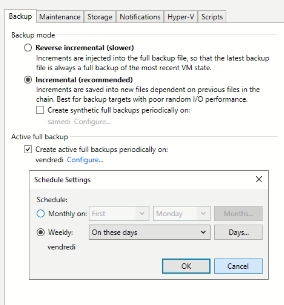
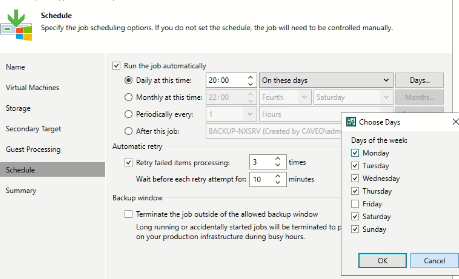
You should check the job configuration. If a full backup is scheduled to run on a specific day but is not executing, the retention policy won’t be applied properly, and backup files will continue accumulating.

Could you share your job settings so we can help troubleshoot?


  • New Here
  • February 26, 2025

Hi,

I Have the same probleme, Retention is not respected, backup files continue to accumulate in the repository. 
Veeam b&R v 12.1.2

Any Solutions Please.

Regards,

You should check the job configuration. If a full backup is scheduled to run on a specific day but is not executing, the retention policy won’t be applied properly, and backup files will continue accumulating.

Could you share your job settings so we can help troubleshoot?

thank you for your response
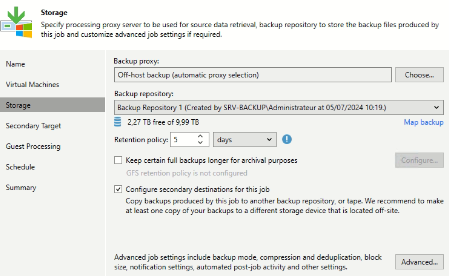
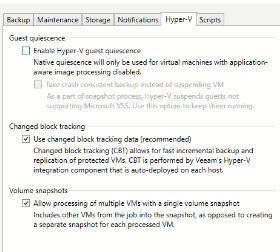
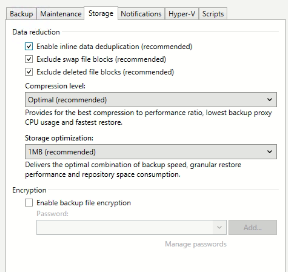
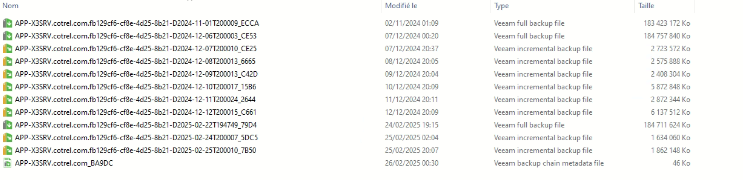
Please find attached the photos of the backup configuration.
knowing that all backups do not exceed 5 days of data retention.


Chris.Childerhose
Forum|alt.badge.img+21
  • Veeam Legend, Veeam Vanguard
  • February 26, 2025

Based on your screenshots (the last one showing the chains) it appears that the Full that starts on Feb 24th is a new chain and the rest are either from a previous chain that is possibly broken.  I would let the 5 days retention go by and see if the chain with this starting full on the 24th cleans itself up.  If so then the other restore points will not be removed is my guess and you may need to clean them up manual.

The easiest way to check would be to try and restore from any of those restore points listed and if you cannot then the chains are broken.


Dynamic
Forum|alt.badge.img+13
  • Veeam Vanguard
  • February 26, 2025

I’m with Chris, it looks like this job or chain has issues. 
Otherwise why there are no backups in between december 12th, and february 24th.

Can you give us some more informations?


matheusgiovanini
Forum|alt.badge.img+7

It looks like there was a failure in applying the retention process for the old backup chain, causing some data to remain that should have already been deleted. Are the jobs running with any errors, or was there a failure at some point near the end of last year?

You can check if Veeam still recognizes these files by going to Home > Backups > Disk and right-clicking on the job associated with these files.