Is this specifically related to Veeam Recovery Orchestrator @Fvinas ? If not then we can get this moved to the Discussion board for broader help and guidance.
@Madi.Cristil@safiya -- If this is not related to VRO specifically can we move it to Discussion board as a question?
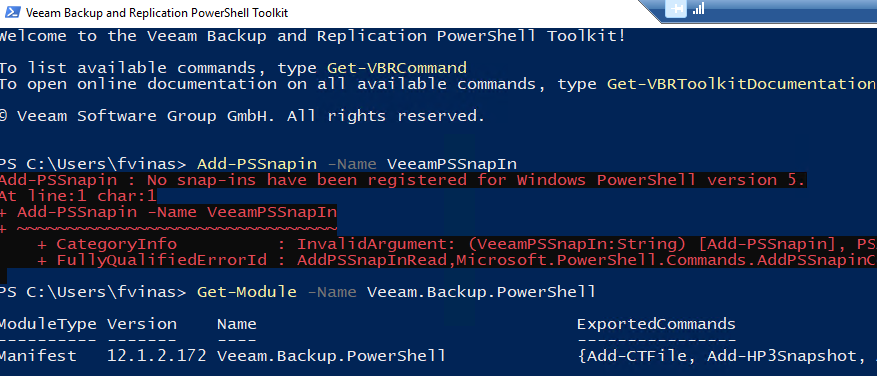
I have been looking at some information within the Veeam documentation, but it could not move forward due to some errors according to images.

This error usually means that you are running PowerShell from a system that does not have Veeam installed or requires that you install the Console at least to register with PowerShell to run commands.
Por supuesto, ya he estado viendo la documentacion al repecto. Add-PSSnapin -Name VeeamPSSnapIn no esta registrado y si trato de registrarlo no hace nada.
Please re-read my comment above where I explained the snap in was replaced with a module in v11, as you have the module you simply need to run “Connect-VBRServer” cmdlet
Por supuesto, ya he estado viendo la documentacion al repecto. Add-PSSnapin -Name VeeamPSSnapIn no esta registrado y si trato de registrarlo no hace nada.
Hola @Fvinas,
Como ya te han comentado varios compañeros el comando “VeeamPSSnapIn” desde la versión v11 de Veeam no es utilizado. Ahora en la versiones recientes se utiliza el comando Import-Module para inicializar los cmdlet de Veeam aunque en mi experiencia los módulos son cargados automáticamente.
Ya había comentado que no tengo mucho expertos sobre el tema, y es por eso que estoy en la comunidad, para ver cómo puede ayudar la asistencia por parte de todos, ahora bien, ya había dicho que necesito restaurar las base de datos de algunas tenares de SQL que tengo en mi plataforma para de esta manera el DBA al mismo tiempo también haga la automatización por su parte.
He visto algunos ejemplos de como ir viendo los diferentes comandos, pero no he llegado a concluir nada.
Sería un poco difícil desarrollar una solución de automatización desde este portal. Te recomiendo que utilices el Foro de Veeam donde estoy seguro que encontrarás las respuestas que buscas.
@Fvinas, sorry for English, but as I get it you need a script to restore SQL DBs via Powershell, correct?
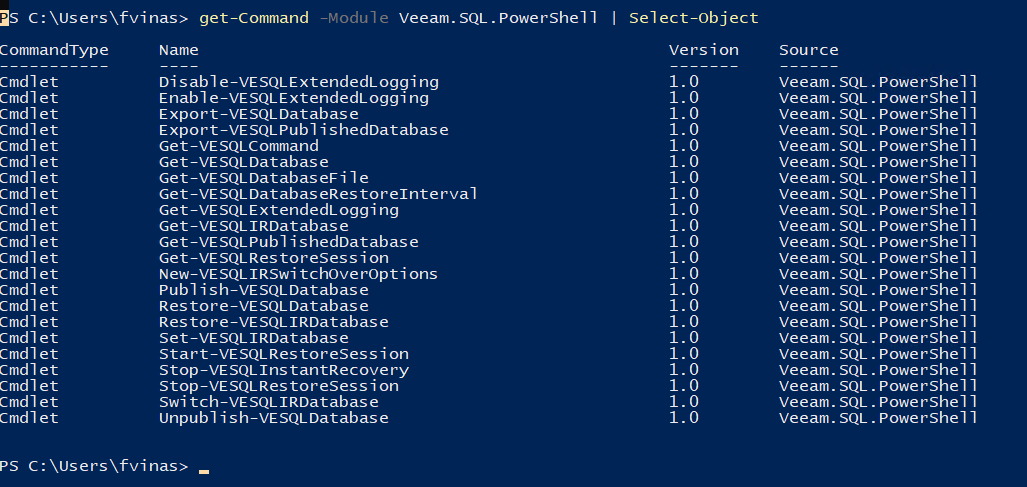
I wrote this for a case a bit back but you can use it as a reference. You _CAN_ customize this a lot and use additional features based on the cmdlets, but this basic workflow should help:
$sqlRP = Get-VBRApplicationRestorePoint -SQL -Name "name of the restore point as shown in the UI" $session = Start-VESQLRestoreSession -RestorePoint $sqlRP $dbToRestore = Get-VESQLDatabase -Session $session -Name "name of the database to restore" $files = Get-VeSqlDatabaseFile -Database $dbToRestore $paths = @{"C:\Full\Path\To\New\File\Location.mdf","C:\Full\Path\To\New\File\Location_log.ldf") #only needed if you want custom paths for MDF/LDF files. Your DBA can tell you if this is needed Restore-VESQLDatabase -Database $dbToRestore -File $files -TargetPath $paths -GuestCredentials [PSCredentialObject] -SqlCredentials [PSCredentialObject]
This is the basic workflow.
1. Start by fetching the necessary VBRApplicationRestorePoint object and save it to a variable. This will return an array of all restore points, so you will likely need to sort the list by passing the results of Get-VBRApplicationRestorePoint | Sort-Object -Property CreationTime -Descending. This will ensure the most recent restore point is the first one.
2. Start a VESQLRestoreSession using the desired restore point. To use the first restore point in an array, you would use [0], e.g., Start-VESQLRestoreSession -RestorePoint $sqlRP[0]
3. Locate the database you intend to restore with Get-VESQLDatabase.
4. Save the files returned by Get-VESQLDatabaseFile to a variable -- likely you will want to parse out the actual filenames from the returned data to build your paths in the next step.
5. (optional if you don’t want to change the location of MDF/LDF) The $paths variable accepts an array of the full paths that you want to restore to. In my example above, the restore would place the files on C:\Full\Path\To\New\File\ with the respective names for the MDF and LDF files.
6. Start the restore with Restore-VESQLDatabase. The [PSCredentialObject] must be built using the native Powershell tooling to build a credential -- this is a rather manual process, but many credential managers have integration with Powershell that allows Powershell to get [PSCredentialObject] into the shell. To do this manually, we would use something like:
$pass = ConvertTo-SecureString "Abc123$%" -AsPlainText -Force #the password does not _have_ to be in plain text in a script, it can for example be taken from a secured file on the Veeam Server to avoid passwords in plaintext.
The process listed above is an example of how to perform the restore to custom location; logic for correctly setting the servers, filenames, new database names, and further will need to be discussed and worked on within your team as this will need to be customized to your needs and environment.
Hello, @mascara I have not taken any action yet, but if it is possible to see the idea of what I want to do since I am only the one who manages the backups, not the APPLICATION DATABASE, to see if you can help me with this, not with the restoration. It is necessary for me to enter the credentials from the SQL admin, I only need to remove the databases from the Veeam backup repository and place them on another server, and from that location the dba will do its restorations. If this Script is modified, how would it be without that part of the credentials, put the other server into operation and everything that involves the start-up. I just needed to take out the last backup of that database and place it on another server.