CrowdStrike update causing BSOD for systems running Microsoft Windows: report

  • July 19, 2024
  • 14 comments
  • 340 views

Link State
Forum|alt.badge.img+11

hi all,

a crwod strike update causes a BSOD loop of Windows systems.

CrowdStrike update causing blue screen error for systems running Microsoft Windows: report (local12.com)

  1. Boot Windows into Safe Mode or the Windows Recovery Environment


  2.  

    Navigate to the C:\Windows\System32\drivers\CrowdStrike directory


  3.  

    Locate the file matching “C-00000291*.sys”, and delete it. 


  4. Boot the host normally. 

14 comments

coolsport00
Forum|alt.badge.img+21
  • Veeam Legend
  • July 19, 2024

Eeek! Thanks for sharing! 


Dynamic
Forum|alt.badge.img+13
  • Veeam Vanguard
  • July 19, 2024

thanks for sharing this, a few of my customers and colleagues are running in this issue this morning.


Chris.Childerhose
Forum|alt.badge.img+21

Saw this in the news this morning. Notified my security team as I think we use it on some servers.  Thanks for sharing here as well.


coolsport00
Forum|alt.badge.img+21
  • Veeam Legend
  • July 19, 2024

I forgot we are testing CS out before implementing it. We had the agent on a handful of systems to test….which of course I had to fix this morning 🙄


Chris.Childerhose
Forum|alt.badge.img+21

Whew!  We did have this installed in two DCs but have since replaced it with Carbon Black.  So we are not affected. 😁


wolff.mateus
Forum|alt.badge.img+11
  • Veeam Vanguard
  • July 19, 2024

Some customers were tremendously affected. 

Until the real problem was discovered, it was necessary to return some backups here.


coolsport00
Forum|alt.badge.img+21
  • Veeam Legend
  • July 19, 2024

Whew!  We did have this installed in two DCs but have since replaced it with Carbon Black.  So we are not affected. 😁

Close call! Remediation isn't too bad aside from it being a manual process. The OS file system is still reachable via admin$ so you can log into an unaffected system then remote to those affected & remove the problem .sys file. Bright side 😁


coolsport00
Forum|alt.badge.img+21
  • Veeam Legend
  • July 19, 2024

Some customers were tremendously affected. 

Until the real problem was discovered, it was necessary to return some backups here.

😳😳


Chris.Childerhose
Forum|alt.badge.img+21

For any wondering this is the workaround on affected systems or as Shane stated remotely from a working system to the admin$ share -

Workaround Steps:

  1. Boot Windows into Safe Mode or the Windows Recovery Environment
  2. Navigate to the C:\Windows\System32\drivers\CrowdStrike directory
  3. Locate the file matching “C-00000291*.sys”, and delete it.
  4. Boot the host normally.

Link State
Forum|alt.badge.img+11
  • Author
  • Veeam Legend
  • July 19, 2024

For any wondering this is the workaround on affected systems or as Shane stated remotely from a working system to the admin$ share -

Workaround Steps:

  1. Boot Windows into Safe Mode or the Windows Recovery Environment
  2. Navigate to the C:\Windows\System32\drivers\CrowdStrike directory
  3. Locate the file matching “C-00000291*.sys”, and delete it.
  4. Boot the host normally.

hi @Chris.Childerhose i had already posted the solution 😛

Here many impacted customers, all windows systems in BSOD were not responding in network. 
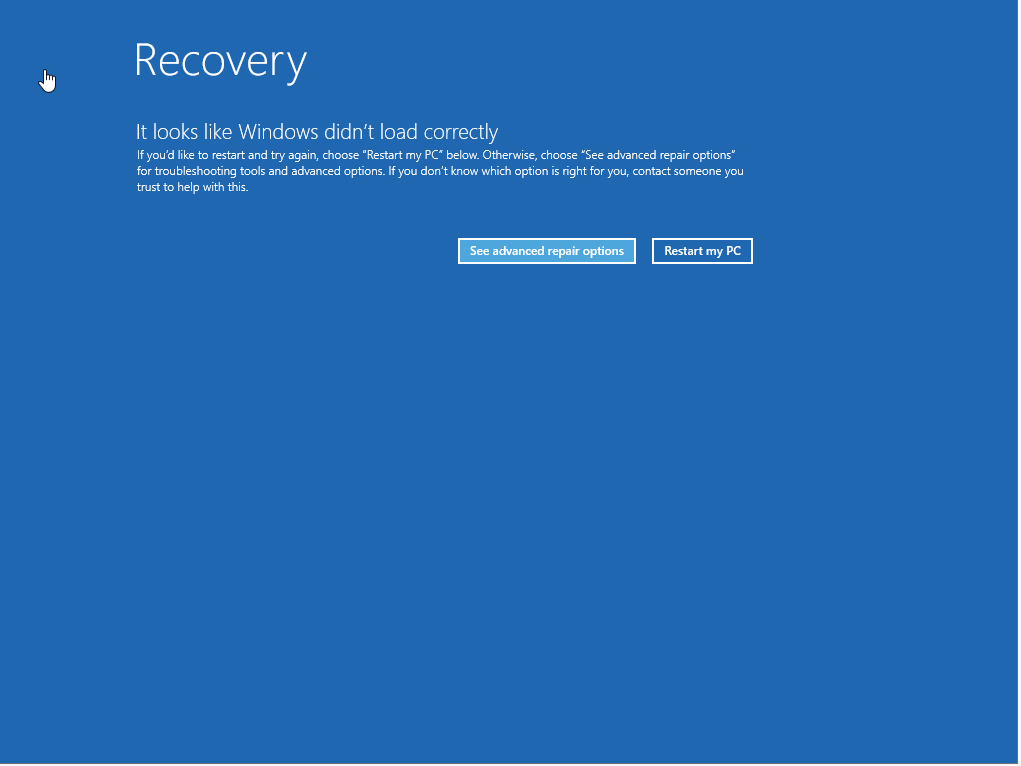
All O.S. Windows were in this condition similar to this sshot, no adminshare available. 😫


ragards


Chris.Childerhose
Forum|alt.badge.img+21

For any wondering this is the workaround on affected systems or as Shane stated remotely from a working system to the admin$ share -

Workaround Steps:

  1. Boot Windows into Safe Mode or the Windows Recovery Environment
  2. Navigate to the C:\Windows\System32\drivers\CrowdStrike directory
  3. Locate the file matching “C-00000291*.sys”, and delete it.
  4. Boot the host normally.

hi @Chris.Childerhose i had already posted the solution 😛

Here many impacted customers, all windows systems in BSOD were not responding in network. 
All O.S. Windows were in this condition similar to this sshot, no adminshare available. 😫

ragards

Ah sorry I did not go back to the OP.  Oops my bad.  😋😂

Guess it doesn’t hurt to have it twice.  😆


coolsport00
Forum|alt.badge.img+21
  • Veeam Legend
  • July 19, 2024

For any wondering this is the workaround on affected systems or as Shane stated remotely from a working system to the admin$ share -

Workaround Steps:

  1. Boot Windows into Safe Mode or the Windows Recovery Environment
  2. Navigate to the C:\Windows\System32\drivers\CrowdStrike directory
  3. Locate the file matching “C-00000291*.sys”, and delete it.
  4. Boot the host normally.

hi @Chris.Childerhose i had already posted the solution 😛

Here many impacted customers, all windows systems in BSOD were not responding in network. 
All O.S. Windows were in this condition similar to this sshot, no adminshare available. 😫


ragards

I had that screen too @Link State . I did have admin share, but maybe because I went into ‘advanced options’. Not directly from this screen did I have admin$. Apologies for any confusion. Again..appreciate your post.


coolsport00
Forum|alt.badge.img+21
  • Veeam Legend
  • July 19, 2024

I was even able to restart a couple VMs and it went to the login screen. Though, that may not be the norm. 🤷🏻‍♂️


Link State
Forum|alt.badge.img+11
  • Author
  • Veeam Legend
  • July 23, 2024