Question

moving 80+ TB to Tape using 1 GFS tape job, Takes 3 DAYS TO COMPLETE. is there a better way?

  • May 12, 2026
  • 7 comments
  • 37 views

in this configuration we run daily incrementals (Monday thru Friday) to disk (Linux Repository)

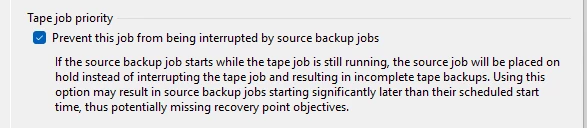
on Saturday Morning (just after Midnight) we start our Tape Backups job,(there is only 1 job that looks at the entire repository)  it is a GFS job that Generates synthetic full backups for Weekly / Monthly retention.  the HP Library target contains 2 LT08 Tape drive that are streaming at about 540MB/Sec.  This would probably be acceptable with the exception of one 42 TB file server (starts about 1/3 of the way through the job and grabs one tape drive for 50 Hours+.)   This causes the Overall tape Backup to run up to 76 Hours.  Spilling into the next days incremental Jobs.   I’m considering a change to the Daily’s Backups jobs  to have them Generate Weekly Full backups on the repository, and then use Tape Copy Jobs to move the Full backups to tape?  is it worth the effort?  is it Supported?

7 comments

Chris.Childerhose
Forum|alt.badge.img+21

The other way would be to split the data to separate jobs for backup.  Sending that much via one job would take long as you have shown.


Forum|alt.badge.img+3
  • Experienced User
  • May 12, 2026

Regrettably there is no means to utilize multiple drives for a single backup, so that larger FileServer will tie up one of the drives while it writes. At max drive speed for LTO8 that’s at least 33 hours.

I would advise against the periodic fulls to disk, it won’t meaningfully help here with the tape-out, and in fact, Virtual Full backups for tape are typically faster than direct copies of full backups (and you save storage space as well)

Few suggestions:

  1. Check the bottleneck on the job -- you mention your two drives typically max out at 540 MB/s, but likely you can eke out some more here (360 per drive is max)
    1. If bottleneck is tape drives, then test with a full write test (without compression) with your tape vendor’s native tools, see if they reach closer to peak
    2. If bottleneck is elsewhere, best to investigate with Veeam Support to determine why the bottleneck is happening
  2. You won’t be able to do much easily to fix the initial full backup of the File Server, but subsequent fulls are best served by Virtual Full Backups for Tape
    1. You will still be limited to one drive here, but Virtual Full should reduce if not eliminate source as bottleneck

Outside of that, only thing I can think of is more drastic, and it involves changing how you backup the File Server. If the fileserver has multiple disks that can be backed up independently of each other (i.e., not spanned disks), then you can do the following:

  1. N primary backup jobs for N disks you want to protect, include only the desired disk
    1. Name the jobs appropriately
  2. Add each primary job as a source job to the tape job
  3. Enable parallel processing in the media pool the tape job will use

This will let you “split” the workload across the two tape drives a bit more easily, but naturally this means recovery is a bit more of a pain since each job only has one disk, so you would only do disk restores or file level restores effectively. In a full DR event for the FileServer, restore the OS disk to a VM, then restore the individual disks from each backup.


Jean.peres.bkp
Forum|alt.badge.img+8

I would do it like this:

1 – Move GFS creation to disk

2 – Use Tape Copy Jobs (not GFS from repository)

3 – Split workloads strategically

4 – Improve tape drive utilization


Current Design Improved Design
1 huge GFS job Multiple Tape Copy Jobs
GFS computed during tape GFS pre-built on disk
Repo-wide scan Job-based processing
Sequential bottlenecks Parallel processing
Long tail (42 TB server) Isolated workload

Forum|alt.badge.img+1
  • Comes here often
  • May 12, 2026

Investing in 10 Gbps L3 switches and setting up trunks that can span across multiple ports.    I would do 40-100 Gbps Trunk.  You will need multiple LTO 9 tape drives to handle that much bandwidth.


Our data center at work has 120 Gbps (12 x 10 Gbps NICs) in a team.   The tape server have 3 LTO 5 tape drives with 6 x 10 Gbps NICs (one on each subnet).   Each tape drive can get 7-8 GB/min backup performance.   You could go to even faster networking.  I have heard of 100 Gbps L3 switches.  Way above our budget.


Chris.Childerhose
Forum|alt.badge.img+21

Investing in 10 Gbps L3 switches and setting up trunks that can span across multiple ports.    I would do 40-100 Gbps Trunk.  You will need multiple LTO 9 tape drives to handle that much bandwidth.


Our data center at work has 120 Gbps (12 x 10 Gbps NICs) in a team.   The tape server have 3 LTO 5 tape drives with 6 x 10 Gbps NICs (one on each subnet).   Each tape drive can get 7-8 GB/min backup performance.   You could go to even faster networking.  I have heard of 100 Gbps L3 switches.  Way above our budget.

Damn that is some speed for tape.  🫪


Forum|alt.badge.img+1
  • Comes here often
  • May 12, 2026

It is all due to the 60 Gbps NICs that are split between subnets.   


AndrePulia
Forum|alt.badge.img+9
  • Veeam Vanguard
  • May 13, 2026

@knorman I would double-check the library itself to verify whether the drives are working properly. Try using the library tools to simulate a workload and check if the library is performing as expected. If you have an HPE library, you can use the Library and Tape Tools (L&TT).