

Veeam Backup & Replication 13.0.2

Let's talk Veeam Backup & Replication 13.0.2

Madi.Cristil
Forum|alt.badge.img+8

Veeam Backup & Replication 13.0.2 has officially landed.

While this isn't a feature-heavy release, it is an important one from a security perspective, addressing a couple of recently disclosed vulnerabilities.

For those already running V13, I'd recommend taking a look at the release notes and planning the upgrade.

Curious to hear from the community:

  • Have you already upgraded?
  • Any observations from your lab or production environments?
  • What's your typical process for validating VBR updates before rollout?
  • Any advice for the ones that are planning to upgrade?

Let's discuss! 

16 comments

Chris.Childerhose
Forum|alt.badge.img+21

I have upgraded my HomeLab already as that is how I tend to test things for work but also within our production lab too.  I have also upgraded our production VSPC servers and VONE as well.

No bad things observed so far.  We also need to update our lab as we have our own tool that ThinkOn created which ties in to the Veeam systems for deployment, billing, etc so it something I need to ensure works.

We are though holding off this update as it mainly affects the VSA install and I have only converted four of our windows releases over so far.  We will keep an eye on thngs and plan updates as needed.  The VSA servers will automatically update with the new settings which takes care of them.

Recommend to read the release and security notes for this release then take the required actions your organisation needs.


Marcel.K
Forum|alt.badge.img+12
  • Veeam Legend
  • June 1, 2026

I got echo in LinkedIn as i am following our v100 members.

Upgrade from 13.0.1 Windows VBR was fluent - no issues like not starting services, broken Veeam service broker, not starting console like on previous version.

Upgrade  from 13.0.1 VSA VBR was provided automatically by our local mirrored repository.

Tests of all parts, which are used, will be done in couple of next days - so i will inform you :)


eblack
Forum|alt.badge.img+2
  • Influencer
  • June 1, 2026

Running it fully in prod after testing. It’s an improvement for us. 


Dynamic
Forum|alt.badge.img+13
  • Veeam Vanguard
  • June 1, 2026

So far so good regarding the automatic update of the VSA – but please keep your dependencies in mind.

For example, this recently happened to me (fortunately only in my lab environment):

A couple of weeks ago my Windows-based VBR 13.0.1 was migrated to the VSA appliance with the help of support.
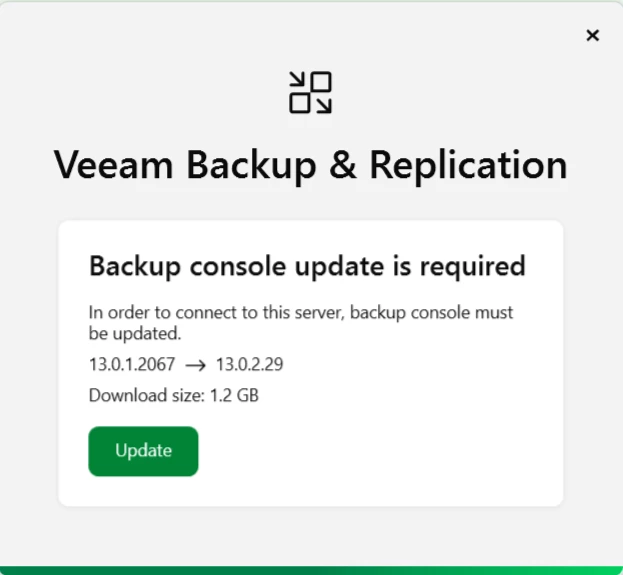
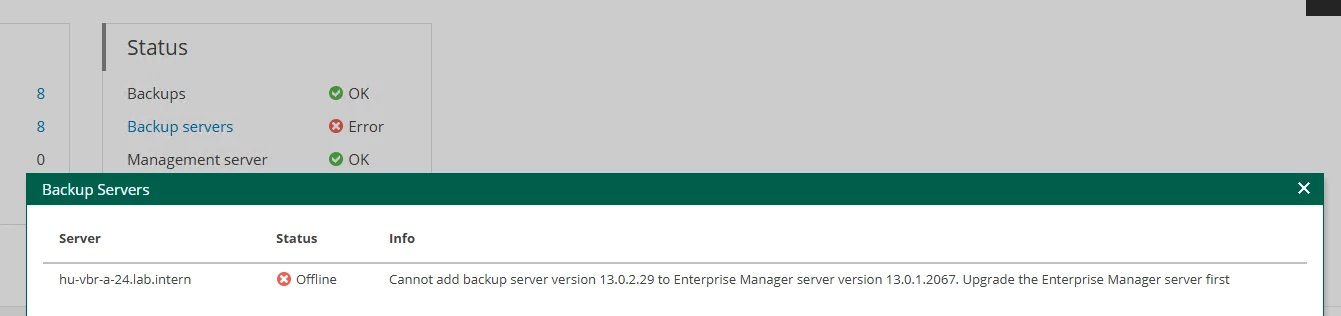
A few days ago, the appliance was automatically updated to 13.0.2. However, my existing VBEM (still running on Windows) was still on version 13.0.1 and could no longer connect to VBR 13.0.2.


Not a big deal to update VBEM to 13.0.2 and regain access – but in a production environment, you would normally update this beforehand, including Veeam ONE as well.

I’m just setting up a short blogpost about this as well! So, stay tuned.


Chris.Childerhose
Forum|alt.badge.img+21

Definitely a good thing to check other dependencies and components, but who needs VBEM anyway. 😋🤣


kciolek
Forum|alt.badge.img+5
  • Influencer
  • June 1, 2026

I’ve upgraded on all the Veeam (Linux & Windows) and my lab. No issues, and was very straightforward upgrade. 


Dynamic
Forum|alt.badge.img+13
  • Veeam Vanguard
  • June 1, 2026

Definitely a good thing to check other dependencies and components, but who needs VBEM anyway. 😋🤣


You’re right! Let’s see what v13.1 will bring 😉


Chris.Childerhose
Forum|alt.badge.img+21

Definitely a good thing to check other dependencies and components, but who needs VBEM anyway. 😋🤣


You’re right! Let’s see what v13.1 will bring 😉

Yeah, I don’t bother with VBEM in the homelab at all, just another pain to upgrade.  LOL

I do have it in my PROD environments so conversion of Windows to VSA is slow, but I also transition that over to the VSA Appliance too.


damien commenge
Forum|alt.badge.img+5

The latest update to 13.0.2 was fine on VBR server and others components but not for the remote console.

When I executed it, it said I had to update and when I started, I got an error message. I download the console from the Veeam account portal and works fine after a reboot needed for a missing prerequesite component.


tm67
Forum|alt.badge.img+2
  • Veeam Legend
  • June 2, 2026

A handful of prod VSAs have already been automatically upgraded, and I see no issues there. Luckily none got a VBEM 😁


Dynamic
Forum|alt.badge.img+13
  • Veeam Vanguard
  • June 2, 2026

A handful of prod VSAs have already been automatically upgraded, and I see no issues there. Luckily none got a VBEM 😁


it won’t be a problem if the VBEM is also an appliance 😅


Forum|alt.badge.img+1
  • Comes here often
  • June 2, 2026

I am on 13.0.2.   I upgraded from 13.0.1.   Did a test email turning off MSMQ to get rid of an error.   Backups are working.   Upgrade took over 1.5 hours to complete.   Everytrhing is working.   I backed up my daily jobs with no errors.   I restored my Bedrock Minecraft VM server.  Restore speed was the same as 13.0.1.   Tape backups are working.   


  • New Here
  • June 4, 2026

1st advice : stay on v12
2nd advice : if you are already in v13, v13.0.1.2067, seems ok, I only experienced problem with windows gateway to synology in NFS… workaroud is a veeam insfrastructure appliance.
3rd advice : if you have a lab, it must have the same element than the production… If you have that, uninstall veeam and use file copy between the prod and the lab... 
4th advice : have an active support subscription
5th advice : don’t do the upgrade before a day off as i did… I’me loosing my day off today to fix Veeam problems aftzer upgrade to 13.0.2.

I’m experienced with veeam since v7. Veeam was ok until v12. Unfortunately the current veeam dev is no longuer ok… The chance is that some veeam supporters are great technicians.


  • New Here
  • June 4, 2026

So yeah. Upgraded to 13.0.2.29 and backups stopped working.

Stuck on detecting OS. Fafa, what were your problems?


Forum|alt.badge.img+1
  • Comes here often
  • June 4, 2026

What did you upgrade from?  Are all the services loaded?  Did you try rebooting and check to see if every service starts?  What are the event viewer errors?


  • New Here
  • June 4, 2026

From my experience, I would recommend waiting for 13.1 if you're doing upgrade in place. I had some issues with some Veeam 12 services not cleaning up. New installs have been going well for me otherwise. The upgrade in place have gone from 13.0.1 to 13.0.2 without issues but I did switch user account access to certificate access with proxies to resolve some weirdness with Veeam infrastructure being off domain. 1 Fresh install of 13.0.1 and 3 upgrades in place of 13.0.1. The 13.0.2 does take along time, i am seeing around just over an hour. VBR as a VM on Dell R720, assigned 8 cores w/ 32 GB ram. I stopped using NFS on Synology awhile back and went with iSCSI. Much more stable with multipath and ReFS volumes for data dedupe.