
Question

Credentials and agents (VM backup, Linux, VBR 13)


Hello,

I'm hitting a wall as we do not necessarily want to configure OS credentials for each and every single VM. Sure we can pre-deploy SSH keys, play with Tag to identify the Guest OS (different types of authentication between Windows/Linux) yadda yadda, but there must be a simpler way.

I have tried with a Linux VM:
1. installed deployment kit, we could just predeploy it everywhere automatically
2. it listens on 6160 (installer service IIRC)
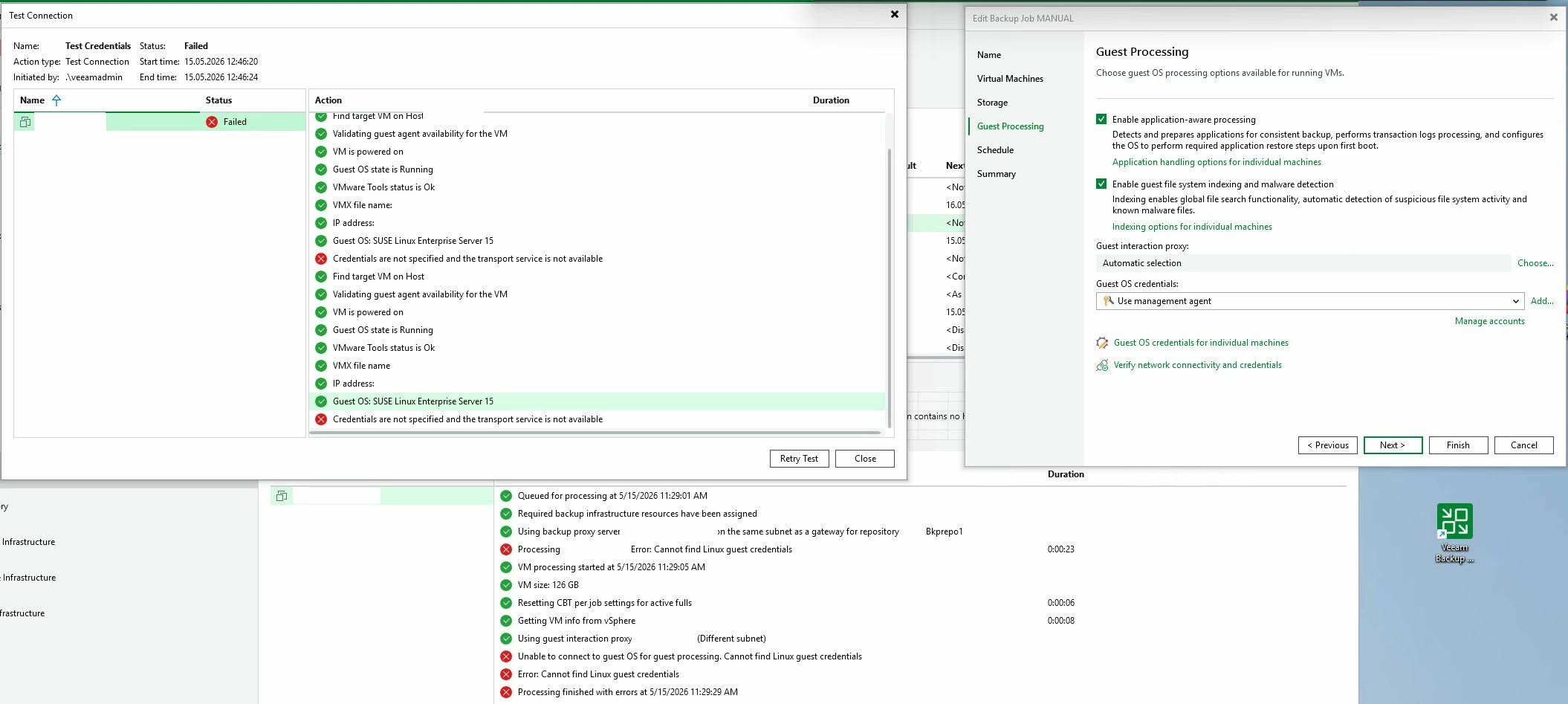
3. When running a job using Guest OS credentials: "Use management agent" it doesn't even talk to 6160 but claims that it's falling back to trying to connect to guest since transport service is not available

Why isn't it just installing it using installer service? 

Is it possible at all to use VBR in some kind of "agent" mode (while veeam optimally takes care of updating the agents as it sees fit)?
Or do we have to use it in this shady ephemeral client "access-all and install whatever I like" mode?

What is deployment kit then good for anyway?

Thanks
 

12 comments

CMF
Forum|alt.badge.img+8
  • Veeam Legend
  • May 15, 2026

Hi ​@Jeronimo ,

What hypervisor are your VMs running on? Usually you don´t need credentials for VM-backups as long as you are not using application aware backups. 

Normal snapshot-based backups don´t need credentials or an agent in the vm. Credentials are only needed for indexing within the vm or application aware backups. 


coolsport00
Forum|alt.badge.img+22
  • Veeam Legend
  • May 15, 2026

Hi ​@Jeronimo - Welcome to the Community!

Yeah...agree with Chalid here...not sure why you’re needing credentials for every VM in VBR, unless you’re adding them as Proxies, etc for hotadd or to be used somehow as Repos? Can you share more what you’re attempting to do/configure? 

Best.


  • Author
  • May 15, 2026

Sorry, forgot to mention that context: it’s about indexing. (hypervisor is vsphere)

It doesn't technically need the creds for indexing but you still have to specify them.

Anyway, to get rid of the creds totally the idea was to simply deploy the agent so it can easily talk to the OS whenever it wants and be done with it.

Turns out it is not that “simple” apparently...


coolsport00
Forum|alt.badge.img+22
  • Veeam Legend
  • May 15, 2026

Ah, ok. Hmm...not sure if Product Managers have an alternative solution (if someone doesn’t chime in here who’s had a similar experience)? You can ping them over on the Forums ​@Jeronimo . Although, they may inquire if you’re reached out to Support first and ask for a case ID.


  • Author
  • May 15, 2026

Well, what does work is using “Install Management Agent” from the GUI, which also installs transport service, not only installer/deployment service. Then you can use “use management agent credentials”.

But I’d need a way to install that globally, not have to click through each single VM. 

So the deployment package does not seem to be it. Maybe there is another package that does this.

But then the question arises who is responible to keep this up-to-date?


The more general question why credentials are needed at all was already mentioned here:

https://forums.veeam.com/veeam-backup-replication-f2/feature-request-vm-guest-os-file-indexing-without-guest-os-credentials-t102984.html


Forum|alt.badge.img+3
  • Experienced User
  • May 15, 2026

The Deployment kit only applies to installing the veeam components and for the initial connection to the target guestOS -- further in-guest operations will require guestOS credentials able to perform the desired action (e.g., AAIP)

There is existing thread on the RND forums with similar request for credential-less AAIP, you can add your voice there for the request, but for now you still need to provide GuestOS credentials for some AAIP operations.


  • Author
  • May 15, 2026

@ddomask Well, even when deployment package is installed, when I use “Install Management Agent” from the GUI, I still have to provide credentials 😄


coolsport00
Forum|alt.badge.img+22
  • Veeam Legend
  • May 15, 2026

Well, what does work is using “Install Management Agent” from the GUI, which also installs transport service, not only installer/deployment service. Then you can use “use management agent credentials”.

But I’d need a way to install that globally, not have to click through each single VM. 

So the deployment package does not seem to be it. Maybe there is another package that does this.

But then the question arises who is responible to keep this up-to-date?


The more general question why credentials are needed at all was already mentioned here:

https://forums.veeam.com/veeam-backup-replication-f2/feature-request-vm-guest-os-file-indexing-without-guest-os-credentials-t102984.html

All good points. Highly recommend you add your name to the list as David suggests. Maybe Veeam can make some “magic” happen in an upcoming release? 🤔😊


  • Author
  • May 15, 2026

Ok, so I guess there is no solution…

Maybe I should open a case to confirm.

But a more general question then: is Veeam a product more targeted at SMBs with a few servers here and there or how do larger organizations handle the mentioned things?


Chris.Childerhose
Forum|alt.badge.img+21

I believe if you use the VIA ISO (Veeam Infrastructure Appliance) you can use certificate-based authentication and not credentials.  I have used creds when I build my own servers, etc. as well as the deployment kit for Windows servers.


Chris.Childerhose
Forum|alt.badge.img+21

Ok, so I guess there is no solution…

Maybe I should open a case to confirm.

But a more general question then: is Veeam a product more targeted at SMBs with a few servers here and there or how do larger organizations handle the mentioned things?

That is probably the best way forward.  We are a large Canadian MSP and use Veeam at all our DCs but we use creds where needed with security in place for those creds.


coolsport00
Forum|alt.badge.img+22
  • Veeam Legend
  • May 15, 2026

Ok, so I guess there is no solution…

Maybe I should open a case to confirm.

But a more general question then: is Veeam a product more targeted at SMBs with a few servers here and there or how do larger organizations handle the mentioned things?

Oh no...I would stating Veeam is more of a product geared towards the Enterprise. Maybe in its early years, it probably was deemed to be a product more for SMBs. But as it’s matured in the last 5-7yrs, it’s most certainly an Enterprise product.






