Question

Error Message: "Failed to Connect to the Backup Server. Unable to resolve host update metadata. The update definition file on the backup server is corrupted.



Hi Community.  I am unable to resolve the above referenced issue.  This happened after an update to v13.  After the install, it worked for 2-3 days. I then started to configure my tape infrastructure and when I finished, I was prompted to reboot the server.  Now I can’t get back into the console.  Any help would be greatly appreciated.

11 comments

Forum|alt.badge.img+1
  • Comes here often
  • June 4, 2026

Check to see if all the Veeam Services are started.  


coolsport00
Forum|alt.badge.img+22
  • Veeam Legend
  • June 4, 2026

Hi ​@AVeeam Novice - welcome to the Community!

First make sure your Veeam Backup Service is running. If so, then take a look at this Veeam KB and see if anything there helps: https://www.veeam.com/kb2127

Let us know how it goes.


matheusgiovanini
Forum|alt.badge.img+9

Hello! Hope you're doing well!

One of the first things I would check is whether the Veeam services are running, especially the Veeam Backup Service.

You can verify them with:

Get-Service -Name veeam*

If any service is stopped, try starting it:

Start-Service -Name veeam*

If the Veeam Backup Service won't start, check whether the Veeam database service is running properly as well (PostgreSQL or SQL Server, depending on your deployment). After an upgrade, database connectivity issues can sometimes prevent the Veeam console from opening.

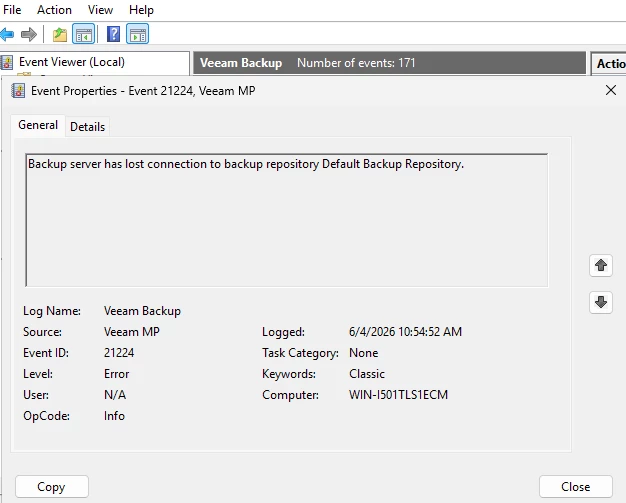
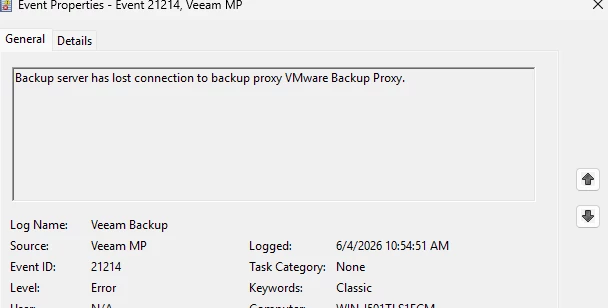
It would also be helpful if you could share any errors from the Windows Event Viewer or from the Veeam Backup Service logs.


  • Author
  • Not a newbie anymore
  • June 4, 2026

The VBS is running.  I will check SQL Server next.  Thanks!


matheusgiovanini
Forum|alt.badge.img+9

The VBS is running.  I will check SQL Server next.  Thanks!

If the Veeam Backup Service is running, the database connectivity is probably OK.

As next steps, I would suggest checking available free space on the drive where VBR is installed, check windows Event Viewer for any Veeam or .NET related errors. 

Could you share the exact error message you receive when opening the console, along with any relevant entries from the Veeam logs or Windows Event Viewer?

If the issue started right after the upgrade and reboot, and there are no obvious service-related problems, it may be worth opening a support case with Veeam and collecting the support logs from the VBR server.


  • Author
  • Not a newbie anymore
  • June 4, 2026

This from the Event Viewer


  • Author
  • Not a newbie anymore
  • June 4, 2026


coolsport00
Forum|alt.badge.img+22
  • Veeam Legend
  • June 4, 2026

@AVeeam Novice - you may have a port conflict with something on your VBR server due services Veeam uses. See this for Port requirements:

https://helpcenter.veeam.com/docs/vbr/userguide/used_ports.html

Also, if you have A/V make sure to add exclusions as noted in Veeam KB1999

https://veeam.com/KB1999

Otherwise, yes... Support Case is your best option. 


lukas.k
Forum|alt.badge.img+13
  • Influencer
  • June 5, 2026

What is your Repository server? Is it the VBR server as well or is it external?

Maybe you can give some overview to see your setup, could help to give further advice.


Forum|alt.badge.img+3
  • Experienced User
  • June 5, 2026

@AVeeam Novice 

>Failed to Connect to the Backup Server. Unable to resolve host update metadata. The update definition file on the backup server is corrupted

https://veeam.com/kb1771 Open a Support case for this. 

This issue has many potential causes, and strongly advise against random troubleshooting on this. 

Support will review the logs and the situation and advise on correct (safe) steps.


Forum|alt.badge.img+1
  • Comes here often
  • June 5, 2026

1.) Are all the services started?

2.) Clear event viewer and reboot, see if any new logs come up.   Check the services to see if they start.  Check the sql server is started.