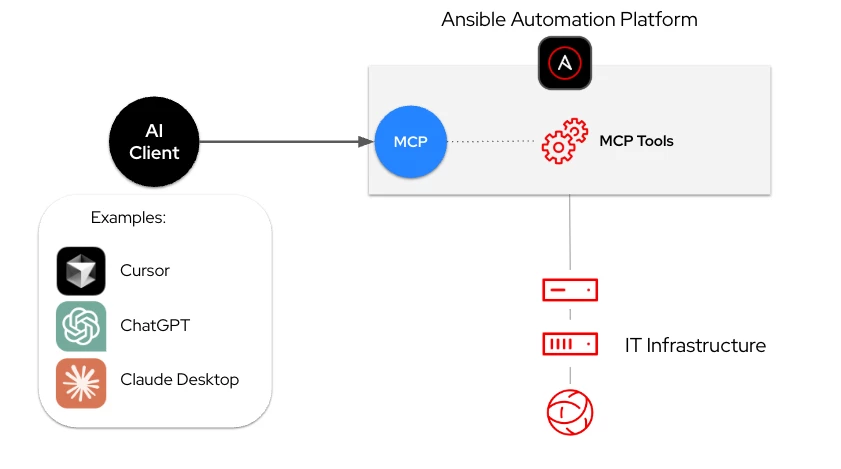

Ansible + Veeam + AI + Monitoring and Observability Tools = AIOps
Everything starts with a signal.
A sudden spike detected by Dynatrace.
Suspicious behavior flagged by CrowdStrike.
A failed backup showing up in Splunk.
Before, this meant just another ticket.
Someone had to notice it.
Someone had to analyze it.
Someone had to act.
Time lost.
Today, the flow is different.
Observability detects.
AI evaluates.
The system decides.
And that’s where everything changes.
👉 Ansible Automation Platform executes automatically:
- isolates the workload
- adjusts the infrastructure
- triggers remediation workflows
Meanwhile…
👉 Veeam ensures there is always a clean recovery point:
- immutable backups
- validated restores
- reliable recovery
👉 The Ansible automation platform executes the remediation.
👉 Veeam ensures data protection and recovery.
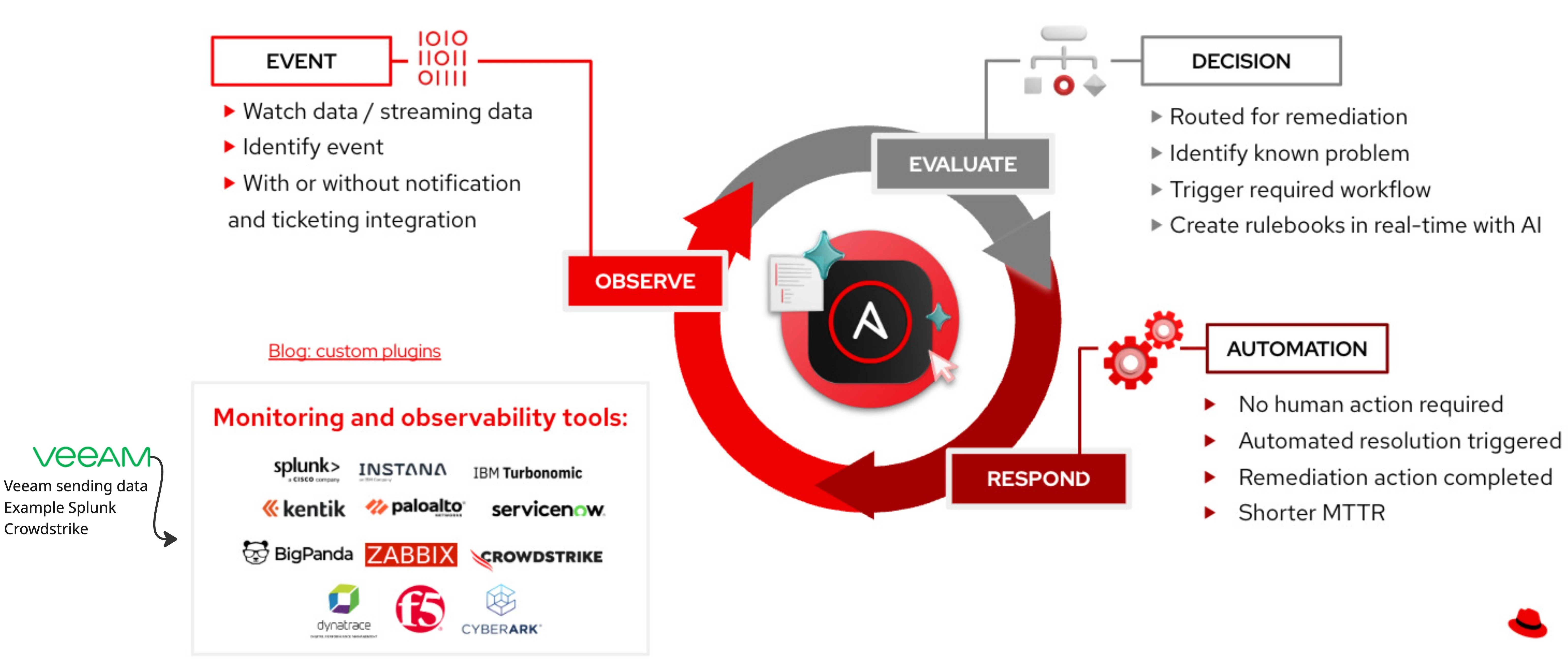
Veeam Integrations with Monitoring & Observability Tools Use Cases
📊 Splunk
Integration:
- Veeam sends logs and events to Splunk
Use Cases:
- Detect backup failures in real time
- Correlate backup issues with infrastructure incidents
- Trigger Ansible Automation Platform playbooks for automated remediation
🔎 Zabbix
Integration:
- Monitor Veeam jobs, repositories, and infrastructure
Use Cases:
- Alert on failed backups → trigger automated retry via Ansible
- Detect storage capacity issues → auto-scale or clean up repositories
⚡ Dynatrace
Integration:
- Application performance and dependency monitoring
Use Cases:
- Detect performance degradation → trigger preemptive backup
- Correlate application issues with backup impact
🧠 Instana
Integration:
- Real-time observability of microservices
Use Cases:
- Trigger protection workflows for critical applications
- Automate DR actions for cloud-native workloads
🛡 CrowdStrike
Integration:
- Security events and threat detection (ransomware, breaches)
Use Cases:
- Detect ransomware →
- Isolate affected systems via Ansible
- Trigger clean restore from immutable backups with Veeam
🔐 Palo Alto Networks
Integration:
- Network security and threat intelligence
Use Cases:
- Detect suspicious traffic → block + trigger backup snapshot
- Automate containment and recovery workflows
🎟 ServiceNow
Integration:
- ITSM workflows and incident management
Use Cases:
- Incident detected → ticket created → Ansible remediates → Veeam validates recovery
- Automated ticket closure after successful remediation
🌐 F5
Integration:
- Application delivery and load balancing
Use Cases:
- Application failure → trigger failover + recovery
- Adjust traffic routing during restore operations
🧩 IBM Turbonomic
Integration:
- Resource optimization and workload placement
Use Cases:
- Optimize workloads → trigger backup before changes
- Ensure safe workload migration with backup validation
🔐 CyberArk
Integration:
- Privileged access and credential management
Use Cases:
- Secure access to backup infrastructure
- Automate credential rotation for backup and restore operations
Do you want to create your own custom plugin in Ansible?
Instructions → Here
🚀 What a Real AIOps Workflow Looks Like with Ansible + Veeam
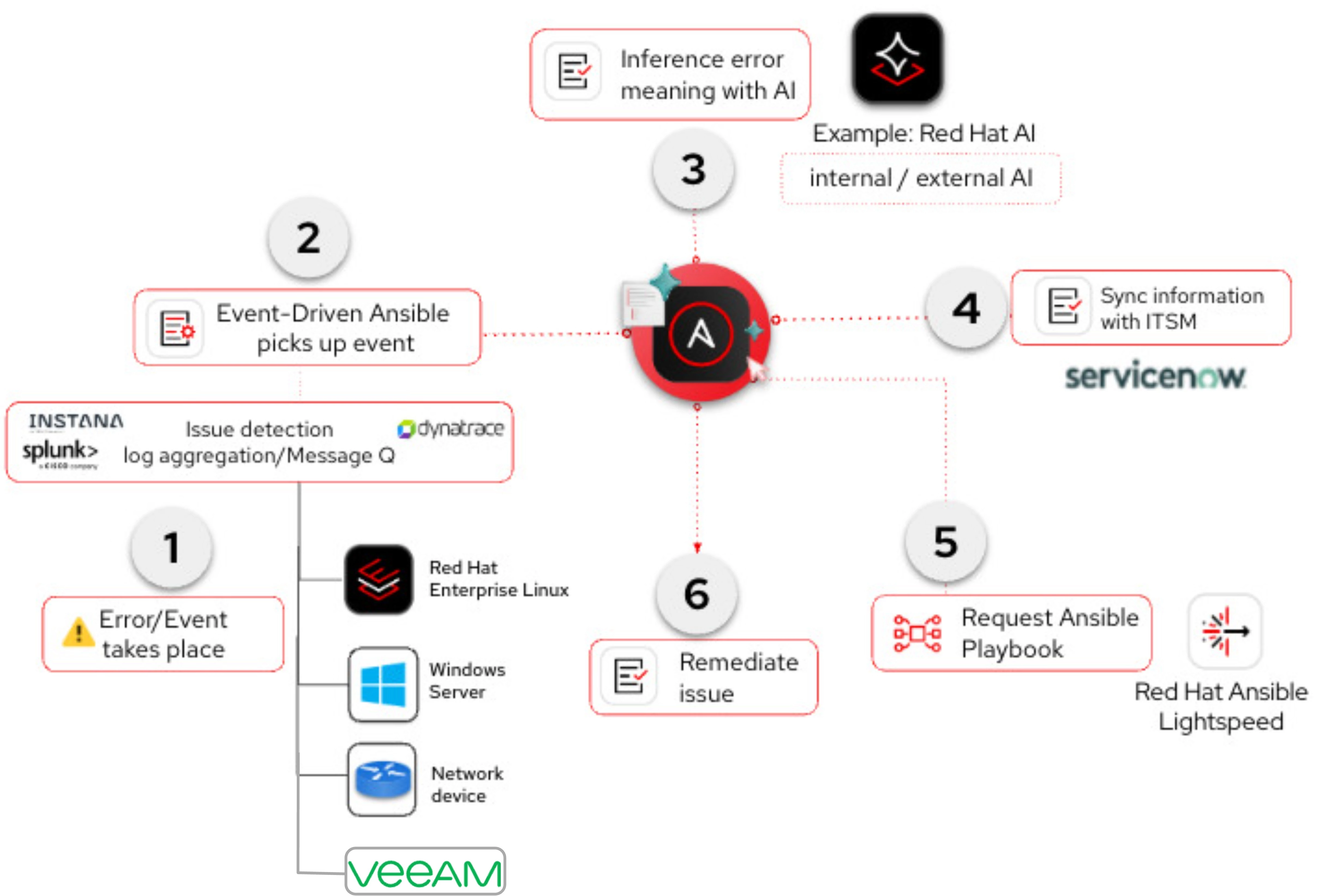
1️⃣ Error / Event Occurs
An issue happens in the environment:
-
Linux system service failure
-
Windows service crash
-
Network device issue
👉 Additionally, Veeam can also act as an event source:
-
Backup job failure
-
Repository issue
-
Ransomware detection (anomaly / suspicious activity)
2️⃣ Event Detection & Ingestion
Monitoring and observability tools like Dynatrace or Splunk detect the issue through logs, metrics, or events.
👉 Veeam integrates here by:
-
Feeding backup and data protection events
-
Providing insights on data integrity and recoverability
👉 Ansible Automation Platform (Event-Driven Ansible) listens and picks up critical events in real time.
3️⃣ AI Interpretation (Key Step)
The issue may be unknown or complex.
Ansible interacts with Red Hat AI to interpret the event.
👉 Important:
Red Hat AI can be any model, including:
-
internal enterprise LLMs
-
external models (OpenAI, etc.)
-
domain-specific AI models
Playbooks collect:
-
logs, metrics, system facts
-
Veeam backup status and recovery points
Then send everything to AI for:
-
root cause analysis
-
recommended remediation
-
recovery validation strategy
4️⃣ ITSM Synchronization
Integration with ServiceNow:
-
Incident is created or updated
-
Includes:
-
infrastructure data
-
AI insights
-
Veeam backup status (e.g., last successful restore point)
-
5️⃣ Playbook Generation (Optional)
Using Ansible Lightspeed, a remediation playbook can be generated dynamically.
Examples:
-
Restart service
-
Fix resource issue
-
Trigger backup validation
👉 With Veeam integration:
-
Validate backup before remediation
-
Prepare restore workflow if needed
6️⃣ Remediation (Execution Phase)
Workflow with Accept / Reject approval.
If approved:
👉 Ansible Automation Platform executes:
-
infrastructure remediation
👉 Veeam ensures data protection:
-
trigger restore from immutable backup if required
-
validate recovery success
-
guarantee clean state
🚀 Outcome
-
Event detected (infra + data layer)
-
AI-driven analysis
-
Automated remediation
-
Verified recovery
🚀 Next Step: From AI Interaction to Autonomous Operations (AIOps)
Once the AI client (e.g., ChatGPT, Claude, Cursor) is connected to Ansible Automation Platform through MCP, the next evolution is clear:
👉 Move from AI-assisted actions → to fully automated, event-driven operations