



In this article I'm going to walk you through deploying a SOBR from scratch in my lab environment — not just the wizard clicks, but the design decisions, the gotchas, and the things I wish I'd known the first time I built one at scale.
In recent years, before Veeam introduced direct-to-cloud capabilities, SOBR was used for tiering backups to the cloud. It can still be used today and play into the 3-2-1 backup strategy. Another use case for SOBR is when you have multiple nodes for Object First or Exagrid and want Veeam to view them as a single backup repository. For this article, we’ll focus on Object First.
The SOBR is one of Veeam's most powerful (and frankly, most underutilized) architectural features. It lets you pool multiple repositories into a single logical target, adds tiered storage with automatic offload to object storage, and makes managing the lifecycle of your backup data dramatically simpler.
What is a Scale-Out Backup Repository?
A SOBR is a logical pool of individual backup repositories — called extents — that Veeam treats as a single target. Jobs point at the SOBR; Veeam handles placement across extents based on the policy you choose.
In backup environments, a SOBR typically has two tiers:
- Performance Tier — your fast, on-prem storage (local disk, SAN, NAS, deduplication appliances). This is where recent backups live and where restores primarily come from.
- Capacity Tier — object storage (on-prem or cloud: AWS S3, Azure Blob, Wasabi, etc.). Older backups are automatically offloaded here based on your retention policy.
- Archive Tier — optional deep cold storage (AWS Glacier, Azure Archive) for long-term compliance retention.
The result is a seamless, tiered storage architecture that scales horizontally as your data grows — without ever repointing a backup job.
Prerequisites & Planning
Don't open the wizard yet. Spend time here first — the decisions you make before touching the UI will determine whether your SOBR is a dream or a headache.
Licensing
SOBR requires Veeam Backup & Replication Enterprise or Enterprise Plus. Standard edition does not support it. Confirm your license tier before planning around this feature.
Placement Policy: Data Locality vs. Performance
This is the most important design decision you'll make. Veeam offers two extent selection policies:
- Data Locality (recommended for most): Keeps all files in a backup chain (full + incrementals) on the same extent. Restore performance is predictable, and the failure domain is a single extent. This is the right choice for the vast majority of deployments.
- Performance: Separates full backups and incrementals across extents based on storage performance characteristics — e.g., fulls to a dedupe appliance, incrementals to fast NAS. Use this only when you have a strong reason and understand the implications.
NOTE: If you switch placement policies on an existing SOBR, already-placed backup chains are not moved. Only new backup chains will follow the new policy. Plan this before you write your first backup job to the SOBR.
Network Design
A SOBR is only as fast as the network connecting its extents to your proxies and the VBR server. In large environments:
- Ensure all extent servers have at least 10GbE connectivity to your proxy layer.
- Consider dedicating a backup VLAN to separate backup traffic from production.
- Be aware that master/slave data mover communication happens between extents during restores — latency between extents matters, especially with the Performance policy.
Sizing Your Extents
Each extent should have sufficient capacity for your expected backup chains. A rough starting point: multiply your total source data size by your change rate and retention period, then apply your deduplication/compression ratio. Veeam's sizing tool can help, but real-world ratios vary significantly by workload type.
Deployment: Step-by-Step
We'll build a SOBR with a two-node Performance Tier (Object First Ootbi & Object First VE) and an S3-compatible Capacity Tier. Adjust to your environment — the process is the same whether you're using NAS, SAN, or dedupe appliances as extents.
Step 1: Add Your Individual Repositories as Extents
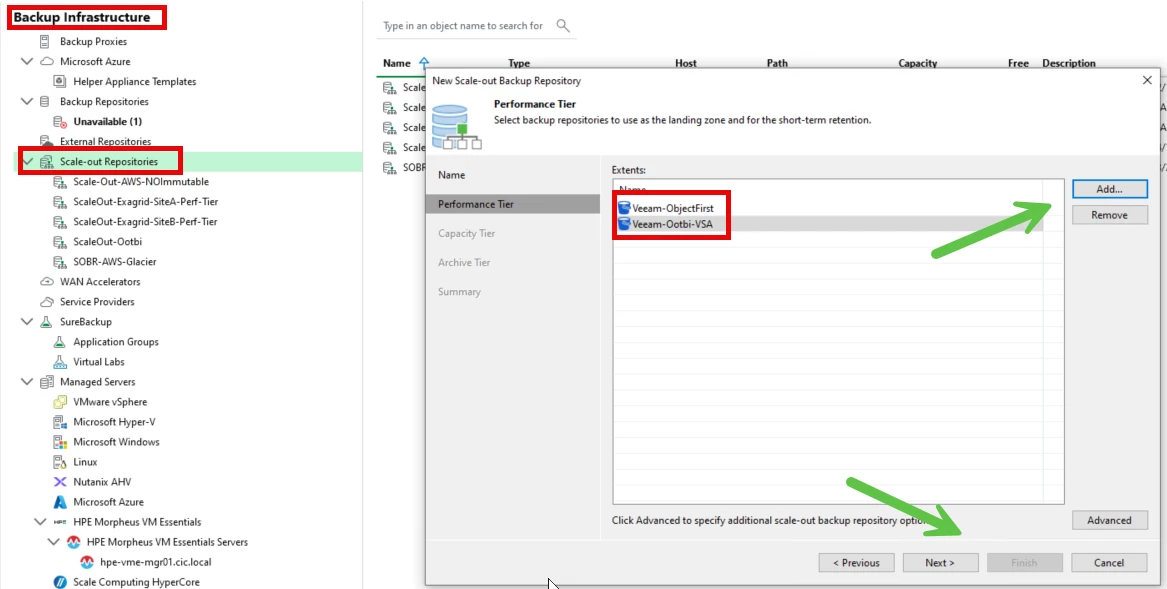
Before creating the SOBR, each underlying repository must already exist as a standard Veeam backup repository. Navigate to Backup Infrastructure > Backup Repositories and add each storage target as you normally would — Windows/Linux servers with attached storage, NAS shares, or dedupe appliances (HPE StoreOnce, Dell EMC DataDomain, ExaGrid, etc.). These become the extents of your SOBR. For this test we're going to use Object First Ootbi appliance and VSA.
Step 2: Add Your Object Storage Repository (Capacity Tier)
Navigate to Backup Infrastructure > Object Storage Repositories > Add Object Storage. Select your provider (AWS S3, Azure Blob, S3-Compatible, Wasabi, etc.) and work through the wizard. Key decisions here:
- Bucket: Use a dedicated bucket for Veeam — do not share with other workloads.
- Immutability: Enable S3 Object Lock if your provider supports it. This is your ransomware protection at the capacity tier. Requires a bucket with Object Lock enabled at creation.
- Gateway server: If your VBR server has direct internet access, it can act as the gateway. For air-gapped or segmented environments, designate a dedicated gateway server with outbound access to your object storage endpoint.
For this test my Object Storage has already been added and configured with Veeam Backup Server
Step 3: Create the Scale-Out Backup Repository
Navigate to Backup Infrastructure > Scale-out Repositories > Add Scale-out Backup Repository. The wizard walks you through:
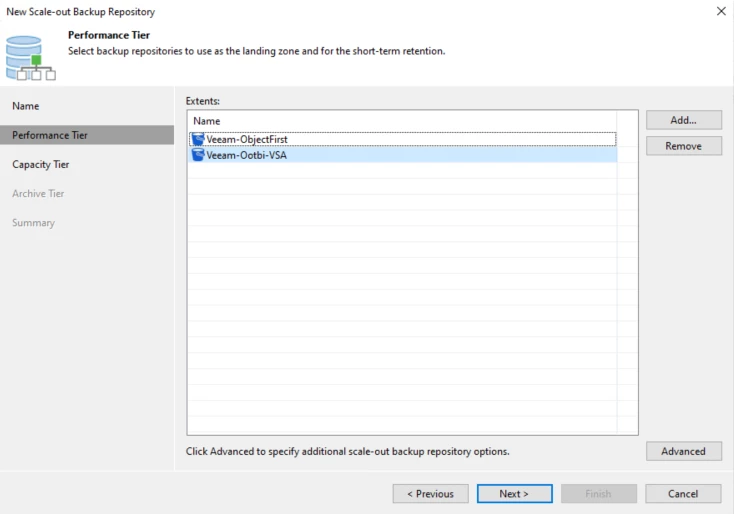
Performance Tier Tab
- Click Add and select the repositories you created in Step 1.
- Set your placement policy (Data Locality recommended).
- Review the capacity summary — Veeam shows aggregate usable space across all extents.
Capacity Tier Tab
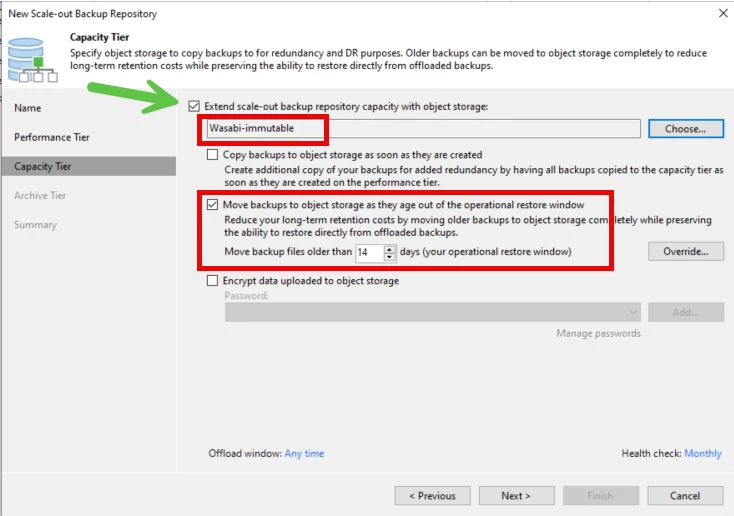
- Enable Capacity Tier and select your object storage repository from Step 2.
- Configure the offload policy: Move backups older than X days. For most enterprises, 14–30 days on the performance tier is a reasonable starting point, with the rest offloaded to capacity tier.
- Copy vs. Move: 'Copy' keeps a copy on the performance tier (more storage used, faster local restore). 'Move' frees up performance tier space (lower cost, restore from object storage is slower). Most enterprise shops use Move.
Archive Tier Tab (Optional)
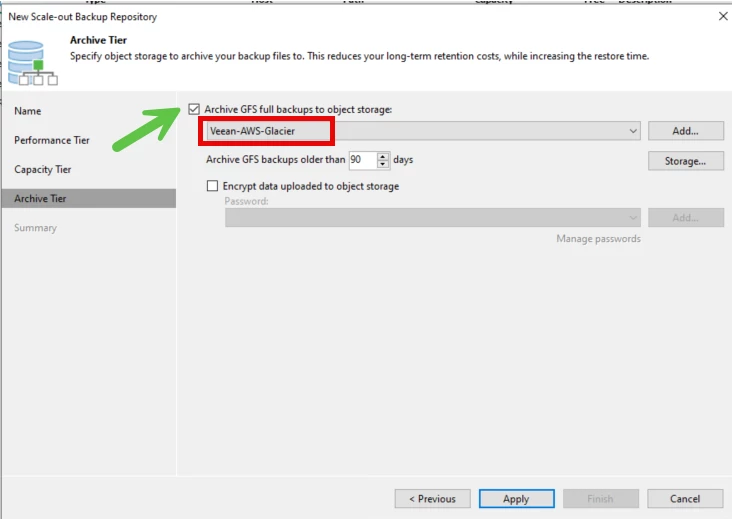
- Enable only if you need long-term compliance retention (7+ years). Maps to AWS Glacier, Azure Archive Blob, etc.
- Archived data cannot be restored without a retrieval delay — factor this into your RTO for compliance data.
Step 4: Point Your Backup Jobs at the SOBR
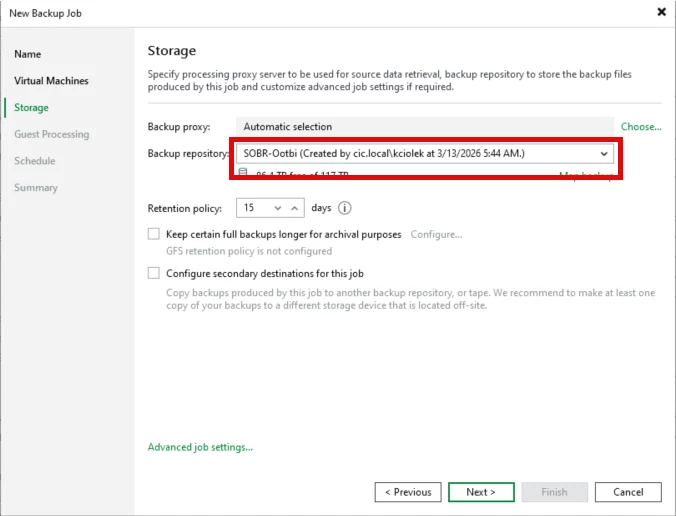
Edit each backup job and change the target repository to your new SOBR. The SOBR appears in the repository list alongside individual repositories. For new jobs, simply select the SOBR from the start. For existing jobs, Veeam will continue writing new backup chains to the SOBR while existing chains remain on their original repository until they age out or are manually moved.
Day-2 Operations: Maintenance Mode & Extent Evacuation
This is where the SOBR really shines and why it's worth the upfront design effort. When you need to retire, replace, or maintain an extent:
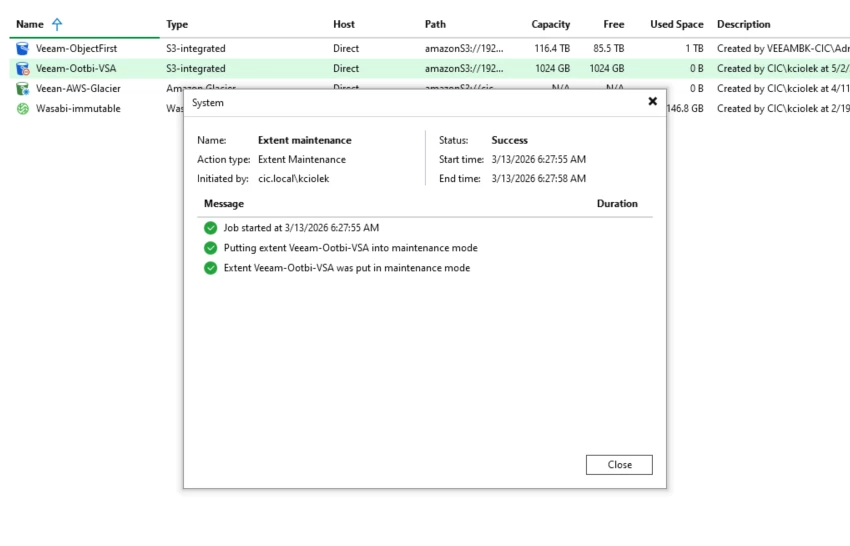
- Right-click the extent in the SOBR and select Maintenance Mode. Veeam stops sending new backups to that extent but continues writing to the others — no backup jobs fail.
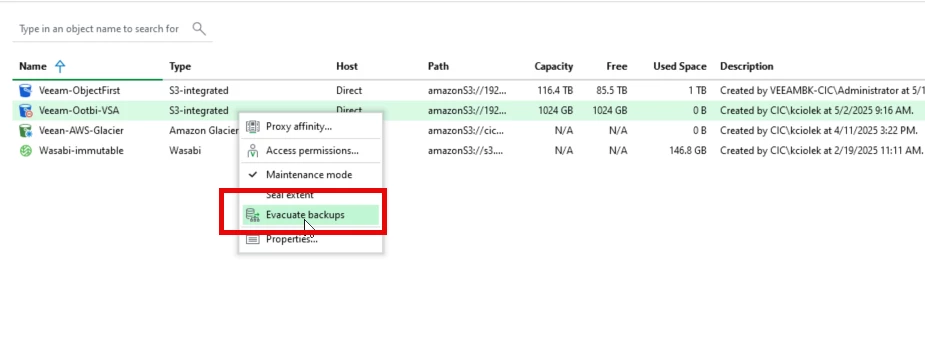
Then select Evacuate Backups to move all backup chains off the extent to the remaining extents. Veeam handles this automatically in the background.
Once evacuation is complete, you can remove the extent from the SOBR and decommission the storage safely.
This workflow alone has saved hours of painful manual data migration in environments I've managed. Compare this to the alternative: orphaned backup chains, deleted jobs, and angry stakeholders when restore points disappear during a hardware refresh.
Monitoring Your SOBR
Veeam ONE provides a dedicated Scale-Out Backup Repository report that shows:
- Per-extent capacity and free space trends over the past 30 days.
- Full vs. incremental backup sizes per extent.
- Number of VMs and workloads stored per extent.
Set alerts in Veeam ONE for extent free space thresholds — I recommend alerting at 80% and critical at 90%. The SOBR will stop accepting backups if all extents run out of space, which is a very bad day.
Also monitor your SOBR Offload job completion status. If offload is consistently not completing within your window, you need to either add capacity tier throughput or restrict the offload schedule more aggressively.
Common Mistakes I See in Enterprise Deployments
- Not sizing the gateway server: The object storage gateway server handles all data transfer to the capacity tier. In large environments, an undersized gateway creates a throughput bottleneck that gets worse as the environment grows.
- Mixing deduplication appliances with standard repositories in a Performance policy SOBR: Dedupe appliances have very different performance profiles for random vs. sequential I/O. If you don't understand which backup file types land where, you'll get worse performance than a simpler design.
- No immutability on the capacity tier: If ransomware hits your environment and your backup data in object storage isn't immutable, attackers can delete it. Enable S3 Object Lock. Full stop.
- One SOBR for everything: In large environments, consider multiple SOBRs — one for Tier 1 workloads with aggressive retention and a fast performance tier, another for lower-priority workloads with cheaper storage. This gives you fine-grained control over SLAs and costs.
Closing Thoughts
The Scale-Out Backup Repository is one of those Veeam features that, once you've built one properly, you'll wonder how you managed without it. The combination of flexible tiering, seamless maintenance mode, and automatic offload to object storage makes it the right architecture for virtually any enterprise backup environment.
The key is doing the design work up front — especially around placement policy, immutability at the capacity tier, and sizing your gateway and extents correctly. Bolt those decisions on after the fact and you'll be fighting the architecture instead of benefiting from it.

