Managed BCDR with Veeam
Delivering Resilient Business Continuity & Disaster Recovery as a Managed Service
Providing Business Continuity and Disaster Recovery (BCDR) as a managed service requires far more than “running backups.”
Customers expect guaranteed recovery outcomes, predictable recovery times, and protection even when the backup infrastructure itself is compromised.
This article walks through a real‑world MSP architecture for delivering Managed BCDR with Veeam using:
- Active/Standby Veeam Backup & Replication (VBR)
- Veeam Cloud Connect
- Veeam Data Cloud Vault (immutable object storage)
- Microsoft Azure as the disaster recovery execution platform
We’ll cover the business problem, architecture decisions, operational flows, DR activation, and practical configuration guidance, concluding with clear pros, cons, and limitations.
The Business Problem MSPs Must Solve
Modern customers don’t buy backups — they buy recovery confidence.
They require:
- Predictable RPO and RTO
- Protection against ransomware and insider threats
- A recoverable backup control plane
- A design that still works if the primary backup server is destroyed
Traditional designs fail these requirements:
- Single VBR architectures collapse when the control plane is lost
- Direct Veeam data Cloud Vault [Vault] attachment breaks during DR due to the one‑VBR‑per‑Vault limitation.
- Rebuilding a backup server from scratch costs time customers don’t have.
MSPs therefore need a repeatable, DR‑ready, and control‑plane‑resilient architecture that survives total site failure.
Architecture Overview
Actors
- End Customer IT Environment
- Managed Service Provider (MSP)
- Primary (Active) Veeam Backup & Replication Server
- Secondary (Standby) Veeam Backup & Replication Server
- Veeam Cloud Connect Infrastructure
- Veeam Data Cloud Vault (Immutable Object Storage)
- Microsoft Azure (DR Target)
Key Design Principles
This design implements:
- Local backups for low RTO restores
- Immutable off‑site copies using Cloud Connect → Vault
- Active/Standby VBR for control plane resiliency
- Dedicated Vault repositories for data and VBR configuration
- Azure as the recovery execution platform
Cloud Connect is critical — it abstracts the Vault, eliminating the single‑VBR‑attachment limitation and enabling true DR orchestration.
Preconditions
- Customer workloads run on‑premises or in hybrid environments
- MSP operates Veeam Cloud Connect infrastructure
- Azure is pre‑configured (networking, IAM, storage)
- Veeam Data Cloud Vault is enabled with immutability
- Active and Standby VBR servers are version‑matched
Normal Operations Flow
1. Local Backups for Fast Recovery
The Active VBR performs local backups:
- Backups land on high‑performance local storage
- Designed to meet aggressive RTO for day‑to‑day restores
2. Off‑Site Immutable Backup Copies
Backup Copy Jobs replicate data off‑site:
- Targets Cloud Connect repositories backed by Veeam Data Cloud Vault
- Retention and immutability are enforced by the MSP
- Eliminates customer‑managed object storage risk
3. Isolated VBR Configuration Backups
VBR configuration backups are:
- Stored in a separate Vault-backed repository
- Encrypted and immutable
- Designed to ensure control plane survivability
4. Passive Standby VBR
- Connected to the same Cloud Connect repositories
- Performs no backup activity under normal operations
- Remains ready for instant activation
Exception Flow: Primary VBR Loss
This event may be triggered by:
- Ransomware
- Configuration corruption
- Site-wide outage
Recovery Steps
- Primary VBR becomes unavailable
- Standby VBR is activated
- MSP validates Cloud Connect availability
- Standby executes a Rescan of Cloud Connect repositories
- Backup metadata is imported
- Restore points become immediately visible
- No data rehydration required
- Optional configuration restore
- VBR configuration is restored from the dedicated Vault repository
- Recovery operations begin
- Instant Recovery or Full Restore
- Workloads recovered into Azure or alternate infrastructure
Postconditions
- Customer workloads are running in Azure or DR infrastructure
- Achieved RPO equals the last successful backup copy
- Backup control plane is fully operational
- Primary site rebuild can proceed without urgency
- Failback occurs when the customer is ready
Benefits Delivered
For Customers
- Guaranteed recovery even after backup infrastructure loss
- Strong ransomware protection via immutable Vault storage
- Clear and predictable RPO/RTO outcomes
- No dependency on customer-managed object storage
For MSPs
- Repeatable architecture across all tenants
- Centralized control of retention and immutability
- Supports multi‑VBR DR scenarios
- Fully aligned with Veeam Vault best practices
Architectural Choices in the Real World
Option A — SOBR-Based Architecture
Best for long retention and automated tiering.
Pros
- Automated lifecycle management
- Scales easily
- Object storage immutability
- Cost optimization
Cons
- Increased complexity for multi‑VBR DR
- Restore point visibility can confuse customers
Limitations
- Chain restrictions
- Slower RTO when restoring from object tier
Option B — Direct Backup Copy to Cloud Connect (Non‑SOBR)
Best for Active/Standby VBR and MSP‑managed DR.
Pros
- Simple and deterministic
- Clean DR import into standby VBR
- Works with all chain types
Cons
- No automated archive tiering
- Requires careful scheduling
Limitations
- WAN speed impacts restore performance
Why Veeam Data Cloud Vault Changes MSP Design
Veeam Data Cloud Vault introduces a critical constraint:
One Vault container can only be actively attached to a single VBR server.
Direct attachment breaks Active/Standby DR models.
The MSP Solution: Vault via Cloud Connect
By publishing Vault storage through Veeam Cloud Connect, MSPs remove this limitation.
Why This Works
- Cloud Connect repositories are provider owned
- Multiple VBR servers can access the same data
- Neither customer nor malware can detach the Vault
Trade-Offs
- Requires MSP Cloud Connect infrastructure
- WAN throughput becomes a design factor
- Replication jobs are not supported in Cloud Connect repositories
This is now the POC architecture for MSP‑delivered Managed BCDR using Vault.
Best Practice: Separate Vault for VBR Configuration
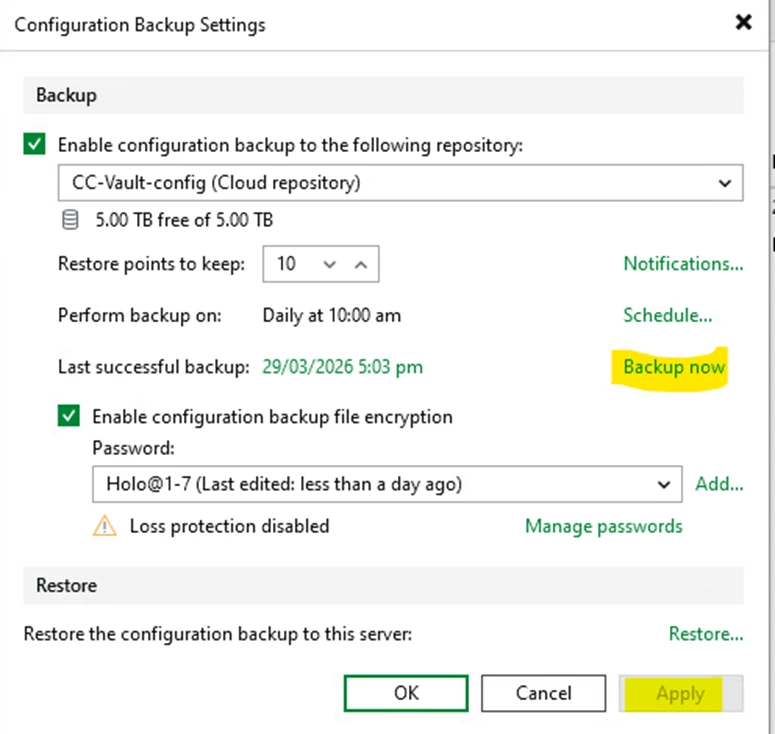
Store VBR configuration backups in a dedicated Vault repository:
- Isolated from production backup data
- Different immutability and retention policies
- Critical for control plane recovery
Active/Standby VBR Responsibilities
Active VBR
- Runs backup and copy jobs
- Stores local backups
- Service provider storage.
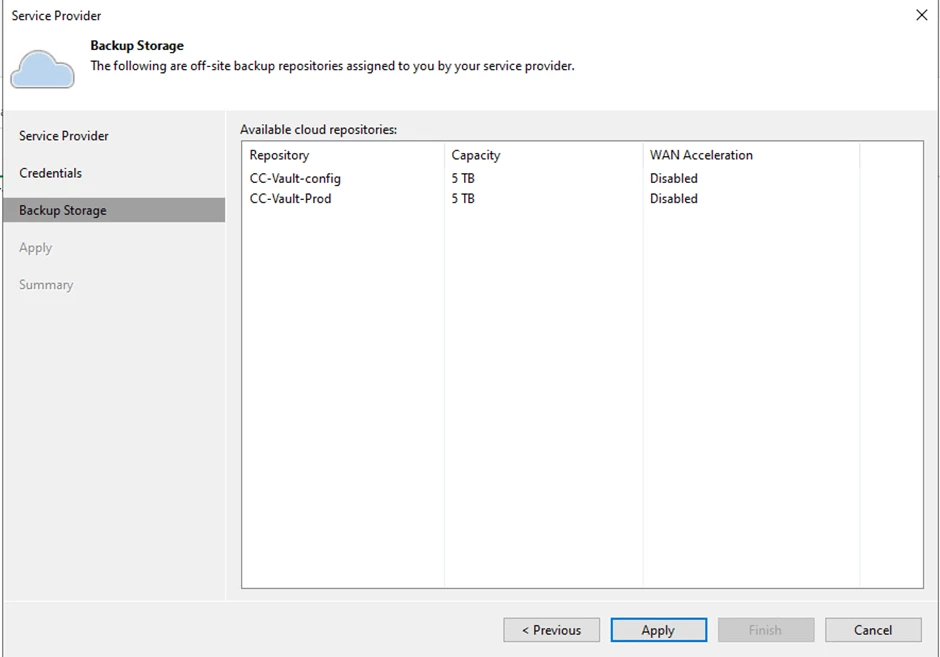
- Sends backup copies to
CC-Vault-Prod - Sends config backups to
CC-Vault-Config
Standby VBR
- Passive until DR
- Connected to Cloud Connect repositories
- Imports backups via Rescan
- Restores workloads into Azure or DR sites
MSP
- Operates Cloud Connect
- Enforces immutability
- Manages Vault storage
- Performs capacity and health monitoring
DR Activation Runbook
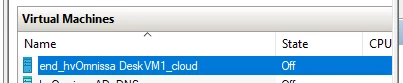
- power-on DR VM
- start VDP
- Validate Cloud Connect availability
- Rescan
CC-Vault-Configand import backup configuration file
-
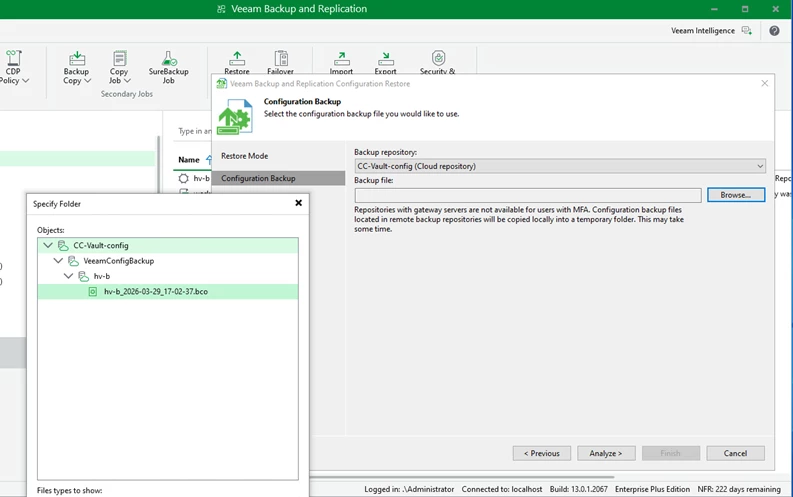
- Rescan
CC-Vault-Prod - Initiate Instant Recovery or Azure DR
- Operate in DR
- Fail back when ready
Azure as the Recovery Platform
Ideal when:
- No secondary datacenter exists
- Cloud DR is preferred
- A full site disaster occurs
Supports:
- Instant Recovery to Azure
- Full VM restore
- Permanent cloud migration if required
Final Thoughts
Delivering Managed BCDR with Veeam requires balancing:
- RPO/RTO guarantees
- Ransomware resilience
- Architectural simplicity
- DR orchestration at scale
Veeam Data Cloud Vault delivers industry‑leading immutability — but forces MSPs to rethink architecture.
When combined with Cloud Connect abstraction and Active/Standby VBR, MSPs can deliver enterprise‑grade, ransomware‑resilient BCDR even after total infrastructure loss.