Announcing AsBuiltReport.Veeam.VBR 1.0.0

  • Apr 11, 2026 3:51 AM UTC
  • 84 comments
  • 1454 views

Show first post

84 comments

jcolonfzenpr

Great job!

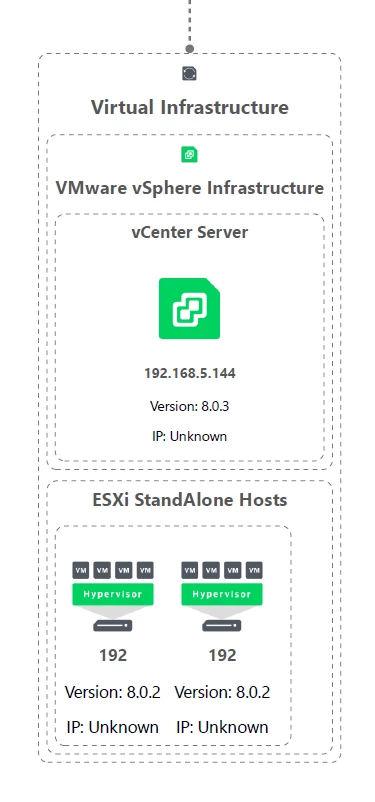
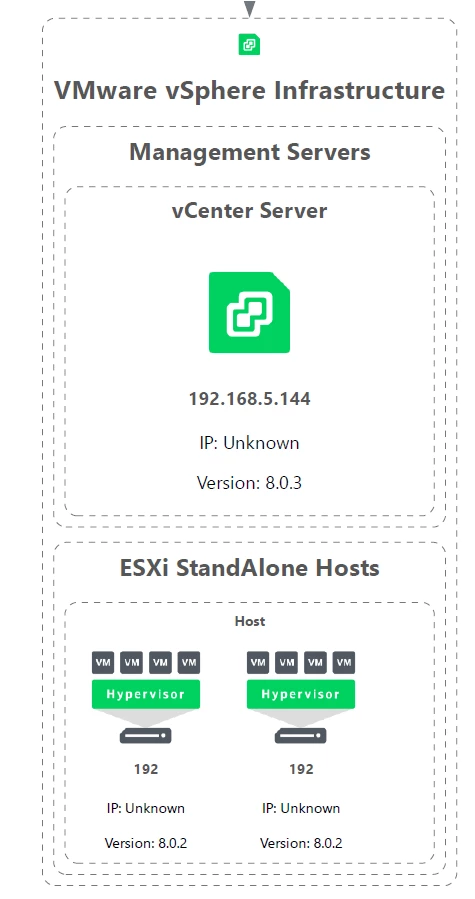
But...i think i’ve found a bug I cannot explain. If I open the AsBuiltReport.Veeam.VBR-Infrastructure.pdf , I notice that the vCenter Server is without IP and the ESXi Hosts are shown as below. Any idea? Many thanks for your great job!


Fixed in v1.0.7!

I’ve found the same problem on “AsBuiltReport.Veeam.VBR-vSphereProxy.pdf”. Please let me know if it is a bother to report any bugs I find; I just want to help!


You can report bugs here or open an issue on GitHub:

https://github.com/AsBuiltReport/AsBuiltReport.Veeam.VBR/issues


Dynamic
Forum|alt.badge.img+16
  • Veeam Vanguard
  • Apr 13, 2026 3:07 PM UTC

Hi again, I just implemented the current release in a VBR v13 VSA with HA deployment. Also tried the new GUI. What I can say so far: It’s like Veeam! It Just Works 😀 wow!


Maybe a feature request, If possible - in the Report there’s no Hint about the HA configuration (afaik or can see...). It would be very nice to see, which Nodes are Build the HA construct.

Great Job Jonathan! Thank you!
My vote for Blog of the month!
 

I will integrate the scheduled task for this later this week at this customers Installation and also the encrypted credentials. Both my customers, colleagues and me, we are sooooooo happy to have this back!


jcolonfzenpr

Hi again, I just implemented the current release in a VBR v13 VSA with HA deployment. Also tried the new GUI. What I can say so far: It’s like Veeam! It Just Works 😀 wow!


Maybe a feature request, If possible - in the Report there’s no Hint about the HA configuration (afaik or can see...). It would be very nice to see, which Nodes are Build the HA construct.

Great Job Jonathan! Thank you!
My vote for Blog of the month!
 

I will integrate the scheduled task for this later this week at this customers Installation and also the encrypted credentials. Both my customers, colleagues and me, we are sooooooo happy to have this back!

If the high-availability information can be retrieved using PowerShell or a REST API, it can be implemented. Could you share how you configure the schedule? I'd like to add that option so it can be configured in the GUI. 


Chris.Childerhose
Forum|alt.badge.img+23

​@jcolonfzenpr Anything special with VCC you want tested?

I would like to know if the Cloud Connect sessions proceed without errors and if the diagrams are generated. 

Ok, let me test it and let you know.


Chris.Childerhose
Forum|alt.badge.img+23

Running on VCC server now and taking a while to collect data.  Going to let it run overnight and see tomorrow.  Will update you then.


jcolonfzenpr

​@jcolonfzenpr - So the VCC report completed and created the documents.  In the Window UI (Beta) I noticed the following warnings and quite a few of them (see below).  I did export the log in case you wanted it to check things, so please let me know.

[WARN] [ 08:56:58:480 ] [ Document ] - Unable to export the CloudConnectTenant Diagram: No Cloud Connect Tenant infrastructure available to diagram


Can you send me the log?

to: jcolonf@techmyth.blog


Chris.Childerhose
Forum|alt.badge.img+23

I know AI has helped me tremendously with documentation, scripting and many other things.  I think it is a good thing to help with your work when used correctly.


Forum|alt.badge.img+2
  • Experienced User
  • Jun 7, 2026 5:58 PM UTC

Thank you. I've received the log and will be analyzing it to see where the problem lies.


Any luck?


  • Comes here often
  • Sep 15, 2026 6:22 AM UTC

Great job!

But...i think i’ve found a bug I cannot explain. If I open the AsBuiltReport.Veeam.VBR-Infrastructure.pdf , I notice that the vCenter Server is without IP and the ESXi Hosts are shown as below. Any idea? Many thanks for your great job!


Fixed in v1.0.7!

I’ve found the same problem on “AsBuiltReport.Veeam.VBR-vSphereProxy.pdf”. Please let me know if it is a bother to report any bugs I find; I just want to help!