Question

Veeam 13 unable to file level restore to VM on Proxmox.


  • Not a newbie anymore

Hey, y’all. Veeam Backup and Replication has been giving me and my team some trouble since we upgraded from version 12 to version 13 with File Level Restoring to our Proxmox VMs. Weird thing is this is only for our FLR Jobs, VM Restore jobs work perfectly fine on our VMs, but our VMs all return the error below when trying to FLR. i can confirm that the Windows server we are trying to restore to does have access to the network, internet, and the backup server but still gives us the error.


Does anyone have any ideas?
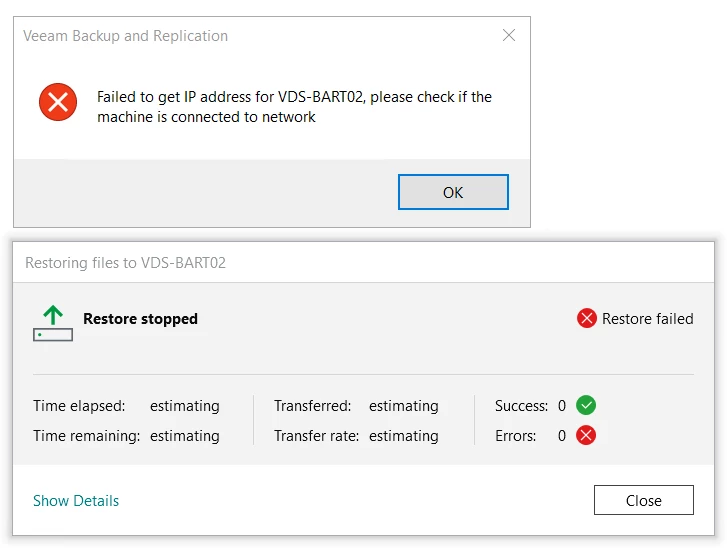


VB&R 13 build 13.0.1.2067
VeeamPluginPVE_13.3.1.7
ProxmoxVE ver. 9.1.1

15 comments

Chris.Childerhose
Forum|alt.badge.img+21

Check out this KB as it should help - https://www.veeam.com/kb4687


I would check the KB that Chris Childerhose already sent first.


As a secondary check, did you set a different mount server at any point during the restore process or on the repository after the upgrade?  This could change the route needed for the FLR.


stevennew
Forum|alt.badge.img+3
  • Veeam Vanguard
  • May 5, 2026

Are you able to ping VDS-BART02 from the Veeam server? Just curios if it is a DNS issue


  • Author
  • Not a newbie anymore
  • May 5, 2026

Are you able to ping VDS-BART02 from the Veeam server? Just curios if it is a DNS issue

I was worried that might have been it, but we are able to ping BART02 from our Veeam host.


  • Author
  • Not a newbie anymore
  • May 5, 2026

Check out this KB as it should help - https://www.veeam.com/kb4687

I did find that KB late last week and worked through it on my host, but unfortunately with no luck.


  • Author
  • Not a newbie anymore
  • May 5, 2026

I would check the KB that Chris Childerhose already sent first.


As a secondary check, did you set a different mount server at any point during the restore process or on the repository after the upgrade?  This could change the route needed for the FLR.

Not that i am aware of. Whenever I had to FLR in the past I would use the default option, that being said, I’ll go try one of the other mount server options it gives me


Chris.Childerhose
Forum|alt.badge.img+21

Check out this KB as it should help - https://www.veeam.com/kb4687

I did find that KB late last week and worked through it on my host, but unfortunately with no luck.

Well hopefully you get it sorted out and a support ticket may help if nothing else does.


  • Author
  • Not a newbie anymore
  • May 5, 2026

I originally went to go put in a service ticket, but the case portal only gave me the options for Free and Evaluation licenses instead of the paid Veeam Data Platform license we pay for.


Chris.Childerhose
Forum|alt.badge.img+21

I originally went to go put in a service ticket, but the case portal only gave me the options for Free and Evaluation licenses instead of the paid Veeam Data Platform license we pay for.


You have to use a company log in for that license associated to the key.


  • Author
  • Not a newbie anymore
  • May 5, 2026

My team and I have access to the Company Login that we share for payments and downloads, but no dice, just the Free and Evaluation licenses.


Chris.Childerhose
Forum|alt.badge.img+21

My team and I have access to the Company Login that we share for payments and downloads, but no dice, just the Free and Evaluation licenses.

Reach out to your Veeam team then.


stevennew
Forum|alt.badge.img+3
  • Veeam Vanguard
  • May 5, 2026

My team and I have access to the Company Login that we share for payments and downloads, but no dice, just the Free and Evaluation licenses.

The license administrator should be able to provide your account access to the support ID to create tickets. You can find the license administrator by opening Veeam and it will say on the splash screen who the product is registered to. If its your email then you just need to login on the left and give yourself access to the support ID your licensing agreement is under


What Steve said.  This KB explains the process of assigning someone as a case administrator on your contracts, which is the role needed to open and work tickets.


https://www.veeam.com/kb2211


  • Author
  • Not a newbie anymore
  • May 6, 2026

What Steve said.  This KB explains the process of assigning someone as a case administrator on your contracts, which is the role needed to open and work tickets.


https://www.veeam.com/kb2211

I have seen that KB, unfortunately for me the only account that I don’t have access to is my License Administrator account and that is our CTO. Wish me luck in trying to get access to that, I’m gonna need it.


Forum|alt.badge.img+2

What Steve said.  This KB explains the process of assigning someone as a case administrator on your contracts, which is the role needed to open and work tickets.


https://www.veeam.com/kb2211

I have seen that KB, unfortunately for me the only account that I don’t have access to is my License Administrator account and that is our CTO. Wish me luck in trying to get access to that, I’m gonna need it.

If you can get your CTO to log in to the portal, he can set you up as a License/Portal Administator as well so that you shouldn’t have to go through him in the future. 


Good luck getting access, and please let us know what the end result of the FLR issue is!