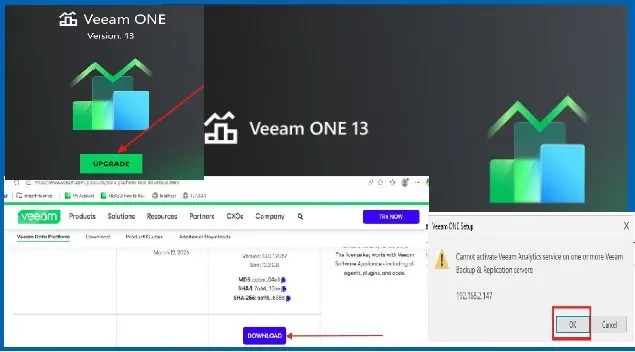
Upgrading Veeam ONE from version 12 to version 13 introduces significant architectural and security improvements, including changes to authentication and communication methods. Version 13 moves away from legacy protocols such as NTLM and WMI in favor of more secure and modern approaches like Kerberos and gRPC as discussed below.
Note: There is a strong business and technical need to upgrade to Veeam ONE v13 in order to leverage Veeam Intelligence, enhanced analytics, and next-generation dashboard capabilities that improve visibility, reporting, and operational decision-making as shown below. For the detailed blogpost, please see https://techdirectarchive.com/2026/05/26/how-to-upgrade-veeam-one-from-v12-to-v13/
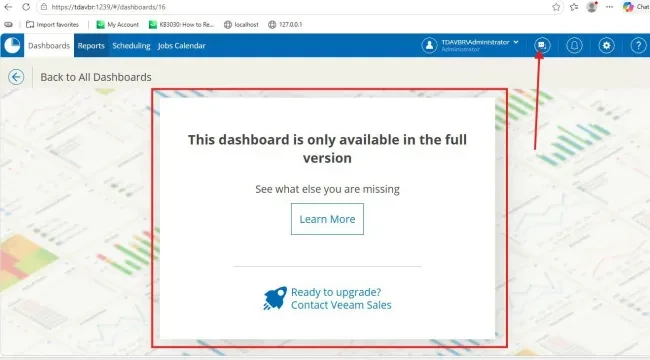
The guide highlights the upgrade best practices, and important lessons learned from real-world upgrade scenarios to help ensure a smooth and stable transition to Veeam ONE v13 in your own environment.
If you are upgrading an isolated (workgroup-based) environment, this architectural shift can trigger an immediate "Invalid Class" or the “Veeam Analytics Service” deployment error during the installation. This is because v13 strictly limits NTLM fallback to enforce Zero Trust standards, the Veeam ONE server can no longer remotely deploy its data collection components across untrusted network segments or non-domain environments using traditional Windows Management Instrumentation.
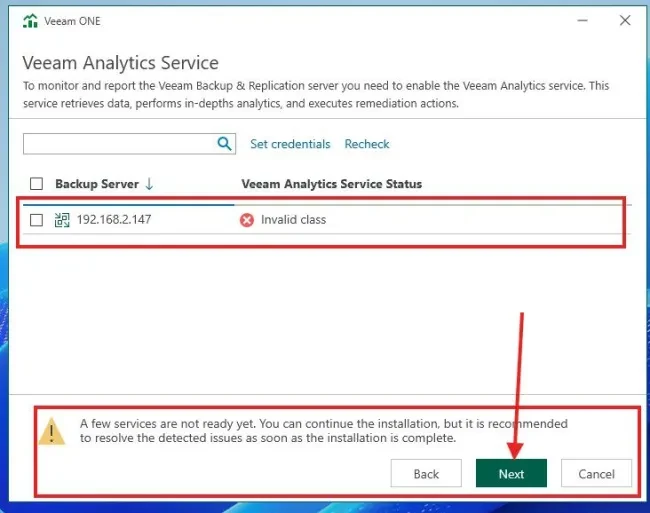
To resolve this analytics service failure, you must bypass the automatic remote deployment. Navigating to the Veeam ONE Web Client under Configuration > Data Collection, download the standalone Windows setup package (.msi), copy it directly to your target Veeam Backup & Replication (VBR) server, and perform a manual local installation. This binds the service locally and establishes a secure outbound connection over TCP port 2805, completely bypassing the NTLM authentication roadblock.
Overall, upgrading to Veeam ONE v13 is a critical step toward a more secure and modern backup monitoring platform.