
I have seen repeated conversations around leveraging SSO in Veeam v13, particularly concerns about joining the backup server to a production domain. This has also come up multiple times in my discussions with partners.
Based on that, I put together this exercise to explore a few possible ways of addressing those concerns. It may be more than what some environments need, but sharing it here to get thoughts and opinions from the wider community.
The challenge: Central identity Vs domain isolation
Veeam Software Appliance v13 brings a SAML SSO experience into Veeam Backup & Replication. Organization want to integrate with Microsoft Entra ID for
- Single Sign-on
- Unified Identity management
- Central auditing
Based on my recent engagements with users, I have heard an interesting challenge: connecting Veeam to a production Entra domain. It has long been considered a best practice to avoid joining backup infrastructure to the production domain to achieve a Zero-trust architecture. So the question is how to maintain security isolation and still achieve ease of access and unified identity management.
The approach I considered was more of a layered model which leverages Entra capabilities to make admin access controlled, policy driven and most importantly time bound.
Get started with Fundamentals: MFA and 4-eyes
Before we start adding additonal security measure the bare minimum is to have MFA and 4-eyes authentication enabled. VSA v13 makes MFA mandatory and Four-eyes authentication is out of the box using the security officer role.
Leveraging (and in v13, enforcing) MFA and four-eyes authentication should together solve the majority of the gaps. For example, if an admin credential gets compromised in Entra ID and the attacker gains admin access in VBR, they cannot make any catastrophic changes without a security officer approving it.
However, the residual risk is, a compromised admin can remain authenticated long enough to perform silent actions such reconnaissance, backup deletion preparation or data exfiltration through legitimate workflows.
Security layer 1: Privileged Identity Management for Just-in-Time access
PIM lets us move from standing admin to JIT previlege access, so the admins are
- Not permanently previleged
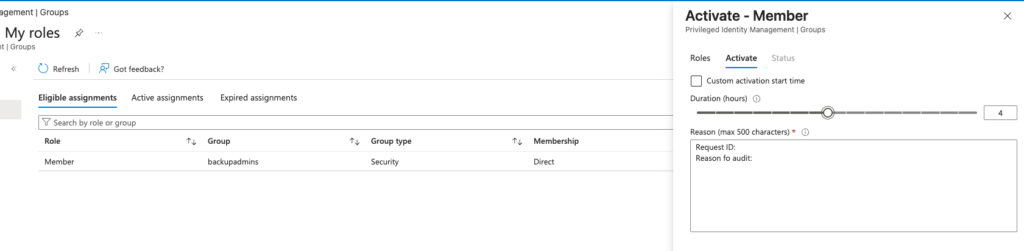
- Privilege access requires an approval and reason
- time bound access
- Access and approval is auditable
Entra ID Groups for veeam roles
The workflow here is
- Configure SAML (if not done already)
- Assign roles to Entra ID groups (Not users)
- The group membership will determine the access
In my case, I created a group BackupAdmins which got admin previlege in Veeam. The access to the group is JIT with approval needed. Potentially, to further lock it down, the admin who is approving the request can be the owner of the group and not an allowed member, so the user never gets access into Veeam if the approver account is compromised.
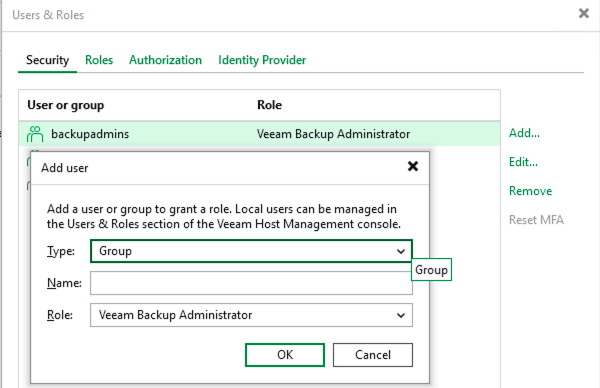
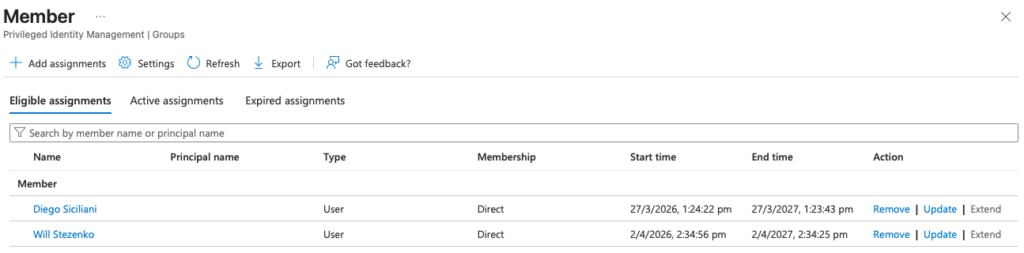
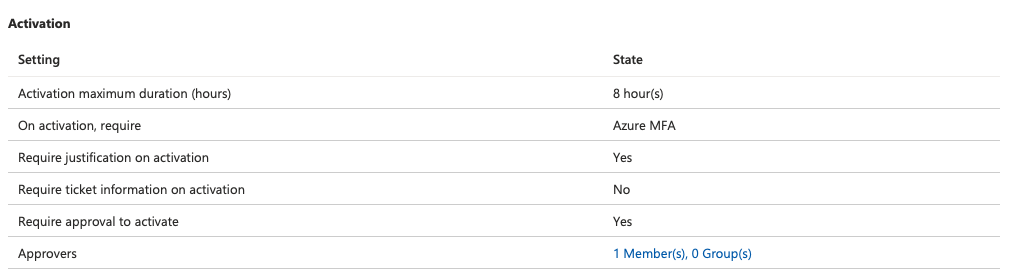
As per the above settings two eligible users can get admin access in Veeam by ading themselves to the group and group membership is timed and subject to approval
Security layer 2: Conditional access to restrict SSO access (who/where/how)
Now that PIM is already improving the posture significantly, let’s use Conditional Access to improve it further by restricting when, where, and who can access the enterprise application used for SAML.
The simplest starting point is obviously enforcing MFA for anyone using this app.
But we have further enhance the posture by combining other conditions such as:
- Location Based control: Geolocation using GPS that allows access only from certain countries
- IP restriction: Allowing access only from certain IP ranges (possibly your corporate network)
- User risk control: Identifying unusual user behavior (add some actual content)
- Device compliance requirements: Allow access only from devices that are marked compliant
“Block all by default” testing approach: As a security best practice, Start with block, then explicitly allow only the conditions you truly want. This helps reduce accidental gaps and forces clarity on legitimate access paths.
Summary and Key takeaways (TL;DR Version)
- Consider separate Entra groups for different roles such as admins, auditor etc.
- Approval and justification needed for elevated admin access.
- Activated elevated access is timebound and keep it short based on the tasks..
- Consider a break-glass account and emergency strategy while restricting access with CA.
- Review logs for PIM and entra signins and you can leverage the SIEMs such as Microsoft Sentinel for effective correlation as Veeam now got an app for Sentinel integration.
So on the whole SSO doesnt mean that we need to sacrifice isolation. With a very common well known features like PIM and conditional access can improve the posture so we find balance between security and operational usability.